
Cursor vs Claude Code in 2026: Which AI Coding Tool Actually Fits Your Workflow?
The short answer: If you spend most of your day typing code inside an IDE, Cursor is the better fit. If you need an AI that can plan and execute multi-step tasks across dozens of files, Claude Code wins. Most developers who stick with either tool for more than a month end up using both — they solve different problems, not the same one.
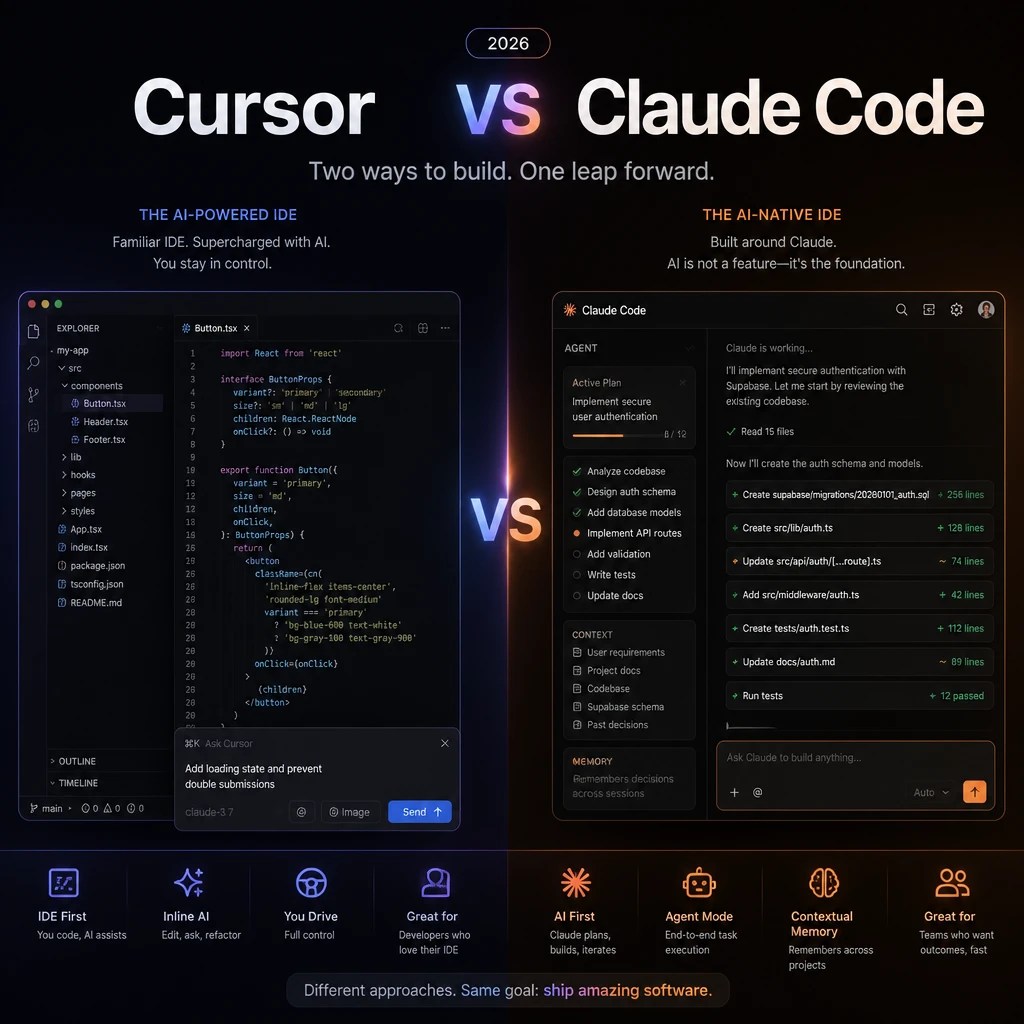
Table of Contents
- What Each Tool Actually Is (and Why the Difference Matters)
- Head-to-Head: 10 Dimensions Compared
- Where Claude Code Wins
- Where Cursor Wins
- Token Economics: Why "Which Is Cheaper" Is the Wrong Question
- Decision Framework: Which One Matches Your Week?
- The Dual-Tool Workflow (What Most Teams Actually Do)
- Pricing Deep Dive 2026
- FAQ
What Each Tool Actually Is (and Why the Difference Matters)
The reason most "vs" comparisons get this wrong is they treat Cursor and Claude Code as competitors. They aren't. They occupy different moments in your day.
Claude Code is a terminal-based agentic AI assistant. You describe a goal in natural language — "refactor the authentication layer to use OAuth2, update all tests, and document the changes" — and it plans, executes, and iterates across your entire codebase without you touching the keyboard. It's an autonomous worker, not a pair programmer.
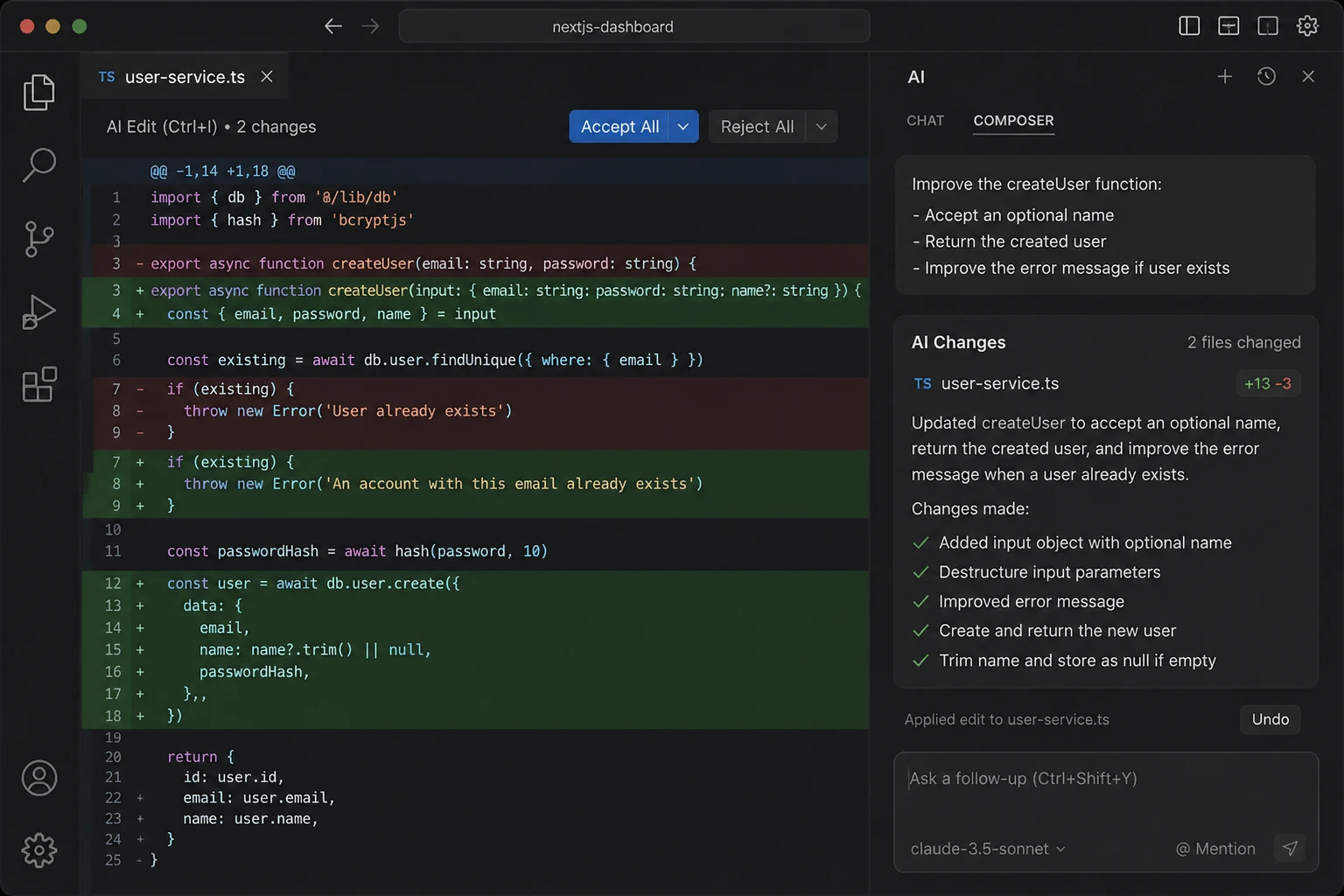
Cursor is an AI-native IDE built on top of VS Code. The AI lives inside your editor: inline code completion (hit Tab), inline edits (Cmd+K), and a multi-file chat agent (Composer). It's your IDE that got smarter — same workflow, AI assistance layered on top.
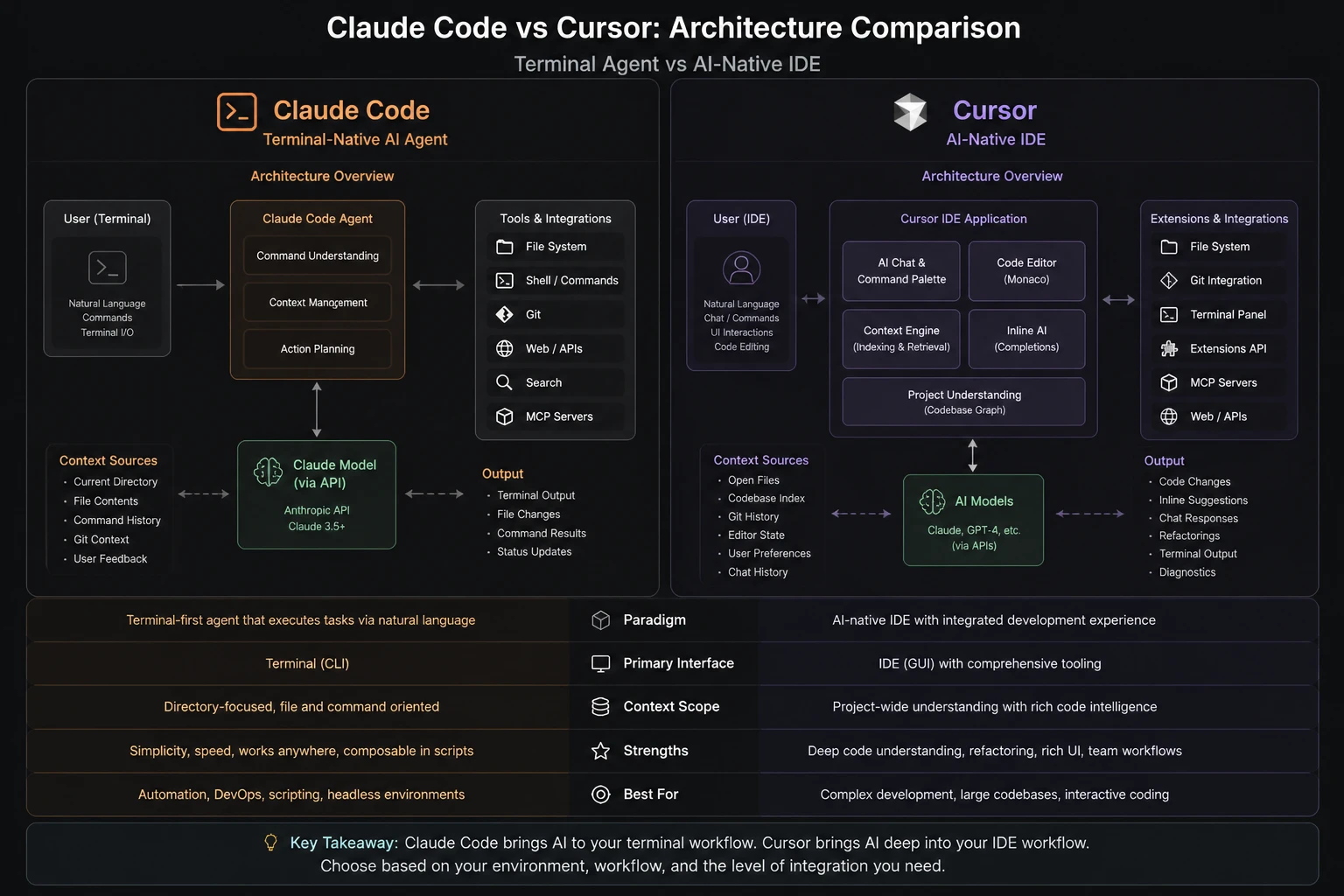
Here's the mental model that clarifies everything:
| Cursor | Claude Code | |
|---|---|---|
| You are | The driver | The commander |
| AI is | The co-pilot | The executor |
| Best moment | "I'm typing this function" | "I know what to do but don't want to do it" |
| Interaction | Turn-by-turn, in the IDE | Describe goal, walk away, review results |
If you understand only one thing from this article, make it this: Cursor optimizes the code you're writing right now; Claude Code optimizes the work you want done but haven't started yet.
Head-to-Head: 10 Dimensions Compared
The table below is the fastest way to see where each tool leads. Numbers and assessments reflect the state of both products as of mid-2026.
| Dimension | Claude Code | Cursor | Winner |
|---|---|---|---|
| Primary interface | Terminal CLI | VS Code fork | — |
| Context window | Up to 1M tokens | ~100K tokens | Claude Code |
| Multi-file editing | Native, 10+ files | Composer mode, manual @ | Claude Code |
| Inline code completion | None | Best-in-class Tab completion | Cursor |
| Model access | Claude only | Claude, GPT-4o, Gemini, more | Cursor |
| Autonomous agent loops | Native, subagents supported | Limited (Composer) | Claude Code |
| MCP server support | Native, first-class | Supported via extensions | Claude Code |
| Learning curve | Moderate (terminal comfort needed) | Low (it's VS Code) | Cursor |
| Token efficiency | ~5.5x fewer tokens/task | Higher consumption | Claude Code |
| Free tier | No | Yes (Hobby plan) | Cursor |
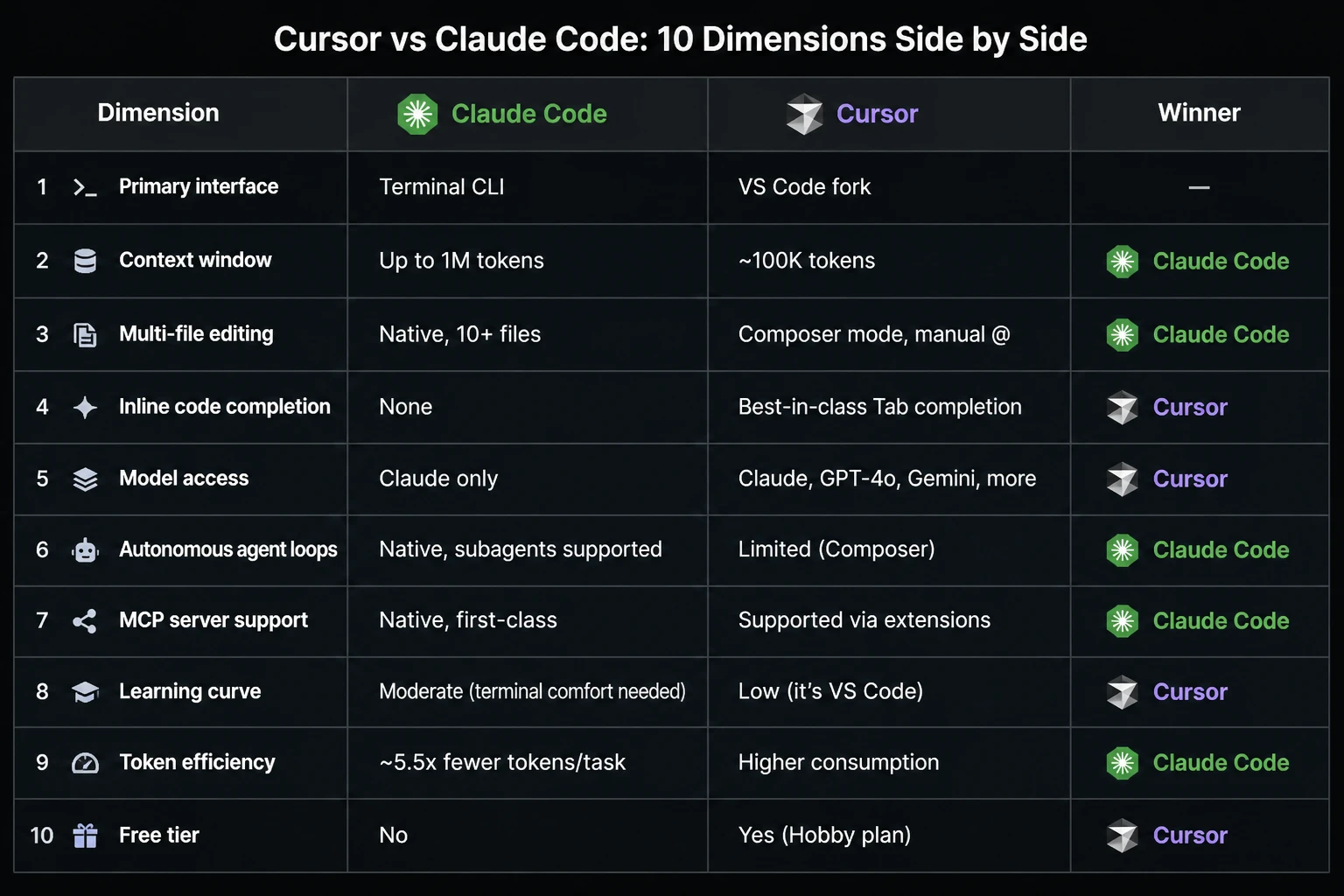
A few notes on the data above:
- Token efficiency comes from independent benchmarks (ToolRadar, TechInsider, 2026) that measured token consumption across identical coding tasks. Claude Code's agentic approach — reading only what it needs, planning before acting — consistently used fewer tokens per completed task.
- Context window matters more than it sounds. 1M tokens is roughly 3,000–4,000 source files. Cursor's ~100K token context means you'll need to manually point it at relevant files for larger codebases.
- MCP support is where Claude Code pulls ahead for non-coding workflows. If you want your AI to read from Notion, pull data from Supabase, or trigger a Stripe webhook as part of a task, Claude Code handles it natively. Cursor can get there via extensions, but it's not the same out-of-the-box experience.
Where Claude Code Wins
1. Multi-File Refactoring (No Competition)
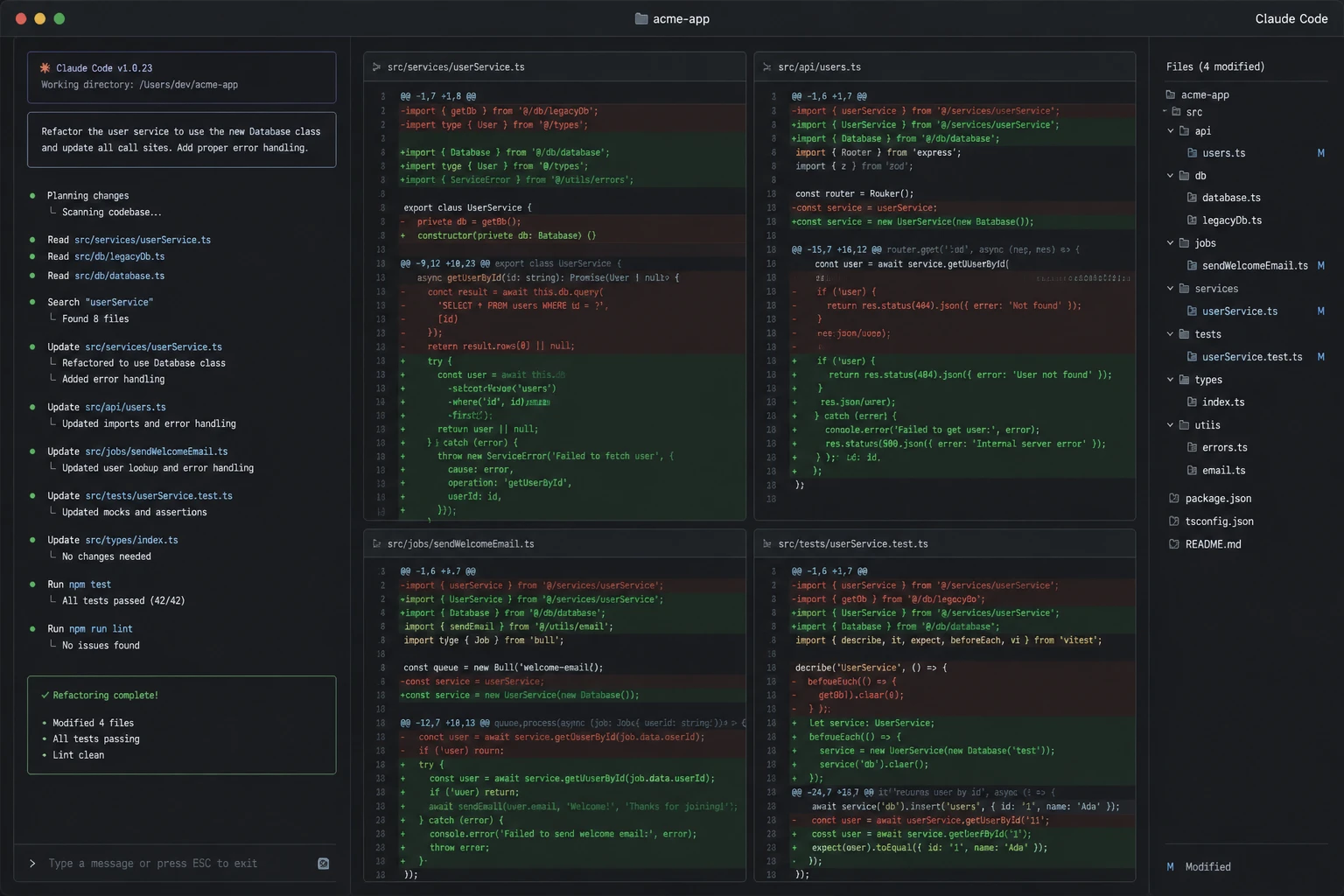
Try renaming a core function that touches 30 files in Cursor. You'll spend serious time manually @-referencing each file, and Composer will still occasionally edit files you didn't intend to touch. In Claude Code, you describe the change once. It reads the entire codebase, identifies every affected file, and applies the changes. You review the diff. Done.
For codebase-wide work — migrations, dependency upgrades, architectural refactoring — Claude Code wins, hands-down.
2. Outer-Loop Work (Content, Ops, Automation)
This is the use case most comparisons underweight. If your week involves tasks like:
- "Generate 5 blog posts from our keyword map"
- "Update the changelog and tag a new release"
- "Ping IndexNow for all published URLs"
- "Triaged open issues and prioritize by severity"
...these are not IDE tasks. They're automation tasks. Claude Code handles them because it lives in the terminal and can run arbitrarily long workflows. Cursor can technically do some of this via Composer, but it feels bolted on.
3. Token Cost Predictability
Claude Code's pricing is flat-rate for the Max plans (100/mo,100/mo,200/mo). You don't think about token consumption because you're not being metered per token. Cursor's $20/mo Pro plan gives you 500 fast requests — after that, you're into usage-based pricing that can spike if you're doing heavy multi-file work.
For teams running AI-assisted workflows at scale, Claude Code's flat rate removes cost anxiety entirely.
4. Non-Developers Who Want to Ship
If you're a marketer, designer, or founder who doesn't live in an IDE but wants to build things, Claude Code's "describe it, AI does it" model is much easier to get into than Cursor's IDE-first approach. You don't need to know what a lint error means — the agent figures it out, fixes it, and commits the result.
Where Cursor Wins
1. Inline Code Completion (Industry-Leading)
Cursor's Tab completion is the single best AI coding feature currently shipping. It's context-aware, multi-line, follows your project's conventions, and surfaces at exactly the right moment. If you write code daily, this feature alone justifies the $20/mo.
Claude Code has nothing comparable — and it's not trying to. It's an agent tool, not a completion engine.
2. The IDE Experience (It's Just VS Code)
Everything you like about VS Code — your extensions, keybindings, themes, debugger — works in Cursor. The transition from VS Code to Cursor is a non-event. The transition from "no terminal AI" to Claude Code requires learning a new mental model.
For developers who are productive in their current IDE setup, Cursor adds AI without disrupting anything.
3. Multi-Model Flexibility
Cursor lets you switch models mid-conversation. Want to use GPT-4o for one task, Claude Sonnet for another, and Gemini for a third? Cursor supports it. Claude Code only uses Claude models — which are excellent, but if you're the kind of developer who likes to A/B test model outputs, Cursor gives you more options.
4. Visual Diff and Review
Cursor shows you exactly what changed, inline, in the editor you're already looking at. Claude Code outputs diffs in the terminal — readable, but not the same visual experience. If you review every AI-generated change (you should), Cursor's inline diff view is the better experience.
Token Economics: Why "Which Is Cheaper" Is the Wrong Question
Most comparisons list pricing and leave it at that. But the real story is in token consumption efficiency — which determines what you actually pay when usage scales.
Independent benchmarks from 2026 found:
| Metric | Claude Code | Cursor (Claude model) |
|---|---|---|
| Tokens per completed task | ~5.5x fewer | Baseline |
| Accuracy per dollar | 8.5 points/$ | 6.2 points/$ |
| Simple task speed | Slower (turn-based) | 12% faster |
| Complex task accuracy | 51.7% (SWE-bench) | ~46% |
The implication: Claude Code is more expensive per month but cheaper per completed task. If you're a heavy user, the flat-rate Max plans often work out cheaper than Cursor's usage-based pricing past the 500 fast requests cap.
For a content automation workflow (5 articles/day), one analysis estimated Cursor + API usage at 300–700/moversusClaudeCodeMax5xat300–700/moversusClaudeCodeMax5xat100/mo flat. That's a 3–7x cost difference for the same output.
Worth noting: these numbers depend heavily on your specific workflow. If your primary use is inline code completion, Cursor's $20/mo Pro plan is hard to beat for value.
Decision Framework: Which One Matches Your Week?
Forget feature checklists. The right way to choose is to look at what your typical week actually contains.
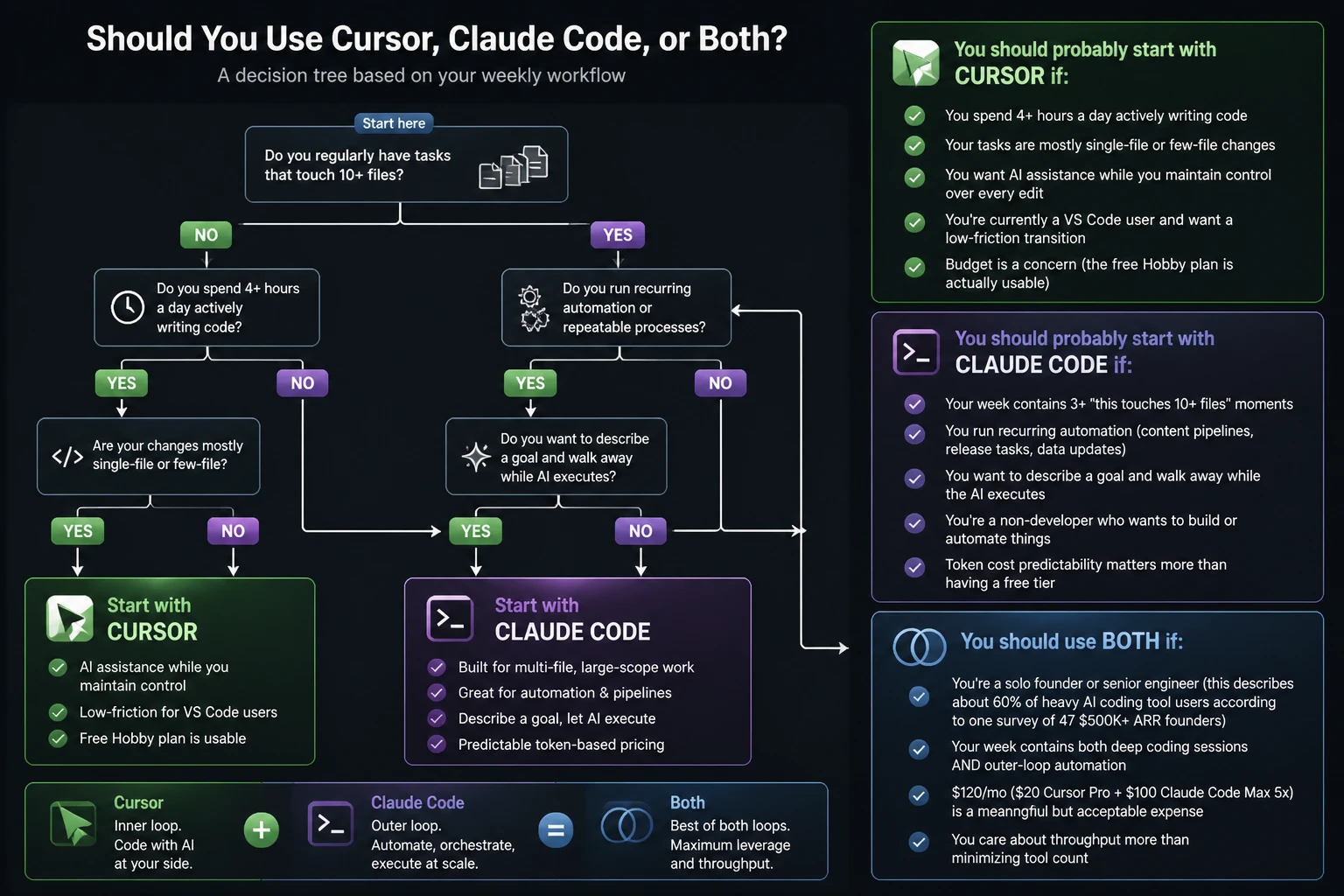
You should probably start with Cursor if:
- You spend 4+ hours a day actively writing code
- Your tasks are mostly single-file or few-file changes
- You want AI assistance while you maintain control over every edit
- You're currently a VS Code user and want a low-friction transition
- Budget is a concern (the free Hobby plan is actually usable)
You should probably start with Claude Code if:
- Your week contains 3+ "this touches 10+ files" moments
- You run recurring automation (content pipelines, release tasks, data updates)
- You want to describe a goal and walk away while the AI executes
- You're a non-developer who wants to build or automate things
- Token cost predictability matters more than having a free tier
You should use both if:
- You're a solo founder or senior engineer (this describes about 60% of heavy AI coding tool users according to one survey of 47 $500K+ ARR founders)
- Your week contains both deep coding sessions AND outer-loop automation
- 120/mo(120/mo(20 Cursor Pro + $100 Claude Code Max 5x) is a meaningful but acceptable expense
- You care about throughput more than minimizing tool count
The Dual-Tool Workflow (What Most Teams Actually Do)
The most common pattern among developers who've used both tools for more than a month:
Morning: Start the day in Cursor. Fix yesterday's bugs, write new feature code, iterate on the UI. The Tab completion and inline edit flow feels noticeably faster for this kind of work.
Afternoon: Switch to Claude Code for the "should get done but requires 2 hours of focus" tasks — refactoring a shared module, updating documentation across the repo, running a batch content generation, or handling the release prep.
Evening (optional): Leave a Claude Code agent running in a terminal tab while you do other things. Come back to reviewed diffs and committed changes.
This isn't theoretical. Multiple developer surveys from 2025–2026 found that 60%+ of developers using AI coding tools regularly use more than one tool. The "which one" question increasingly has the answer "both, for different things."
Pricing Deep Dive 2026
Claude Code Pricing
Claude Code requires a paid Claude.ai subscription — there is no free tier.
| Plan | Price | What you get |
|---|---|---|
| Pro | $20/mo | Standard usage, suitable for getting started |
| Max 5x | $100/mo | 5x usage multiplier, good for daily heavy use |
| Max 20x | $200/mo | 20x usage, for power users and teams |
| Team/Enterprise | $30+/seat/mo | Central billing, admin controls, priority access |
The Max 5x plan at $100/mo is the sweet spot for developers doing meaningful AI-assisted work. It's flat-rate, so you never think about token consumption.
Cursor Pricing
Cursor offers a free tier, which makes it the easier tool to try first.
| Plan | Price | What you get |
|---|---|---|
| Hobby | Free | 2,000 completions + 50 slow requests/mo |
| Pro | $20/mo | Unlimited completions + 500 fast requests/mo |
| Pro+ | $60/mo | Unlimited fast requests + priority model access |
| Business | $40/seat/mo | Team management + privacy mode |
The Pro plan at $20/mo is good value if your usage stays within the 500 fast requests. Heavy users report occasionally hitting usage-based overage charges — worth budgeting for if you're doing daily multi-file work.
Quick Math: Using Both
| Combination | Monthly cost |
|---|---|
| Cursor Hobby (Free) + Claude Code Pro ($20) | $20/mo |
| Cursor Pro (20)+ClaudeCodePro(20)+ClaudeCodePro(20) | $40/mo |
| Cursor Pro (20)+ClaudeCodeMax5x(20)+ClaudeCodeMax5x(100) | $120/mo |
| Cursor Business (40/seat)+ClaudeCodeTeam(40/seat)+ClaudeCodeTeam(30/seat) | $70/seat/mo |
For most individual developers, **$120/mo for both tools is the realistic "no compromises" number**. It's not nothing — but it's also less than a single day of a senior developer's time in most markets.
Final Thoughts
The "vs" framing is a bit of a trap. These tools aren't competing — they're complementary. Cursor makes you faster at the code you're writing right now. Claude Code handles the work you'd otherwise put off because it's tedious or complex.
If you have to pick one to start: pick Cursor if you're a developer who lives in an IDE, pick Claude Code if you're automating workflows or building things without a deep coding background.
If you can afford both: run them together. It's the current mainstream setup for a reason.
Ready to try Claude Code?
FamilyPro provides top-up services for Claude Pro and Claude Code access — no credit card issues, no region restrictions.
| Action | Link |
|---|---|
| Get Claude Pro / Claude Code access | familypro.io/en/products/claude-top-up |
| Get Grok access (another leading coding model) | familypro.io/en/products/grok |
| Try Grok Imagine (free AI video generation) | familypro.io/en/grok-imagine |
No credit card required to browse — explore both models today.
FAQ
Is Claude Code better than Cursor for coding?
Neither is universally better. Claude Code is stronger for multi-file refactoring, autonomous task execution, and outer-loop automation. Cursor is stronger for inline code completion, daily IDE work, and developers who want fine-grained control over every edit. Most developers use both.
Can I use Claude Code inside Cursor?
You can run Claude Code in a terminal while using Cursor as your IDE — many developers do this. But Claude Code is a separate terminal tool, not a Cursor plugin. If you want Claude models inside Cursor, you can select Claude as your model in Cursor's model menu — but that gives you Claude's model capabilities, not Claude Code's agentic workflow.
Which tool is better for beginners in 2026?
Cursor is the better starting point. It has a free tier, looks and feels like VS Code, and the learning curve is gentle. Once you're comfortable with AI-assisted development, try Claude Code to experience agentic workflows.
How much does it cost to use both tools?
The most common setup is Cursor Pro (20/mo)+ClaudeCodeMax5x(20/mo)+ClaudeCodeMax5x(100/mo) = 120/mo.Ifyou′rebudget−constrained,startwithCursorHobby(free)+ClaudeCodePro(120/mo.Ifyou′rebudget−constrained,startwithCursorHobby(free)+ClaudeCodePro(20/mo) = $20/mo.
Does Claude Code have an IDE version?
No. Claude Code is terminal-only by design. Anthropic has signaled no plans for an IDE version. The philosophy is that the terminal is the most flexible interface for an autonomous agent.
Which tool should I use for a large codebase (100K+ lines)?
Claude Code handles large codebases better because of its 1M token context window. Cursor works, but you'll need to manually reference relevant files more often. For large-scale refactoring, Claude Code is the stronger choice.
Is there a free version of Claude Code?
Not currently. You need at least a Claude Pro subscription ($20/mo) to use Claude Code. Cursor's free Hobby plan makes it the more accessible starting point.
Can Claude Code and Cursor share context?
Not natively. Both read your repo, but their session memories don't sync. The practical workaround: keep architectural decisions in a CLAUDE.md file (Claude Code reads it automatically) and maintain equivalent context in Cursor's project rules.