
Why Did My GPT Account Get Banned? How to Appeal and Get Back Access
Getting banned from GPT can be stressful, especially if you use it for work, school, writing, coding, or daily productivity.
One day everything works normally. The next day, you try to log in and see a message like:
“You do not have an account because it has been deleted or deactivated.”
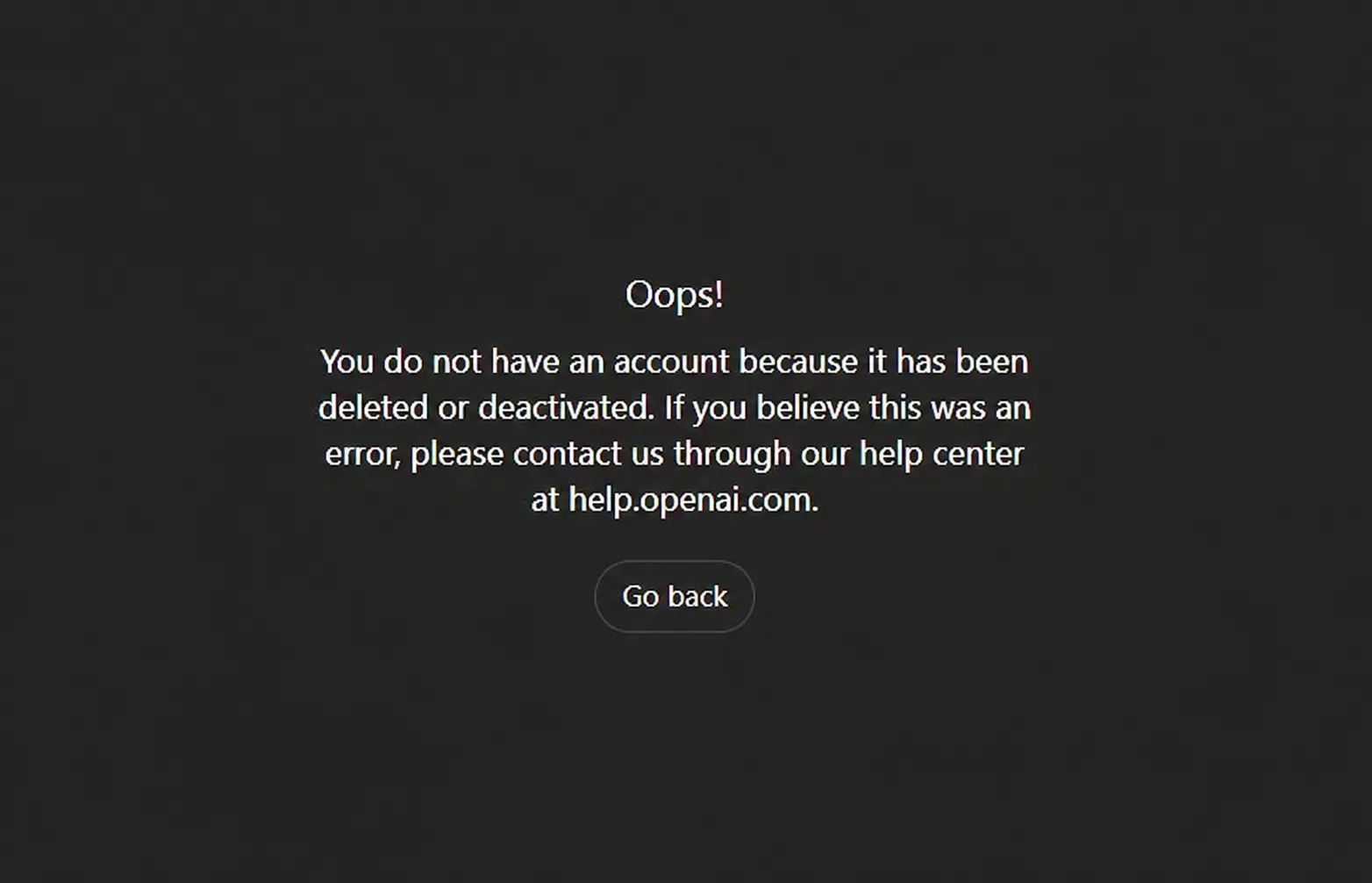
If this happened to you, don’t panic yet.
A GPT account may be restricted for several reasons, and not all cases are permanent. Sometimes it is a policy issue. Sometimes it is a payment issue. Sometimes the system detects unusual login activity and disables the account for security reasons.
This guide explains the most common reasons why a GPT account gets banned, what you should do first, how to appeal, and how to reduce the risk of future problems.
We’ll also show how FamilyPro can help users access premium GPT features in a more affordable way.
1. Why Was My GPT Account Banned?
A GPT account may be banned, suspended, blocked, or deactivated when OpenAI detects activity that violates its policies, creates security risks, or causes billing problems.
Here are the most common reasons.
1.1 Policy Violations
The most serious reason is a policy violation.
OpenAI may restrict an account if GPT is used for harmful, illegal, deceptive, or abusive activity.
Examples include:
- Creating scams or phishing messages
- Sending spam or mass promotional content
- Generating malware or cyber abuse instructions
- Producing hateful, threatening, or harassing content
- Trying to bypass safety systems
- Impersonating other people or organizations
- Using GPT for fraud or misleading activity
- Repeatedly submitting prohibited requests
A single accidental mistake does not always lead to a ban. But repeated violations, obvious abuse, or serious misuse can result in account deactivation.
What this means: If your account was banned for policy reasons, your appeal should be calm and specific. Explain what happened, ask for clarification, and state that you will follow the rules going forward.
1.2 Suspicious Login Activity
Your account may also be flagged if your login activity looks unusual.
This can happen when:
- You log in from many different countries in a short time
- You frequently switch VPN locations
- You use unstable proxy services
- Your account is accessed from unknown devices
- There are many failed login attempts
- Your usage suddenly becomes much higher than usual
- Your activity looks automated or bot-like
In some cases, your account may be disabled to protect it from unauthorized access.
What this means: If you recently traveled, used a VPN, changed devices, or noticed unknown activity, mention this in your appeal.
1.3 Unsupported Region Access
GPT is not available in every country or region.
If your account is accessed from an unsupported location, or if your connection appears to come from an unsupported region, your account may be blocked.
VPN use can make this more complicated. If your IP address changes too often, the system may treat the activity as suspicious.
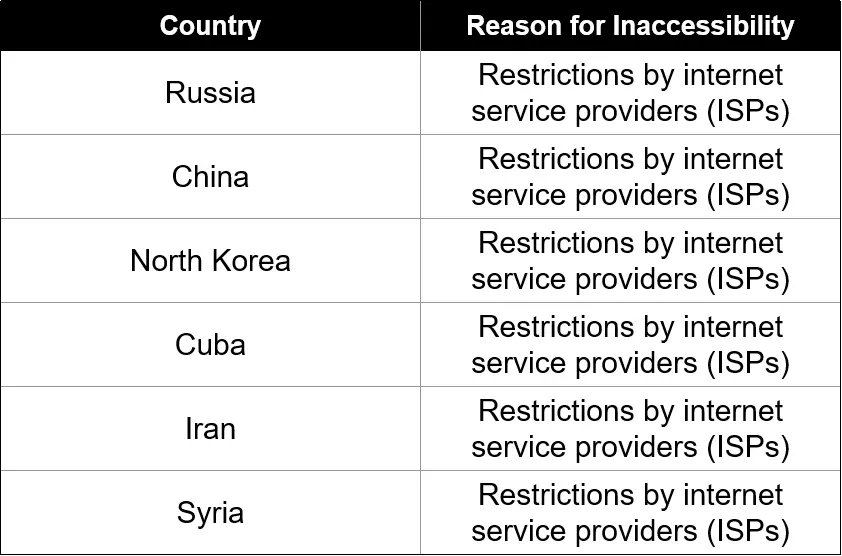
What this means: Use a stable connection when possible. Avoid rapidly switching between different countries or VPN servers.
1.4 Payment Issues or Chargebacks
Billing problems can also lead to account restrictions.
Common payment-related issues include:
- Failed subscription payments
- Repeated card declines
- Chargebacks
- Payment disputes
- Suspicious card activity
- Unauthorized transaction reports
- Payment method mismatch with account region
Chargebacks are especially serious because they signal that a payment may be disputed or fraudulent.
What this means: If the ban is related to billing, prepare your receipts, payment date, amount charged, and any bank dispute details before contacting support.
1.5 Account Security Problems
Sometimes the issue is not caused by you directly.
Your account may be restricted if there are signs of unauthorized access.
Warning signs include:
- You see conversations you did not create
- Your account was used from unfamiliar locations
- Your email or password may have been leaked
- Your payment method was used without permission
- You received security alerts
- Your account activity changed suddenly
What this means: If you think your account was compromised, say this clearly in your appeal. Also change your email password and secure your login information.
2. What Should You Do First If Your GPT Account Is Deactivated?
Before submitting an appeal, take a few basic steps. This helps you understand whether the problem is a real ban or just a login issue.
Step 1: Check Your Email
OpenAI may send a message explaining why your account was restricted.
Check:
- Inbox
- Spam
- Junk
- Promotions
- Any email linked to your GPT account
Look for messages about:
- Account deactivation
- Policy warnings
- Payment issues
- Suspicious activity
- Security alerts
If the email includes an appeal link, use that link first.
Step 2: Try Basic Login Troubleshooting
Sometimes the error is caused by browser or session problems.
Try this:
- Log out completely.
- Clear browser cache and cookies.
- Try another browser.
- Use incognito or private mode.
- Try logging in on another device.
- Disable VPN if you are in a supported region.
- Make sure you are using the correct email address.
If the same deactivation message still appears, it is likely an account-level issue.
Step 3: Stop Repeating Failed Login Attempts
Do not keep trying different VPNs, devices, or regions again and again.
That can make your account look even more suspicious.
Avoid:
- Constantly switching VPN countries
- Logging in from several devices at once
- Creating multiple support tickets with different explanations
- Filing payment disputes before contacting support
- Sending emotional or aggressive messages
A clear appeal is more useful than repeated login attempts.
3. How to Appeal a GPT Account Ban
If you believe your account was banned by mistake, you can submit an appeal.
The best appeal is:
- Short
- Polite
- Factual
- Specific
- Easy to review
Do not write a long complaint. Do not accuse support. Do not submit fake information.
Just explain what happened and provide useful details.
3.1 What to Include in Your Appeal
Prepare the following information:
| Information | Why It Matters |
|---|---|
| Account email | Helps support identify your account |
| Error message | Shows the exact issue |
| Date the problem started | Helps review activity logs |
| Recent travel or VPN use | Explains unusual login locations |
| Payment details | Useful for billing-related bans |
| Suspicious activity | Helps if your account was compromised |
| Screenshots | Makes the case easier to understand |
The more specific you are, the easier it is for support to review your case.
3.2 GPT Account Ban Appeal Template
You can use this template:
Subject: Request to Review My GPT Account Deactivation
Dear OpenAI Support Team,
I am writing to request a review of my GPT account linked to this email address: **[your email address]**.
When I tried to log in, I saw this message:
“[paste the exact error message here]”
I believe my account may have been deactivated by mistake. I would appreciate it if your team could review the case and let me know the reason for the restriction.
Here are the relevant details:
- Account email: [your email address]
- Date the issue started: [date]
- Recent travel or VPN use: [yes/no, with details]
- Recent payment issue: [yes/no, with details]
- Suspicious activity noticed: [yes/no, with details]
- Screenshots attached: [yes/no]
If any activity on my account violated policy, I would appreciate clarification so I can understand the issue and avoid repeating it.
Thank you for your time and support. Please let me know if you need any additional information.
Best regards, [your name]
3.3 How Long Does an Appeal Take?
Response time can vary.
Some users may receive a reply quickly. Others may need to wait longer, especially if the case involves billing disputes, security concerns, or serious policy violations.
While waiting, avoid submitting the same appeal repeatedly.
If you need to follow up, add new information instead of sending the same message again.
4. How to Avoid Getting Banned Again
The easiest way to deal with a ban is to prevent it from happening.
Here are practical habits that can reduce your risk.
4.1 Follow the Usage Rules
Avoid using GPT for:
- Scams
- Fraud
- Spam
- Phishing
- Malware
- Harassment
- Hate speech
- Impersonation
- Illegal instructions
- Attempts to bypass safety systems
If GPT refuses a request, do not keep rewriting the same request to force an answer. That can look like intentional policy evasion.
4.2 Keep Your Login Activity Stable
If you use a VPN, try to keep it stable.
Avoid:
- Switching countries too often
- Using free or unstable proxy services
- Logging in from unsupported regions
- Sharing login access across many locations
- Using multiple devices and IP addresses at the same time
A stable login pattern is safer.
4.3 Protect Your Account
Use basic account security habits:
- Use a strong password
- Do not reuse old passwords
- Protect your email account
- Log out from devices you no longer use
- Avoid fake login pages
- Do not share your password publicly
- Watch for payment alerts
If you suspect unauthorized access, secure your email first and then contact support.
4.4 Avoid Risky Automation
Do not use unauthorized bots, scripts, or tools to send large numbers of GPT requests.
High-frequency automated activity can look like abuse, even if your intention is not harmful.
If you need large-scale AI usage, use a proper business or API solution instead of automating a normal consumer account.
4.5 Be Careful with Sensitive Information
GPT is useful for writing, studying, research, and productivity. But you should still be careful with sensitive personal information.
Avoid entering:
- Passwords
- Bank details
- Private identity documents
- Confidential business files
- Sensitive medical or legal information
- Other people’s private data
For general tasks, remove personal details before pasting content into GPT.
5. GPT Plans and Model Updates
GPT access has changed over time. Older articles may mention outdated plan names, pricing, or model availability.
In general, GPT plans may include free and paid options depending on your country and account type.
Common plan categories include:
- Free: Basic GPT access with more limited usage.
- Go: A lower-cost paid option in selected markets.
- Plus: A popular option for regular users who want better access and higher limits.
- Pro: Designed for heavier users who need stronger capabilities and higher usage.
- Business: Built for teams that need collaboration and admin features.
- Enterprise: Designed for larger organizations with advanced controls.
Model availability can also change. Newer GPT models usually offer better reasoning, faster responses, better multimodal abilities, and stronger tool support.
Before choosing a plan, consider how you use GPT.
Ask yourself:
- Do I use GPT every day?
- Do I need advanced reasoning?
- Do I upload files often?
- Do I create images?
- Do I use GPT for work?
- Do I need higher limits?
- Is cost the main concern?
If you only use GPT occasionally, a basic plan may be enough. If you use it for work, study, coding, content creation, or research, premium access can be much more useful.
6. Explore More About GPT
Besides account bans and appeal steps, many users also run into other GPT-related questions, such as login errors, subscription prices, and whether a paid plan is actually worth it.
If you are troubleshooting an account issue, first make sure whether your account is truly deactivated or whether you are only seeing a temporary login error.
For example, if the page shows **“Hmm...something seems to have gone wrong”**, the problem may be related to your browser, network, session status, VPN, or temporary service instability rather than an account ban.
Related guide:How to Fix “Hmm...something seems to have gone wrong” Error in GPT?
If you are considering upgrading your GPT plan, pricing can also be confusing. Subscription costs, taxes, payment options, and available plans may vary by country or region.
Related guide:How Much Is ChatGPT Plus? 2026 Price Guide: Don't Overpay!
You may also be wondering whether GPT Plus is worth paying for. The answer depends on how often you use GPT, what tasks you use it for, and whether advanced models, file analysis, image generation, or higher limits matter to you.
Related guide:Is GPT Plus Worth It?
These guides can help you understand GPT from three practical angles: fixing common errors, comparing subscription costs, and deciding whether a paid plan is worth it.
After that, if you want premium GPT access but still care about monthly cost, FamilyPro can be a more budget-friendly option.
7. A More Affordable Way to Access GPT with FamilyPro
For many users, the biggest problem is not whether GPT is useful.
The problem is cost.
A premium GPT plan can be expensive if you pay the full price every month, especially for students, freelancers, creators, and users who already pay for many online subscriptions.
That is where FamilyPro can help.
FamilyPro is designed for users who want access to premium digital services at a lower cost. It helps make GPT and other popular subscriptions more affordable, so users can enjoy premium features without paying more than necessary.
With FamilyPro, you can get:
- More affordable GPT access
- A simple setup process
- Flexible subscription options
- Access to popular premium tools
- A budget-friendly way to try advanced features
- Support when you need help
If you want GPT for writing, study, research, coding, content creation, or productivity, FamilyPro can be a practical choice.
7.1 Who Is FamilyPro Best For?
FamilyPro is especially useful for:
- Students who need GPT for homework, research, and writing
- Freelancers who want to reduce monthly tool costs
- Bloggers and creators who use GPT for content ideas
- Casual users who do not want to pay full price
- People who want to test premium GPT features first
- Users who manage several subscriptions and want to save money
Instead of overpaying for every digital tool separately, FamilyPro gives users a more cost-effective way to access the tools they actually use.
7.2 Tips for a Better GPT Experience with FamilyPro
To get the best experience, follow these simple tips:
- Read the setup instructions carefully
- Use GPT for normal, policy-compliant tasks
- Avoid prohibited content
- Do not use suspicious automation tools
- Keep your usage reasonable
- Remove sensitive personal details before pasting content
- Contact FamilyPro support if you have access issues
These habits help you use GPT more smoothly and safely.
Final Thoughts
A GPT account ban can happen for many reasons.
The most common causes are:
- Policy violations
- Suspicious login activity
- Unsupported region access
- Payment disputes
- Chargebacks
- Account security problems
- Risky automation
If your account is banned, start with the basics:
- Check your email.
- Confirm the exact error message.
- Try browser troubleshooting.
- Collect screenshots and account details.
- Submit a clear appeal.
- Avoid repeated suspicious login attempts.
- Improve your account security.
GPT is a powerful tool, but it should be used responsibly.
If premium access feels too expensive, FamilyPro offers a more affordable way to use GPT and other popular digital services. For students, freelancers, creators, and budget-conscious users, it can be a smart way to save money while still enjoying premium AI tools.
FAQ
1. Why did my GPT account get banned?
Your GPT account may be banned because of policy violations, suspicious login activity, unsupported region access, payment problems, chargebacks, or security concerns.
2. Can I appeal a GPT account ban?
Yes. If you believe the ban was a mistake, you can submit an appeal through OpenAI support. Include your account email, error message, screenshots, and relevant details.
3. What should I do first if my GPT account is deactivated?
First, check your email for a notice. Then try basic login troubleshooting. If the problem remains, submit an appeal.
4. Can VPN use cause account problems?
VPN use does not always cause problems, but unstable VPN activity, frequent country switching, or unsupported region access may trigger security checks.
5. Can payment issues lead to a GPT ban?
Yes. Failed payments, chargebacks, suspicious card activity, and payment disputes can lead to account restrictions.
6. How can I reduce the risk of getting banned?
Follow usage rules, avoid prohibited content, keep your login stable, protect your account, and avoid unauthorized automation.
7. Is FamilyPro useful for GPT users?
Yes. FamilyPro is useful for users who want more affordable access to GPT and other premium digital services.
8. Who should use FamilyPro?
FamilyPro is a good option for students, freelancers, creators, casual users, and anyone who wants to reduce subscription costs.