
Is Grok Imagine No Longer Free? What to Check Before Paying
Seeing an upgrade screen in Grok Imagine does not, by itself, prove that every image and video feature became permanently paid worldwide. Your account, selected feature, remaining usage, and access provider matter. The current official pricing page lists Imagine among paid-plan features; do not assume the Free chat tier includes the video generation you want.
Contents
- What is confirmed about current access?
- Identify the reason for the prompt
- Already paid? Check the account and allowance first
- Lower-cost ways to continue creating
- FamilyPro tool credits and shared accounts are different
- Frequently asked questions
What is confirmed about current access?
Checked November 12, 2026: the official pricing page offers The X Subscription to new customers, with paid plans starting at Plus for $8/month before applicable taxes. Older SuperGrok subscriptions can still exist. The former claim that everyone must buy a $30 plan is therefore not a reliable description of every current option.
An account-specific trial is also different from permanent free access. Check duration, payment requirement, renewal price, and cancellation deadline on the actual offer. This article does not establish a universal three-day trial or a guaranteed free video quota.
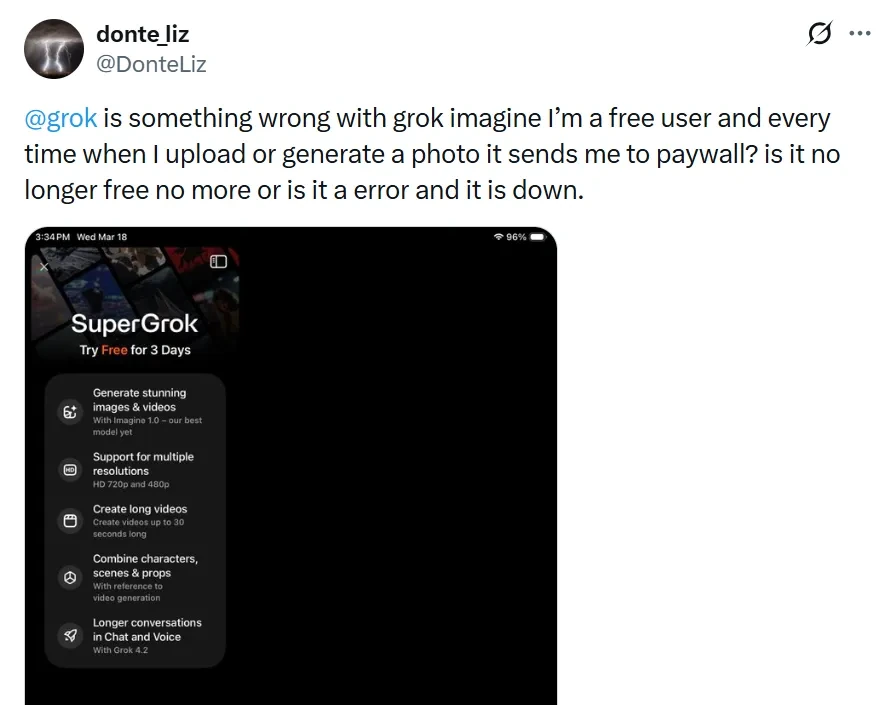
This screenshot records one user's earlier experience. It is not an official global rollout announcement, a current trial offer, or a test conducted for this revision.
Identify the reason for the prompt
| What you see | What to check |
|---|---|
| Subscribe or start a trial | Whether your selected feature is included in the account |
| Usage limit or reset time | Remaining allowance and next reset |
| Upgrade prompt despite an active purchase | Whether you used the same account and login method |
| A rejected prompt or generation error | Content rules, file input, and service status; paying may not fix it |
| Credits required on another website | That provider's balance and pricing, not your Grok balance |
Avoid guessing that every failed generation is a new paywall. Record the exact message before changing plans.
Already paid? Check the account and allowance first
- Compare the signed-in account with the account used for the receipt, including Apple, Google, or X sign-in.
- Open billing and confirm the subscription is active through its original purchase channel.
- Check Settings → Usage for the remaining allowance and reset time.
- If an active subscription is not recognized, update and restart the app or test the same account in a browser before buying again.
- If the mismatch persists, send support the error and receipt details through official channels. Never send your password.
The Grok help FAQ discusses account mismatches and activation problems. For The X Subscription, eligible first-party activity across supported Grok and Cursor surfaces uses a shared weekly pool. A paid plan can still run out; check current usage rules before adding credits or upgrading.
Lower-cost ways to continue creating
For a few clips: compare the exact cost of your selected duration and resolution with a short subscription. A small credit balance may not cover even one selected job. Check whether failed requests consume credits and whether purchased credits expire.
For regular creation: record how many usable clips you obtain, not just how many attempts you submit. Monthly spend divided by usable clips gives a practical comparison. Start with a short draft and simple movement, then expand after the result works. Our Grok Imagine workflow guide includes a prompt example and quality checklist.
For other tools: Kling and Google Veo provide alternative places to investigate. Compare the current accessible model, image references, audio, export settings, and price using the same task. They are not presented here as unlimited free replacements or proven winners in a hands-on test.
For subscriptions, see our updated Grok pricing comparison, which separates current plans from older SuperGrok offers.
FamilyPro tool credits and shared accounts are different
The FamilyPro Imagine tool is a third-party browser workflow. Check its current credit allowance and the price displayed for your settings. An advertised daily reward does not establish unlimited use, identical app features, or enough credits for every video. We have not independently audited its backend integration.
The FamilyPro Grok account product is a separate service. Its rules say Imagine quotas are shared and chat data may be visible to other account users. The supplied plan may be legacy SuperGrok or X Subscription Premium, so check what your order provides. Do not treat the older $5.99 promotional figure as a verified current price or promise of independent usage.
Shared-account quota issues are excluded from refunds. Quota-product refund conditions also mention payment-channel fees and a 20% service fee, with replacement or full refund for platform-related failure on first use. Read these conditions before purchasing for a deadline-sensitive project.
Frequently asked questions
Why did free access change?
This revision has not established a single official reason for every account's change. Compute costs or commercial strategy may be explanations, but they should not be presented as confirmed motives without a relevant announcement.
Can paying guarantee better-looking videos?
No. Access and allowance are different from output quality. Test motion, faces, text, and sound before committing to a longer plan.
Is the API a free workaround?
No. API access has its own model availability, billing, and limits. A third-party tool may subsidize a trial, but that does not make the underlying service unlimited or free.
Should I buy again when the app asks me to upgrade?
First verify the account, purchase status, and usage. A duplicate payment does not resolve signing into the wrong account.