
Grok Imagine Video 1.5 vs 1.0: What's New and Improved
I'll be honest — when xAI quietly dropped Grok Imagine Video 1.5 in preview at the end of May 2026, my first reaction was skepticism. Version 1.0 had already been a solid image-to-video tool with native audio, so I wanted to see if 1.5 was a genuine leap or just a minor patch dressed up in a new version number.
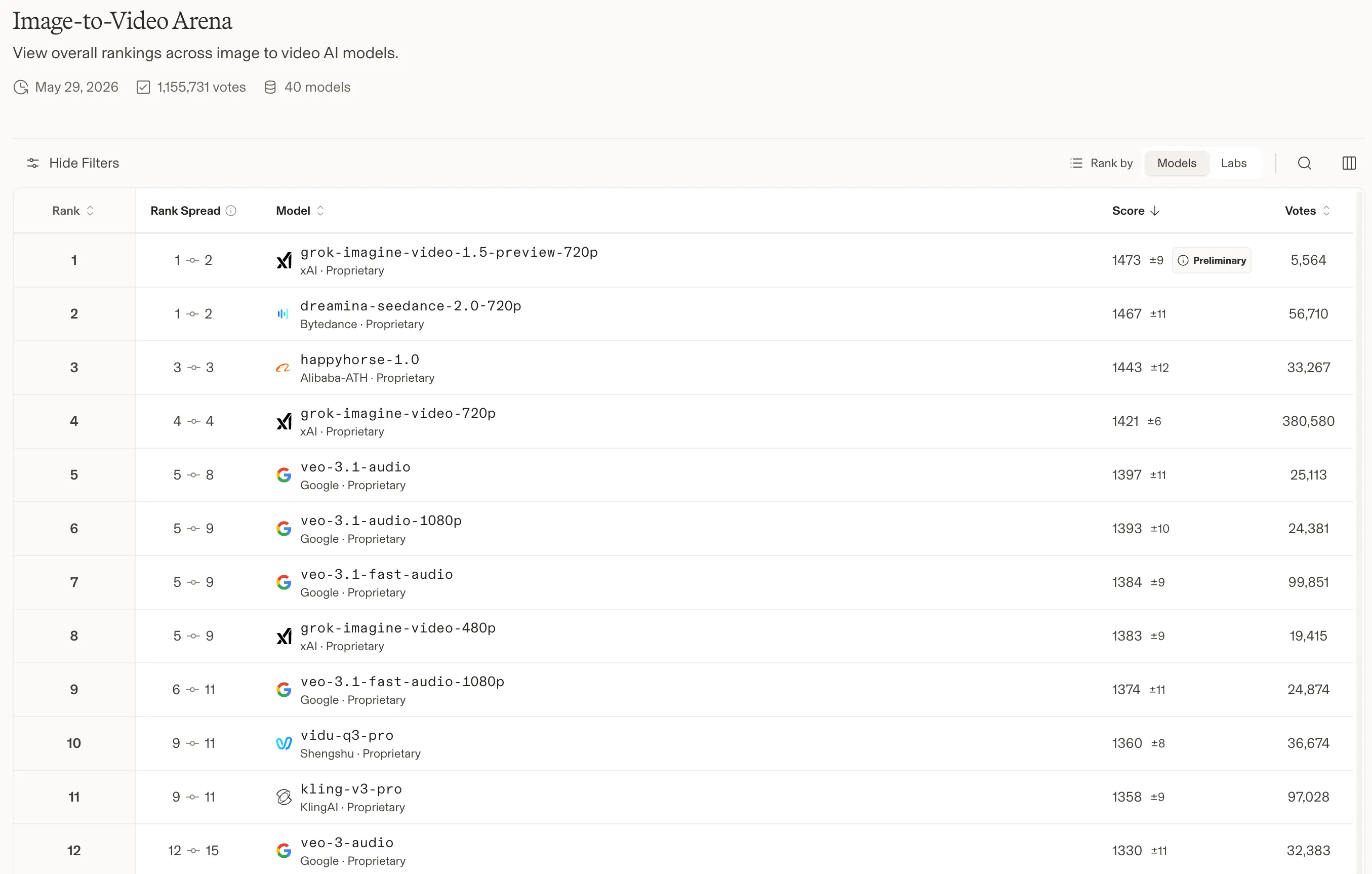
The benchmark community moved fast. Shortly after launch, Grok Imagine Video 1.5 debuted at #1 on the Arena.ai image-to-video leaderboard — the crowdsourced video quality ranking run by Arena.ai — with an Elo score of 1473, edging out ByteDance's Dreamina Seedance 2.0. That's an attention-grabbing opening act. But benchmark scores and real-world usability aren't always the same thing, so I wanted to see what 1.5 actually delivers for day-to-day content creation.
After putting both versions through their paces and spending a good chunk of time reading through Reddit discussions from other real users — here's my honest breakdown of what changed, what improved, and where 1.5 still has work to do.
Quick Comparison: Grok Imagine Video 1.5 vs 1.0
Before we dive into the details, here's a side-by-side overview of the main differences based on my usage and community feedback:
| Aspect | Grok Imagine Video 1.0 | Grok Imagine Video 1.5 | Improvement |
|---|---|---|---|
| Audio Quality | Mechanical dialogue, generic sounds | More natural pacing and scene-adaptive audio | Significant |
| Character Consistency | Frequent drift during movement | Better face and lighting stability | Noticeable |
| Motion Quality | Acceptable for simple actions | Smoother everyday movements | Moderate |
| Video Extension | Noticeable quality drop at joins | Reduced quality loss when chaining clips | Clear |
| Action Scenes | Often struggles with complex movement | Still weak in fast combat and physics | Minimal |
| Overall Usability | Good for quick clips | More suitable for short storytelling | Noticeable |
The table tells a clean story: 1.5 is a meaningful step forward in the areas that matter most for everyday content creation, while remaining a work in progress for complex action. Let me walk through each area in depth.
Audio: The Biggest Win in 1.5
If you've used Grok Imagine Video 1.0 for anything involving dialogue, you know the pain. The speech output often felt robotic — correct words, wrong timing, and that telltale synthetic flatness that immediately signals "AI-generated" to any attentive viewer. Background sounds were similarly generic, like someone had grabbed a stock audio pack and called it a day.
Version 1.5 fixes a lot of this. Conversational speech now has noticeably better pacing, with pauses and inflection that feel more natural. Ambient sounds — wind, crowd noise, room tone — feel more connected to the actual scene being depicted rather than layered on top as an afterthought.
This observation lines up with what multiple Reddit users have noted. Several creators in the community highlighted audio naturalness as the single clearest improvement in 1.5, and my own tests back that up. That said, I still recommend a quick listen-through before finalizing any clip for public use, because edge cases and occasional quirks do still appear.
For content creators making talking-head style videos, product demos, or anything with dialogue, this upgrade alone makes 1.5 worth trying.
Character Consistency and Motion
One of the most frustrating quirks in version 1.0 was character drift — the subtle (and sometimes not-so-subtle) way a person's face would shift during camera movement or scene changes. It was especially obvious during pans and zooms, where the subject's lighting or facial structure would subtly warp mid-clip.
Version 1.5 handles this noticeably better. Faces and lighting remain more stable across movement, and everyday motions — walking, turning, gesturing — feel smoother and more physically convincing.
Community feedback on Reddit here is more mixed than it is for audio. The positive group praises the improved camera motion and how characters now hold up across longer takes. But there's a vocal subset pointing out that action scenes and complex physical interactions — combat, acrobatics, anything with rapid or chaotic movement — still look unnatural in 1.5, much the same as they did in 1.0.
My take: if your content involves people having conversations, walking through environments, or performing simple actions, 1.5 is a clear improvement. If you need convincing fight choreography or physics-heavy sequences, you'll hit the same wall as before.
Video Extension and Chaining Clips
This is a practical improvement that I didn't expect to care about as much as I do.
In version 1.0, extending a video or chaining multiple generated clips together was a bit of a gamble. The joins — the points where one generation ended and the next began — were often visible as quality drops, color shifts, or subtle inconsistencies in lighting. Building any kind of multi-shot sequence required a lot of extra effort to smooth things out.
In 1.5, this drop at join points is noticeably smaller. It's not invisible, but it's much less jarring, which makes assembling short sequences significantly more practical. For creators trying to build anything longer than a single 10-second clip, this is a meaningful workflow improvement.
One thing worth flagging: some users on Reddit have observed that 1.5 sometimes generates videos with internal scene cuts rather than a single continuous shot. Opinions on this are genuinely split — some find it more cinematic and natural-looking, others find it disorienting and prefer the previous approach of continuous single-take generation. Your preference will likely depend on what you're building.
Under the Hood: The Aurora Engine
One reason 1.5 can deliver noticeably better audio alongside video is architectural. Grok Imagine 1.5 is built on xAI's proprietary Aurora engine, and it differs from most competing image-to-video models in a meaningful way.
The majority of today's video generation tools — including many of Grok's direct competitors — rely on diffusion Transformer architectures. Aurora takes a different path: it's an autoregressive Mixture-of-Experts (MoE) network that treats text, images, video frames, and audio as a unified stream of tokens during training. Rather than iteratively denoising a latent representation, it predicts the next token in a joint sequence that spans all four modalities simultaneously.
In practice, this means 1.5 can generate audio-visual content in a single inference pass — no post-production dubbing step, no separate audio model bolted on afterward. You feed it a starting image and a natural-language prompt describing camera movement, scene pacing, and sound design, and the model outputs video and synchronized audio together: dialogue, background music, and ambient sound effects all generated as part of the same prediction.
The current output spec for 1.5 is up to 15 seconds at a maximum resolution of 720p. That's a step up from the 10-second ceiling in version 1.0 and gives creators more room to tell a complete micro-story in a single generation.
For most users this architecture difference is invisible — what you notice is the output, not the math. But it's worth understanding why audio feels more integrated in 1.5 compared to 1.0 and most competing models: it's not a post-processing trick, it's baked into how the model was trained.
Where 1.5 Still Falls Short
Version 1.5 is in preview, and it shows in certain areas. Here's what's still unresolved based on my experience and community reports:
- Complex physics and fast action remain the model's weakest area. Grok Imagine Video still struggles with the kind of rapid, chaotic movement you'd see in a fight scene or sports clip.
- Similar artifacts to 1.0 appear in demanding scenarios — you'll recognize the tell-tale signs if you've used the older version.
- Access is still awkward for regular app users. The API route is currently more reliable and full-featured than the in-app experience through the standard Grok interface.
- The overall leap, while real, isn't massive. Some community members who expected a dramatic jump from 1.0 came away underwhelmed, particularly when comparing Grok Imagine Video to strong competitors in the space.
These limitations don't make 1.5 a bad release — they just calibrate expectations. It's a solid iterative update, not a generation leap.
Should You Switch from 1.0 to 1.5?
Based on what I've seen in my own usage and what the community is saying, here's my honest recommendation:
Switch to 1.5 if you work with dialogue-heavy content, need more natural-sounding audio, or want to build short multi-shot sequences. The improvements in those areas are genuinely useful and will save you editing time.
Stay with 1.0 for now if your content is heavy on fast action, complex physics, or anything where the model's weaknesses are most exposed. You won't find meaningful improvement there in 1.5, and sticking with the version you know well makes sense until things advance further.
Personally, I've moved 1.5 into my default workflow for most projects, but I still review outputs before publishing — which, honestly, is good practice regardless of version.
Try Grok Imagine Free on FamilyPro — No Sign-Up Required
FamilyPro gives you free daily credits to experience Grok Imagine online — completely free, with zero friction. No registration, no login, no ads to sit through. Just open the page and start generating.
It's the fastest way to run your own hands-on comparison of 1.0 and 1.5 before deciding whether a full SuperGrok subscription is worth it for your workflow.
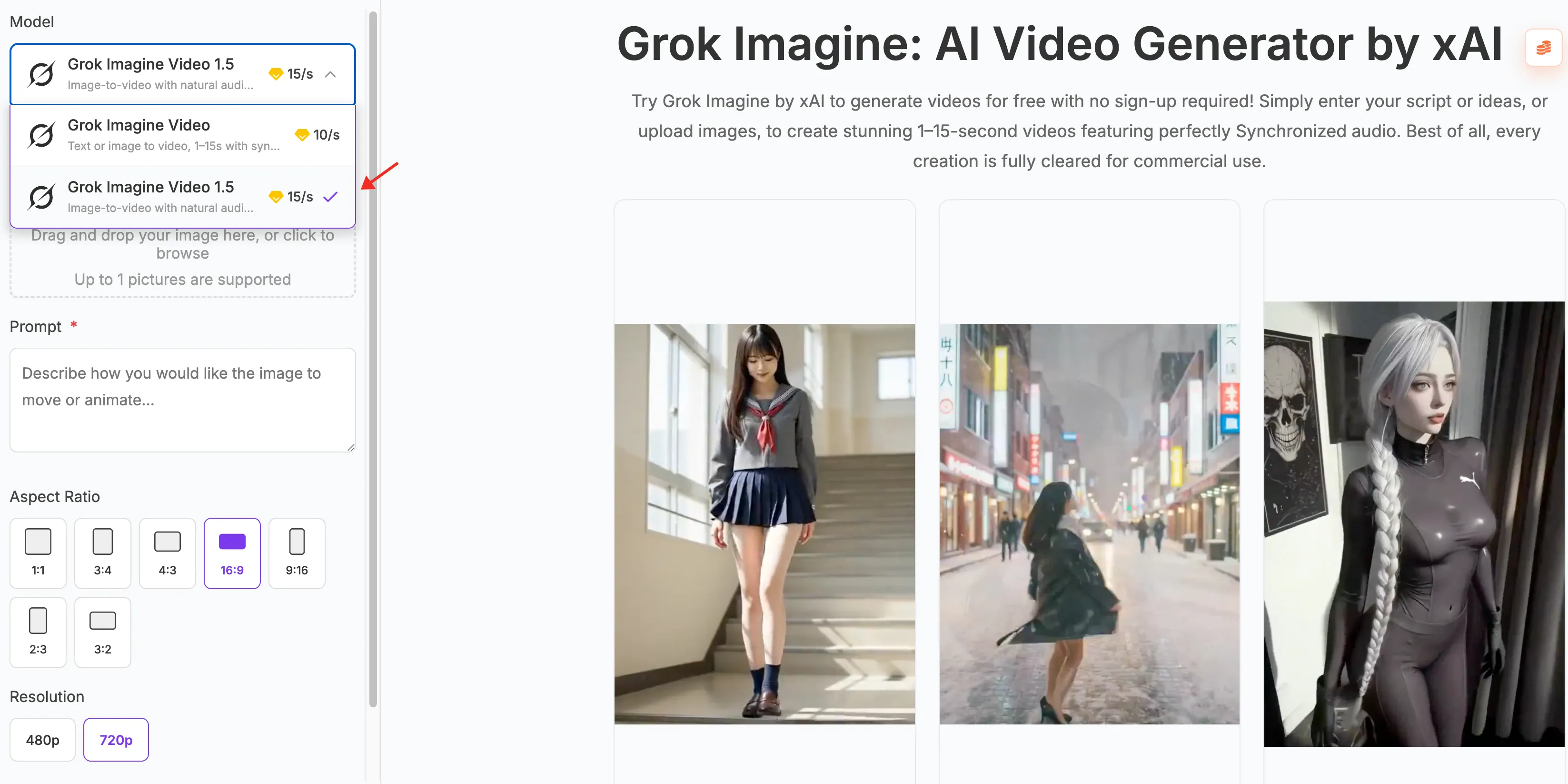
The model running under the hood is the same official Grok Imagine — no quality compromises, no paywalls to get started.
Conclusion
Grok Imagine Video 1.5 is a real improvement over 1.0 — not a revolution, but a meaningful upgrade in the areas that affect day-to-day creative work the most. Audio naturalness, character stability, and video extension all take clear steps forward. The community reaction on Reddit broadly agrees on the audio improvements, while staying cautious about action scene quality and the overall scale of the advancement.
If you're already using Grok Imagine Video for regular content, it's absolutely worth testing 1.5 with your usual prompts and comparing the results directly. The improvements are tangible enough that most users working in dialogue or narrative formats will feel the difference immediately.
Grok Imagine Video 1.5 FAQ
1. What is Grok Imagine Video 1.5?
Grok Imagine Video 1.5 is the latest preview version of xAI's image-to-video generation model, released to developers at the end of May 2026. It is built on xAI's Aurora engine — an autoregressive Mixture-of-Experts (MoE) architecture — which generates video and audio together in a single inference pass. It supports clips up to 15 seconds long at up to 720p resolution, up from the 10-second limit in version 1.0.
2. Is Grok Imagine Video 1.5 available to everyone?
As of June 2026, version 1.5 is available in preview via the xAI developer platform API. Access through the standard Grok app and web interface is limited; the experience is currently more complete and accessible via the API or through third-party platforms like FamilyPro.
3. What improved the most between 1.0 and 1.5?
Audio quality is the most clear-cut improvement. Because the Aurora engine generates video and audio jointly in one pass, the speech pacing and ambient sounds in 1.5 feel more integrated with the scene — not dubbed on after the fact. Character consistency during camera movement and smoother everyday motion are also noticeably better.
4. Does Grok Imagine Video 1.5 fix the action scene problem?
Not meaningfully. Fast action, complex physical interactions, and combat scenes remain weak points in 1.5, much as they were in 1.0. This is still an area where the model has significant room to grow.
5. Why does 1.5 sometimes produce videos with scene cuts?
This is a behavioral change some users have noticed in 1.5 — the model sometimes generates internal scene cuts rather than a single continuous shot. Opinions are divided: some creators find it more cinematic, while others prefer the uninterrupted single-take style of 1.0. There's no official setting to control this behavior in the current preview.
6. How can I try Grok Imagine Video 1.5 without paying $30/month?
FamilyPro offers free daily credits so you can experience Grok Imagine online at no cost. Just visit the page and start generating — no subscription needed to try it out. It's a practical way to test 1.5 before committing to a full SuperGrok subscription.
7. Did Grok Imagine Video 1.5 really rank #1 on Arena.ai?
Yes. After launch, 1.5 debuted at the top of the Arena.ai image-to-video leaderboard with an Elo score of 1473 in initial evaluations, placing it above ByteDance's Dreamina Seedance 2.0. Arena.ai uses crowdsourced human preference comparisons to rank models, making it one of the more practical real-world quality benchmarks available. Rankings do shift over time as more votes are collected, so check the leaderboard for the current standings.