
How to Safely Get a Shared GPT Plus Account: Real Experience and Practical Tips
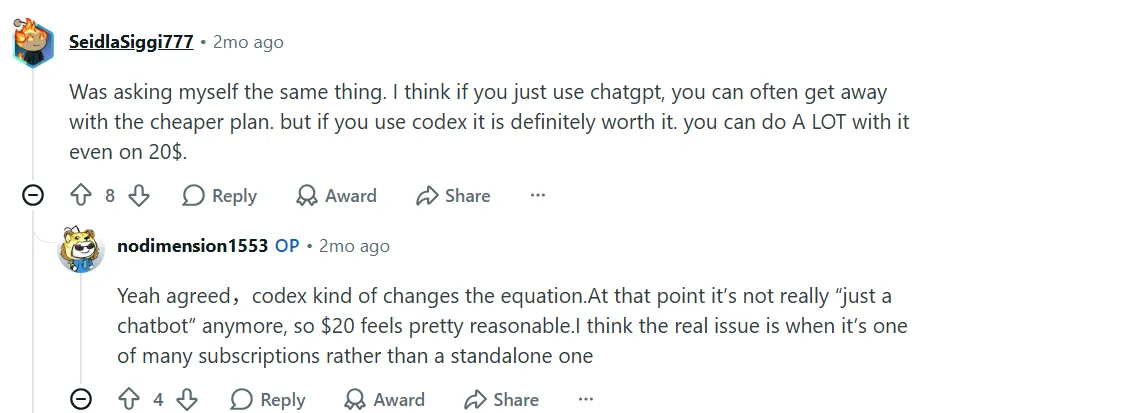
I often see people discussing GPT Plus on Reddit and X (Twitter). The most common concerns usually come down to two things: the price feels a bit high, and people are not sure where to buy it safely.
To be honest, I felt the same way at first.
The official price of GPT Plus is $20 per month. For heavy users, that may be worth it. But for many people who only want to occasionally try advanced models, write articles, translate content, or process a few files, paying $20 every month can feel like a noticeable expense. On top of that, some users also run into issues such as unsupported regions, declined credit cards, or failed payments.
That is why there has always been demand for shared GPT Plus accounts, or what many people call “account sharing” or “group subscriptions.”
Personally, I do not think the idea of group sharing is a problem. Many digital services now have similar shared-use needs, including streaming platforms, design tools, AI tools, and cloud services. What users want is actually very simple: access better tools at a lower cost while avoiding scams as much as possible.
The problem is not “sharing” itself. The real question is where you share from, who you share with, and whether anyone will help when something goes wrong.
That is why I started recommending FamilyPro.
Compared with making private deals with unknown sellers on Reddit, X, Telegram, or Discord, FamilyPro is at least a platform with a clearer process: you can place an order on the website, choose a plan, view your order details, and access support if problems come up. For me, that feels much safer than randomly transferring money to a stranger.
Of course, I would never say that any third-party service is 100% risk-free. Account sharing itself can be affected by account status, login environment, number of users, model limits, and platform rules. But if your original goal is to try GPT Plus at a lower cost, I think FamilyPro is a more worthwhile option to consider, because it makes many things that are normally unclear much more transparent.
What Is a Shared GPT Plus Account?
How does a shared account work?
A shared GPT Plus account simply means that multiple people use one account that already has Plus access, or purchase a shared slot through a platform to use GPT Plus features at a lower cost.
This model is quite common among AI tool users. Many people do not use GPT heavily every day. They may only need an advanced model occasionally to write articles, summarize materials, generate images, analyze files, or try the latest model. If everyone subscribes to the official Plus plan individually, the $20 monthly cost is not exactly low.
The logic behind group sharing is to split the cost.
For example, several people share the cost of one account, and each person only pays a portion of the total fee. It is not fully exclusive, but for light and moderate users, the value for money can be much better.
Of course, a shared account is not the same as an official individual subscription. The advantage of an official subscription is that the account is entirely yours, with better stability, privacy, and control. The advantage of a shared account is that it is cheaper, faster to start using, and does not require you to handle payment or subscription issues yourself.
So my view on shared accounts is simple: it is not the perfect solution, but it does fit the needs of some users.
If you frequently upload important materials, handle company files, or keep long-term chat histories, I recommend choosing a private account or an official subscription. If you simply want to try GPT Plus at a lower cost, then a shared plan is worth considering.
Why Do People Choose GPT Plus Group Sharing?
I think there are several main reasons.
First, price is a real barrier.
For users in the United States, $20 may not feel especially expensive. But for users in many other countries and regions, it is a meaningful monthly expense. This is especially true for students, freelancers, light users, or people who only occasionally need advanced models and may not want to pay a recurring subscription every month.
Second, payment is not always smooth.
Many users have experienced declined credit cards, regional restrictions, inability to add a payment method, or failed subscriptions. Even if your card works normally on other websites, OpenAI’s payment system may be stricter with certain banks, regions, or payment methods.
Third, many people simply want to try it first.
GPT models are being updated quickly, and the feature set keeps expanding. Many users are not sure whether Plus is truly suitable for them, so they want to experience it at a lower cost for a while before deciding whether to subscribe long term.
Fourth, buying privately from sellers is too risky.
You can often find people selling accounts on Reddit, X, Telegram, or Discord, but the biggest issue is the lack of protection. The seller may disappear after receiving payment, give you an account that stops working shortly afterward, or sell an account that too many people use at the same time. In the end, you may have no one to contact when something goes wrong.
That is why I prefer a platform-based service like FamilyPro. At least it is not a purely private transaction. There is an order, a process, and after-sales support. That matters a lot for ordinary users.
The market demand is real
First of all, demand for shared GPT accounts is clearly strong. In the OpenAI community, for example, many users have asked for family plan support. On Reddit, many people also ask whether family sharing is possible.
Although OpenAI does not offer “shared GPT Plus accounts” as an official standard subscription option, from the perspective of user demand, group sharing is definitely a real and existing choice.
I personally agree with the concept of group sharing. Not everyone needs a fully exclusive account, and not everyone wants to pay the full official price from the start. As long as users clearly understand that it is a shared plan, and the platform can provide clear rules, stable delivery, and after-sales protection, then it is a reasonable low-cost option.
Account sharing is essentially a mutually convenient arrangement. Parents can share with children, friends can share with each other, and light users can also split costs through a platform.
The core features you get are similar to purchasing directly from OpenAI, but the actual experience will be affected by account status, number of users, model limits, and the platform’s support quality.
So there is really no need to overcomplicate it. If you are looking for a reliable shared GPT Plus account, you can take a look at FamilyPro. Its plans are suitable for users with limited budgets, users who want to try the service first, or users who cannot subscribe directly. If you care more about stability, you can also choose a private account, which is usually still cheaper than the official route.
Who Is a Shared Account Suitable For?
Based on my observations, the following types of users are more suited to a shared plan.
Users with limited budgets
Many people have tight budgets, and $20 per month is not always easy to afford. This is especially true for students, freelancers, light creators, or people who only occasionally need advanced models.
With a shared account, you can access advanced features at a lower cost. For example, with FamilyPro’s 5-person shared plan, if you only need to pay a few dollars per month, you can experience the core capabilities of GPT Plus. For many users, this is a much more realistic choice.
Users who cannot subscribe directly
Some users may encounter messages like:
“Subscriptions are not supported in your region.” “Your credit card was declined.” “Payment failed. Please try another payment method.”
These problems are not rare. Even if your card works normally on other websites, OpenAI’s payment system may be stricter with certain banks, regions, or payment methods.
For these users, a ready-made solution from a third-party platform can save a lot of trouble.
Users who want to try it first
If you only want to see whether the latest GPT models are worth using, such as GPT-5.5, GPT-5.5 Thinking, file analysis, image generation, web browsing, and other features, then a shared account can serve as a low-cost trial option.
I suggest that these users avoid subscribing to a long-term plan right away. Start with one month first. Once you confirm that you will actually use it and that it genuinely improves your productivity, then consider long-term use.
Users who do not want to manage subscriptions
Some people simply do not want to deal with automatic renewals, bills, subscription cancellations, failed payments, or bank card charges.
Shared plans are usually purchased for a fixed period, such as 1 month or 3 months. You renew when you need it and stop when you do not. For light users, this is more convenient.
Users who are not suitable for shared accounts
I also have to be honest: shared accounts are not suitable for everyone.
If you need to handle company files, client information, private photos, contracts, financial data, code repositories, or long-term project materials, I do not recommend using a shared account.
These scenarios are better suited to a private account or a direct official subscription.
Shared accounts are suitable for testing and light use, but not for storing important private information or long-term work materials.
Pros and Cons of Shared GPT Plus
Pros
More affordable pricing
This is the most obvious advantage.
Taking FamilyPro’s 5-person shared plan as an example, if it costs only $5.5 per month, compared with the official $20 per month, the cost can be reduced by more than 70%. For light users, this difference is very noticeable.
Personally, I think that if you only use GPT a few times a month for occasional tasks, subscribing directly to the official Plus plan may feel a bit wasteful. A shared plan fills that gap well.
Better for trying new features
AI tools are evolving very quickly. Today it may be GPT-5.5, and tomorrow there may be new models and new features. Many people simply want to test whether the model is strong, whether the writing quality is good, whether image generation works, and whether file analysis is convenient.
A shared plan allows you to explore these features at a lower cost without committing too much upfront.
More reliable than private transactions
This is the point I care about most.
I do not really recommend buying accounts directly from strangers on Reddit, X, Telegram, or Discord. These transactions usually have no support, no order record, and no refund mechanism. Once you send the money, whether the seller continues to reply is entirely a matter of luck.
FamilyPro’s advantage is that it is at least a proper website, with an order process, an order page, account delivery, and after-sales handling. It cannot reduce risk to zero, but it can make risk more manageable.
After-sales support as a safety net
What is the biggest fear with shared accounts?
It is not that the price is high. It is that the account suddenly stops working and nobody helps.
What makes FamilyPro attractive to me is that it provides after-sales protection, such as account replacement, refunds, or other handling methods when an account has issues. For users, this is more important than simply having a low price.
Cons
Advanced models have usage limits
GPT Plus does not mean “unlimited” usage.
Currently, Plus / Go users can use GPT-5.5 with a limit of up to 160 messages every 3 hours. After reaching the limit, the system switches to the mini version until the quota resets.
GPT-5.5 Thinking also has an independent limit. Plus users can manually select GPT-5.5 Thinking, with up to 3,000 messages per week. After reaching the weekly limit, GPT-5.5 Thinking can no longer be manually selected, although the system may still automatically switch to Thinking for some complex questions.
So if you are a heavy user who has many conversations every day, writes in bulk, uploads files frequently, generates images repeatedly, or uses reasoning models for long sessions, a shared account may not be enough.
The experience may be affected by other users
The biggest variable with a shared account is “other people.”
If other users on the same account use it heavily, they may consume the model quota earlier. When you log in, you may find that part of the advanced model quota has already been used.
That is why I recommend shared plans more for light users, while high-frequency users should choose an exclusive account.
Stability is not as good as an exclusive account
A shared account is usually not as stable as an official account you subscribe to yourself. The reason is simple: multiple users, multiple devices, and multiple regions naturally make it easier to trigger risk controls or verification.
This is not a problem unique to FamilyPro. It is an inherent issue with the shared account model.
So my recommendation is to treat a shared account as a low-cost trial option, not as a long-term core account that is fully equivalent to an official personal subscription.
Not suitable for uploading sensitive content
This point must be emphasized.
Do not upload ID documents, contracts, company files, client information, personal photos, banking information, passwords, API keys, business plans, or any sensitive content to a shared account.
Shared accounts are best suited for:
Copywriting Translation Summarizing public materials Learning Brainstorming Basic image generation Simple coding assistance Non-sensitive file analysis
They are not suitable for handling private information or core business data.
Current GPT Plus Models and Usage Limits
Many older articles still talk about GPT-4, GPT-4o, GPT-4.1, o4-mini, and similar models, but that information is no longer suitable as the main reference.
At this stage, what is more worth paying attention to is the GPT-5.5 series, including GPT-5.5 Instant, GPT-5.5 Thinking, and GPT-5.5 Pro in higher-tier plans.
Legacy vs Current Models
| Legacy Models | Current Models | Note |
|---|---|---|
| GPT-4o | GPT-5.5 Instant | Current default/everyday general model, better suited for frequent chats, writing, summarizing, and light tasks |
| GPT-4.1 | GPT-5.5 Thinking | Suitable for stronger reasoning, complex analysis, coding, planning, and multi-step tasks |
| GPT-4.1 mini / GPT-4o mini | GPT-5.5 mini / fallback model | May switch to the mini version after reaching usage limits |
| OpenAI o4-mini | GPT-5.5 Thinking | Reasoning capabilities have been integrated into the newer GPT-5.5 Thinking experience |
| GPT-5 Instant / GPT-5 Thinking | GPT-5.5 Instant / GPT-5.5 Thinking | Earlier GPT-5 series versions have been replaced by updated models |
| GPT-5 Pro | GPT-5.5 Pro | Designed for higher-tier subscriptions and complex professional tasks |
The actual user experience is not always exactly the same as the official description. Sometimes you may notice fluctuations in response speed, accuracy, or contextual understanding. This is normal, especially during peak hours, model switching, quota limits, or unstable network conditions.
My suggestion is:
For everyday writing, translation, and summarization, GPT-5.5 Instant is enough. For complex reasoning, code debugging, and long-form analysis, GPT-5.5 Thinking is more suitable. If you are only trying it lightly, there is no need to overthink the model names. The key is whether it can meet your actual needs.
Step-by-Step Guide: How to Safely Get a GPT Plus Account
Step 1: Choose a reliable platform — FamilyPro
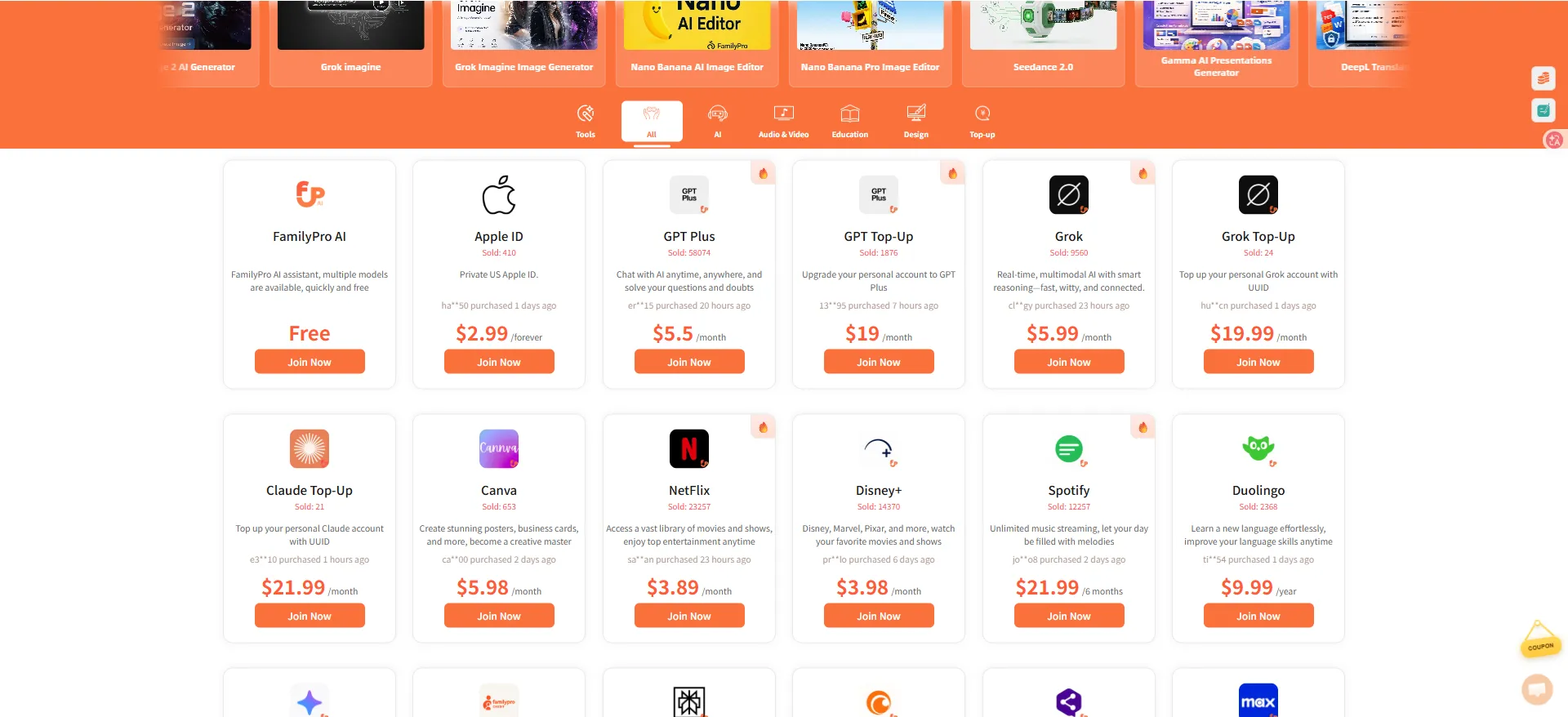
If you decide to try a shared GPT Plus account, I recommend choosing a platform-based service first instead of making private deals with strangers.
The benefit of FamilyPro is that the process is relatively clear: visit the website, choose a plan, complete the payment, view your order, and get your account information. If you encounter a problem, there is also a support entry point.
This is much safer than “sending money to someone online and waiting for them to send an account.”
When choosing a platform, I suggest checking the following points:
Whether it has an official website; Whether the plan details are clearly explained; Whether the number of shared users is stated; Whether there is an order page; Whether after-sales support is available; Whether refund or account replacement rules are explained; Whether multiple payment methods are supported; Whether account information can be obtained in a timely manner.
FamilyPro does fairly well in these areas, which is why I am more willing to recommend it.
Step 2: Register and log in
Visit the FamilyPro registration page, where you will see a relatively simple sign-up interface. It usually supports one-click Google login and email registration.
I recommend registering with an email address you commonly use, so order notifications, support communication, and account information are easier to manage.
Step 3: Choose a GPT Plus plan and complete payment
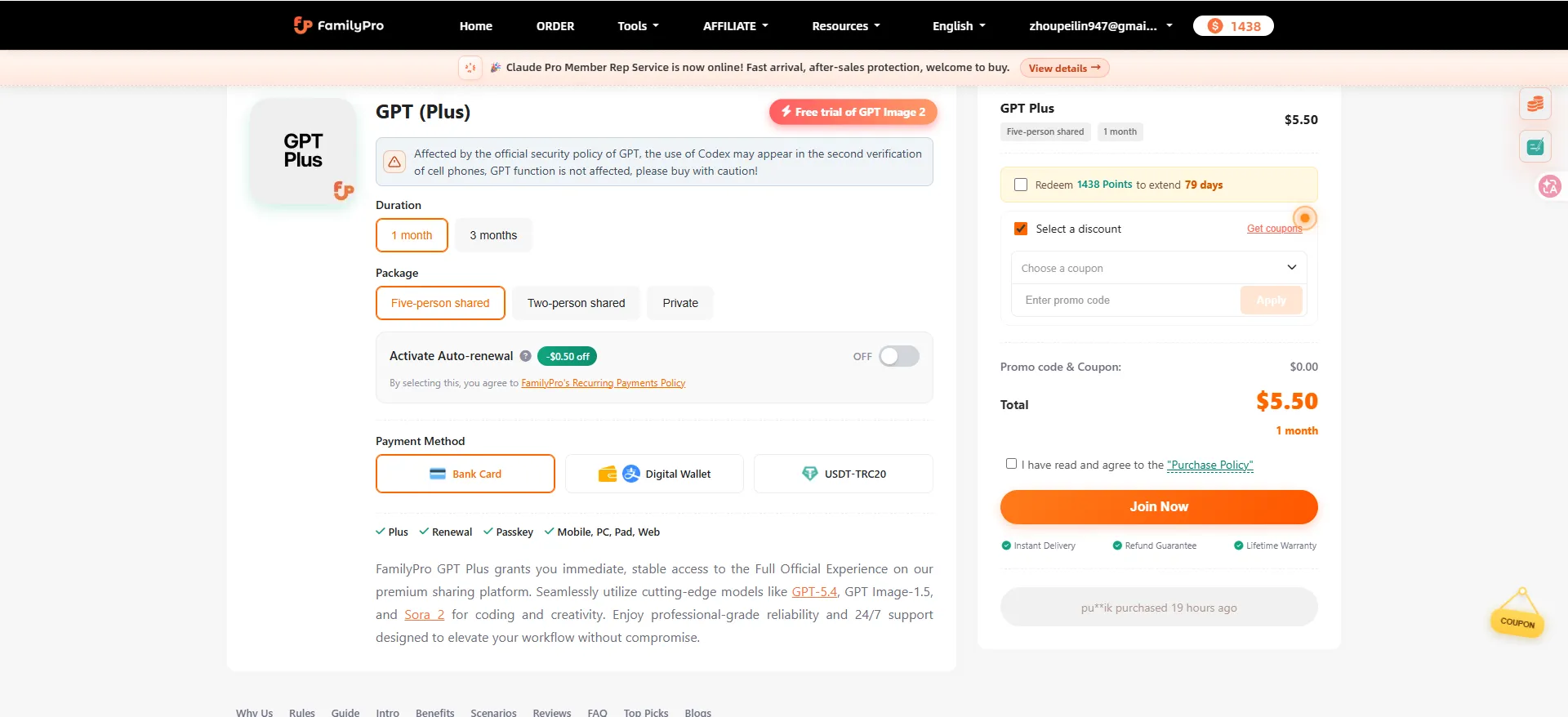
After logging in, go to the GPT product page. You can choose a 2-person shared plan, 4-person shared plan, or private account, and you can also choose a 1-month or 3-month duration.
If you only want to try it, I recommend starting with a short-term shared plan. If you use it every day, I recommend considering a private account directly. If you have high stability requirements, I do not recommend choosing a multi-user shared plan just to save a little money.
After selecting an available slot and completing payment, the system will usually assign account information automatically. Once payment is complete, you can view the relevant information on the order page.
Step 4: Start using GPT Plus
 |
| 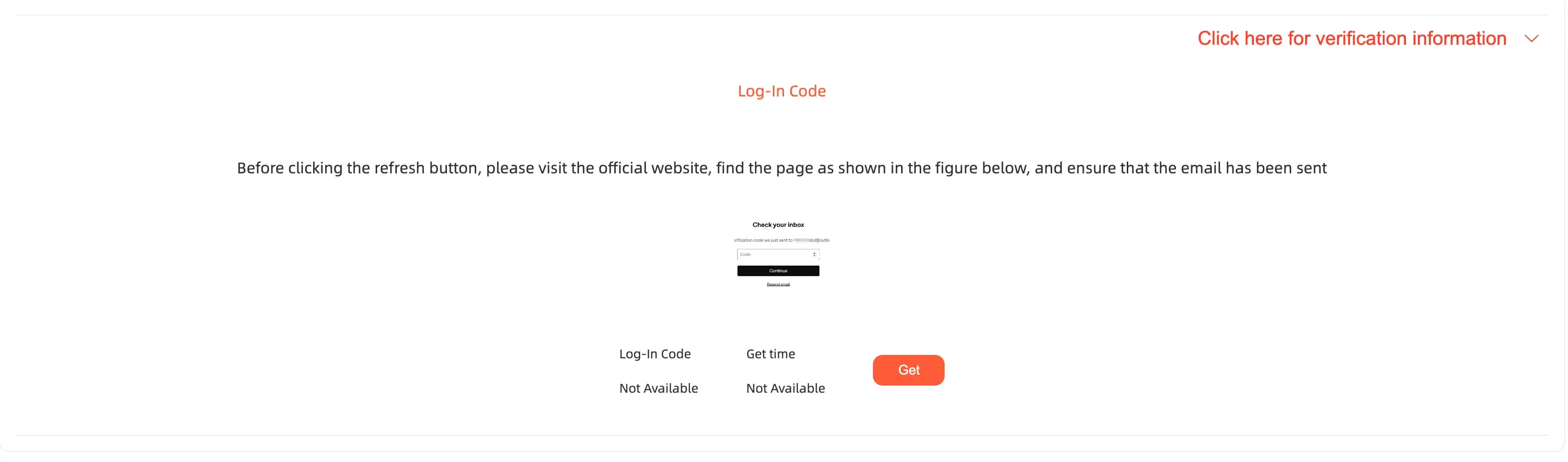
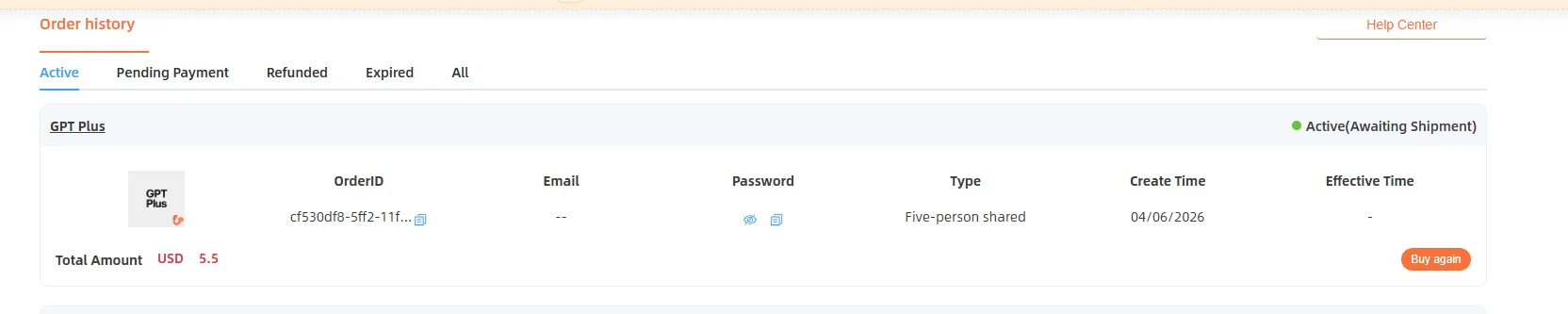
After payment is completed, you will be automatically redirected to the order page. If you are not redirected, you can click “Order” in the navigation bar.
There, you can view the GPT account information. Go to the official GPT website to log in. If a verification code is required, you can obtain it according to the instructions on the FamilyPro page.
After logging in, I recommend running a few simple checks first:
Confirm whether the account has Plus access; Check which models are currently available; Test whether GPT-5.5 is available; Test file upload or image generation features; Confirm whether the overall experience is normal.
If everything works normally, you can start using it.
Is Shared GPT Plus Safe? Risks and Tips
Account login failure or deleted account
Some users may encounter an error like this: 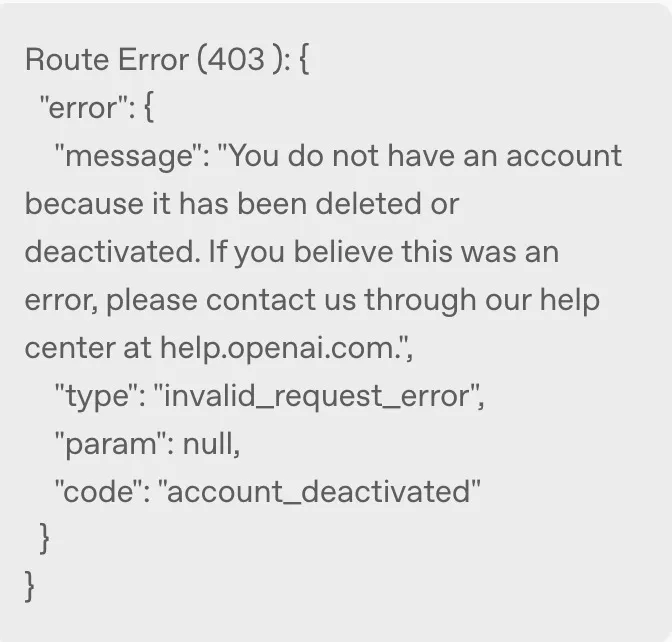 |
|
“You do not have an account because it has been deleted or deactivated.”
This situation can be caused by many factors, such as account abnormalities, platform risk control, changes in the login environment, rule violations, or multiple users frequently switching devices.
If you bought the account from an unknown seller yourself, you may have no choice but to accept the loss. But if you purchased through a platform like FamilyPro, at least you can contact support for help.
This is also why I believe platform-based services are more reliable than private transactions.
Abnormal issues during login
Sometimes you may encounter: 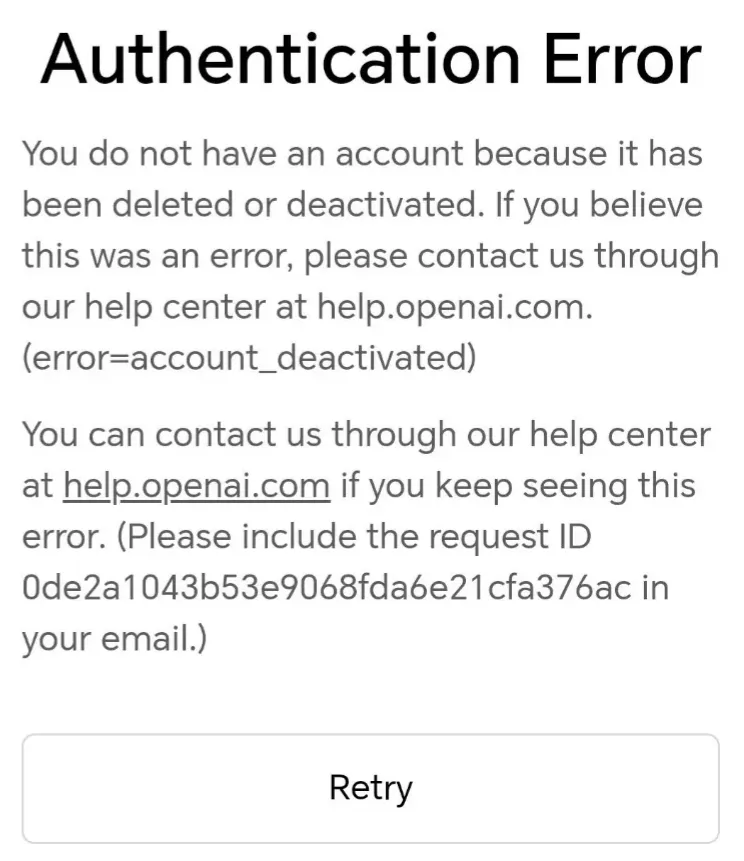 |
| 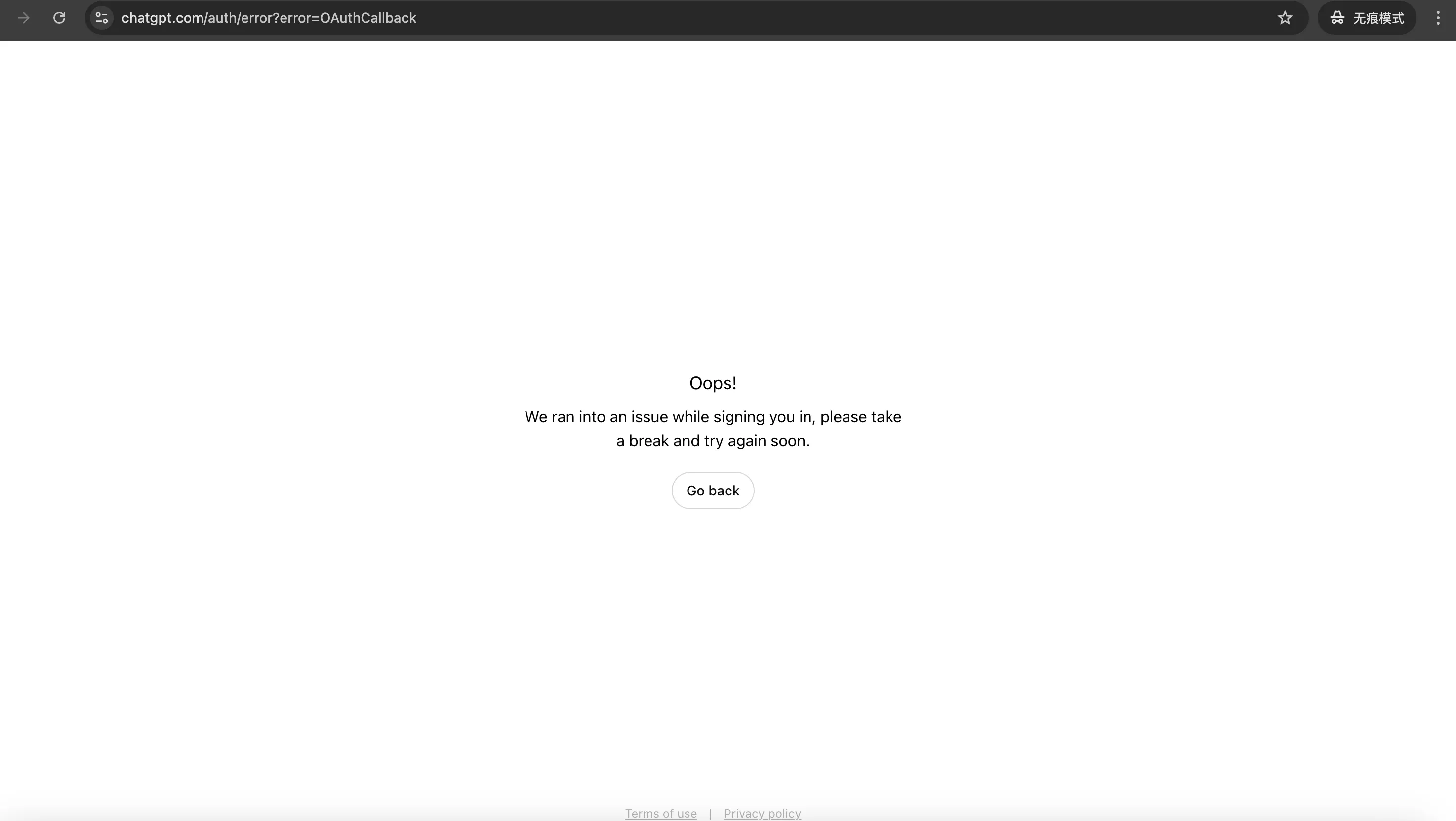 |
|
“Authentication Error” “We ran into an issue while signing you in.” Unable to receive the verification code The page gets stuck Permissions look abnormal after login
These problems do not necessarily mean the account is completely unusable. Some may be temporary bugs, while others may be caused by browser cache, network environment, or login verification.
Based on my experience, when you encounter these issues, you can first try:
Switching browsers; Clearing cache; Disabling extensions; Trying again later; Using a stable network; Contacting platform support for a verification code or solution.
Do not repeatedly log in too frequently as soon as a problem appears. That may actually increase the chance of triggering abnormal activity.
How to Reduce Risk and Protect the Account
Many of the risks mentioned above are often simply blamed on “multiple people sharing.” But the more likely causes may include device environment, login location, account status, model quota consumption, or abnormal usage behavior that triggers bans, restrictions, or account deletion.
It is not comprehensive to blame everything entirely on “sharing.”
My suggestions are:
1. Do not upload sensitive materials
Shared accounts are suitable for light use, not privacy-sensitive scenarios.
Any content involving personal identity, company data, client information, code keys, contracts, finance, medical records, or legal documents should not be uploaded.
2. Keep a stable login environment
Try not to frequently change devices, browsers, regions, or network environments.
If you use a U.S. IP today, an Asian IP tomorrow, and a European IP the day after, the account is more likely to trigger abnormalities. Stable use is safer than frequent switching.
3. Avoid multiple users using it heavily at the same time
A shared account is meant to split costs. If everyone uses it heavily, the experience will definitely decline.
If you find yourself using GPT heavily every day, that means you are no longer a light user and should consider a private account.
4. Back up important content promptly
GPT currently supports exporting account data, but that does not mean you can fully back up, fully import, or restore all chat histories without loss in one click.
After an account is deleted, replaced, or becomes inaccessible, many people may still lose important conversations.
So I recommend copying important content to local documents promptly instead of fully relying on account history.
For this need, FamilyPro has also developed a Chrome extension that can be used to save and restore chat histories. For users who often switch accounts or worry about losing data, this feature is quite practical.
5. Choose a platform with after-sales support
I think this is the most important point.
A shared account can never be completely risk-free, so the key question is whether someone will help when something goes wrong.
If you encounter similar problems while using a FamilyPro account, the platform provides two relatively fair handling options:
A refund based on the remaining time. A free replacement with a brand-new account — until you are satisfied.
This is also why I recommend FamilyPro more than telling people to find random sellers.
Low price is only the first step. Support is the core.
FAQ: Buying a Shared GPT Plus Account
Why is FamilyPro cheaper than the official website?
Because the shared plan splits the cost among multiple users. The official Plus plan is an individual subscription at $20 per month, while a shared plan lowers the cost per person by splitting it across users.
That is the core logic of group sharing.
Is a shared account more likely to be banned?
A shared account is indeed more likely than an exclusive account to encounter login abnormalities or risk control issues, because multiple users, multiple devices, and multiple regions increase uncertainty.
But that does not mean all shared accounts are unstable. The key factors are how the platform manages accounts, whether it controls the number of users, whether it provides support, and whether your own usage habits are stable.
What should I do if the account suddenly stops working?
If you purchased through FamilyPro, I recommend checking the order page first to see whether there is new account information or verification code instructions.
If it still does not work, contact FamilyPro support and provide your order number, error screenshots, and the specific error message. Usually, support will handle the issue with a replacement or refund depending on the situation.
Is sharing really more cost-effective than buying individually?
For light users, yes.
If you only occasionally write articles, translate content, summarize materials, generate images, or try advanced models, a shared plan is more cost-effective.
But if you use it heavily every day, or use it for work, business, study projects, and long-term material storage, an exclusive personal account is more suitable.
Will it renew automatically?
This depends on the platform’s plan rules. Before purchasing, check whether there is automatic renewal, whether cancellation is supported, and whether you need to renew manually after the plan expires.
If you do not want a long-term commitment, I recommend buying a short-term plan first.
Should I choose a shared account or a private account?
My recommendation is:
Light trial use: choose shared. Moderate use: choose a shared plan with fewer users. High-frequency use: choose a private account. Professional work: choose a private account or official subscription. Sensitive data involved: do not use a shared account.
Final Thoughts: Is Shared GPT Plus Right for You?
If your main goal is to try the latest GPT models and features, or to save money, choosing a shared account is a practical option.
I personally agree with the concept of group sharing because it solves real user problems: high pricing, payment difficulties, reluctance to subscribe long term, and uncertainty about whether the service is worth buying.
But I also do not recommend blindly chasing the lowest price.
What really matters is whether the platform is reliable, whether delivery is clear, and whether support can handle problems.
From this perspective, FamilyPro is an option worth considering. It offers more protection than random private transactions and is more convenient than searching everywhere for sellers yourself. Especially for first-time users trying a shared GPT Plus account, a platform-based process can reduce many unnecessary risks.
If you are only a light user, FamilyPro’s shared plan offers strong value for money. If you need a more stable experience, you can choose FamilyPro’s private account. If you need to handle sensitive information or long-term professional work, I recommend using an exclusive account or an official subscription.
To summarize it in one sentence:
Shared GPT Plus is not for everyone, but it is a good fit for users with limited budgets who want to try advanced models at a low cost without taking risks with unknown sellers.
And for this type of need, FamilyPro’s advantage is not just that it is cheap. Its real advantage is a clearer process, easier purchasing, and more manageable after-sales support.
For me, that is the key to “safely getting a shared GPT Plus account.”