Seedance 2.0 Mini: Features, Pricing, and How to Use
Just moments ago, CapCut officially announced on Twitter the launch of the Seedance 2.0 Mini model.
Previously, Seedance 2.0 had climbed to the top of the AI video generation model rankings thanks to its high-quality output and strong prompt understanding. At the same time, however, its high usage cost and long waiting times had also become recurring points of criticism among many users.
That makes the arrival of Seedance 2.0 Mini especially worth watching. As its name suggests, this is a lightweight model focused on being smaller, faster, and more cost-efficient. So what surprises will it bring? And can it truly strike a practical balance between generation quality, speed, and cost? This is likely the question every user cares about most. How exactly does Seedance 2.0 Mini perform? Let’s break it down in this article. 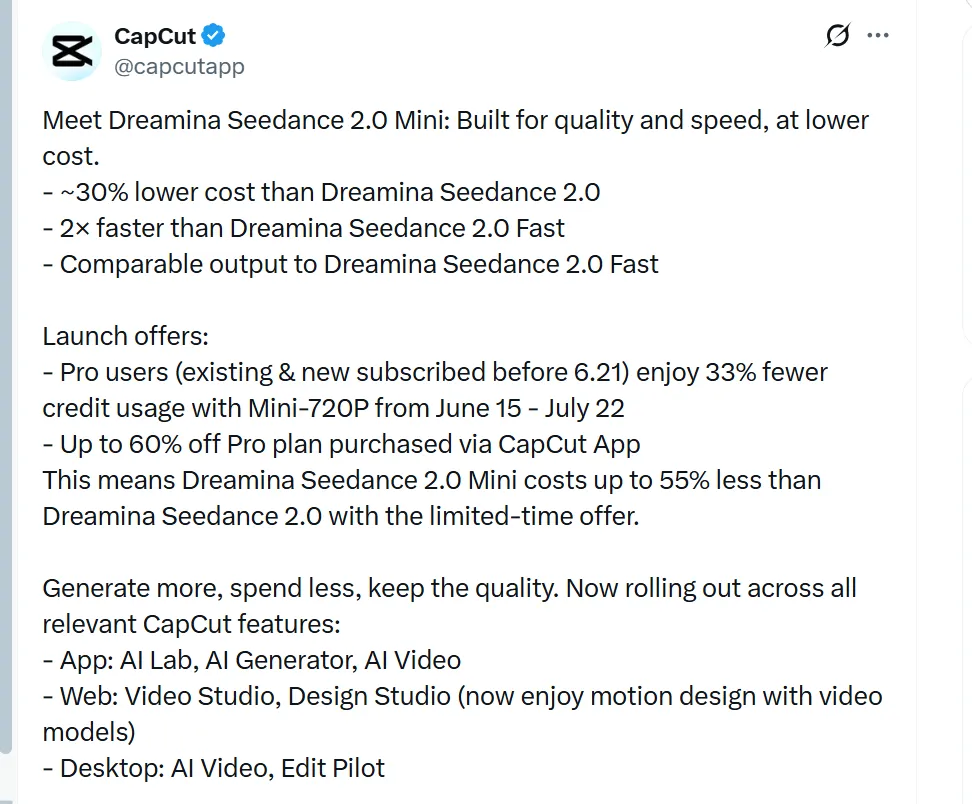
Seedance 2.0 Mini Performance Review
1. Still Maintains a High Level of Prompt Understanding
Let’s first address the question users care about most: will Seedance 2.0 Mini downgrade its prompt understanding capability simply because the model is smaller?
We can answer this by referring to the official information: what Seedance 2.0 Mini inherits first and foremost is one of the most important capabilities of the Seedance 2.0 series. Its understanding of prompts no longer stays at the basic level of “matching visual elements.” Instead, it begins to understand more complex scene relationships and camera intentions.
This is precisely what makes Seedance 2.0 Mini more noteworthy than a typical lightweight model. It is not simply designed to be fast for the sake of speed. Rather, it aims to preserve as much of Seedance 2.0’s prompt understanding framework as possible while lowering the barrier to use.
In other words, it is not trying to be a “cheaper version of a video generator.” It is positioned more as a lightweight creative entry point suited to high-frequency use. Of course, being lightweight also means it is more oriented toward mass-market, non-professional use cases.
For everyday users, this is crucial. The real difficulty of AI video generation often lies not merely in producing a decent-looking image, but in whether the model can accurately understand the creator’s intended scene, action, relationships, and camera language.
2. Multi-Shot Storytelling
Based on the positioning shown on the official page, Seedance 2.0 Mini places strong emphasis on cinematic multi-shot video generation — in other words, the ability to create cinematic narratives across multiple shots.
This is a particularly interesting point.
One problem with many AI video models in the past was that they could generate a beautiful single-shot scene, but once the task moved into multi-shot storytelling, characters would easily drift, scenes would start to break apart, and the shots often lacked the continuity they should have. Each segment might look fine on its own, but once edited together, it became hard to believe they belonged to the same story.
This is exactly the problem Seedance 2.0 Mini is trying to address.
It is not simply generating an isolated video clip based on a prompt. Instead, it attempts to understand the prompt as a complete visual narrative.
In other words, the model is not just generating “one shot.” It also needs to understand how different shots should connect: how the opening establishes the scene, how the action moves forward, whether the transitions feel natural, whether the character’s state remains consistent, and whether the overall visual rhythm holds together.
This is especially important for short-form video creators, e-commerce sellers, and ad creative testing.
These users may not need a complex 30-second cinematic short film, but they do need a tool that can quickly generate 5–12 second clips. More importantly, those clips should have a clear narrative arc, a sense of camera direction, and coherent action logic — rather than feeling like a randomly moving AI-generated image.
This is where Seedance 2.0 Mini’s advantage lies: it puts “usability” in a more important position than “technical showmanship.”
3. Speed and Cost
What makes Seedance 2.0 Mini most worth watching is, of course, speed and cost.
Seedance 2.0 has generated so much discussion among users because it does perform impressively in image quality, motion stability, and prompt understanding. But the problem is just as obvious: high-quality generation often means higher costs, longer queues, and a user experience that is less suited to frequent trial and error.
The arrival of Mini is a direct response to that pain point.
It does not necessarily need to outperform Seedance 2.0 in every dimension. In fact, what Mini really needs to do is something else: in most everyday creative scenarios, offer an option that is “good enough, but noticeably faster and cheaper.”
That is also the most reasonable positioning for a lightweight model.
A creator’s real workflow is never about getting it right in a single generation. It is about constant iteration: changing the prompt, changing the shot, changing the aspect ratio, adjusting the character’s movement, switching the product angle, and refining the emotional rhythm. In that process, if every generation is expensive and every wait takes too long, creativity can easily be slowed down by cost and time.
So if Seedance 2.0 Mini can lower the cost of each iteration and reduce waiting time, its value is not simply that it is “cheaper.” It is that it can help move AI video from a high-cost experiment for a small group of users closer to an everyday production tool.
That may be Mini’s real ambition.
How Much Can Seedance 2.0 Mini Actually Save?
The biggest appeal of Seedance 2.0 Mini is not just that it is “smaller and faster,” but that it significantly brings down the relatively high usage cost of Seedance 2.0.
According to currently available public information, Seedance 2.0 Mini is about 30% cheaper to use than the original Seedance 2.0 at the base level. In other words, if the generation cost of Seedance 2.0 is calculated as 100%, Mini only requires around 70% of that cost.
This matters a lot for high-frequency creators. AI video generation rarely succeeds on the first try. More often, users need to keep testing prompts, shots, compositions, actions, and visual styles.
With the same budget that would originally generate 10 videos using Seedance 2.0, switching to Seedance 2.0 Mini could theoretically generate around 14 videos. In other words, Mini does not simply help you “spend a little less.” It gives you nearly 40% more room for trial and error.
More importantly, Mini is also launching with a limited-time discount.
From June 15 to July 22, users who have already subscribed to Pro, or who subscribe to Pro before June 21, can enjoy 33% lower credit consumption when using Mini-720P. At the same time, users who purchase a Pro plan through the CapCut app can get up to 60% off.
After these discounts are applied, Dreamina Seedance 2.0 Mini can reduce overall usage costs by up to approximately 55% compared with Dreamina Seedance 2.0.
That is the most practical appeal of Mini this time. It is not just about slightly lowering the price. It allows users to generate more videos with the same budget, test different creative ideas faster, and reduce the cost pressure before each generation.
So the positioning of Seedance 2.0 Mini is very clear: it is not designed to push the upper limit of image quality, but to make AI video generation better suited for everyday creation.
To sum it up in one sentence: Generate more, spend less, keep the quality.
What it really saves is not only the 30% to up to 55% reduction in generation cost, but also waiting time, trial-and-error pressure, and the hesitation creators feel before clicking generate each time.
Seedance 2.0 Mini Hands-On Test
In the end, the most important question about Seedance 2.0 Mini is simple: how good is the actual video quality?
Based on the currently available demos and hands-on results, Seedance 2.0 Mini does not feel like a model built to push the absolute ceiling of video quality. Instead, its first impression is stable, clean, and usable. Unlike the full Seedance 2.0, which is more focused on maximum quality, Mini is clearly aimed at everyday creative workflows: short videos, ad drafts, product showcases, social media content, and storyboard testing.
First, the visual quality is solid. Seedance 2.0 Mini still keeps the recognizable cinematic look of the Seedance family: clean colors, clear lighting layers, and decent separation between the subject and the background. In scenes such as character close-ups, urban street shots, and product displays, it can often generate a video that looks usable at first glance.
Motion performance is also reasonably stable. Mini handles simple actions quite well, such as walking, turning around, raising a hand, camera push-ins, and product rotation. The movement generally feels natural, with fewer obvious glitches or frame tearing. However, for harder scenarios such as multi-person interaction, fast action scenes, complex dancing, or detailed hand movements, you may still need several generations to find a stable result.
Prompt understanding is one of its stronger points. Seedance 2.0 Mini does not simply match keywords; it can understand a certain level of camera language. Descriptions such as “slow camera push-in,” “cinematic close-up,” “tracking shot,” and “soft lighting” can usually be translated into clearer camera movement and visual atmosphere. This makes the output feel less like a still image being animated, and more like a short shot with an actual camera intention behind it.
In terms of character consistency, Mini performs well in short, single-subject clips. Facial structure, hairstyle, clothing, and the overall character feel usually remain stable. But when there are too many shot changes, large angle shifts, or multiple people in the same frame, some local details can still drift. For that reason, it is better suited for short clips and lightweight storytelling, rather than complex long-form narratives.
Overall, Seedance 2.0 Mini’s strength is not “the best possible image quality,” but the ability to produce stable, usable videos with a lighter model. It is well suited for short-form video assets, ad concept testing, e-commerce product videos, character mood clips, and storyboard drafts. For users who need maximum visual detail or complex cinematic shots, the full Seedance 2.0 is still the better choice.
In one sentence: Seedance 2.0 Mini may not reach flagship-level quality, but its stability, camera feel, and everyday usability are better than what the word “Mini” might suggest. What makes it impressive is not that every generation looks spectacular, but that it allows creators to produce genuinely usable videos more frequently and with less pressure.
Who Is Seedance 2.0 Mini For?
Based on these characteristics, Seedance 2.0 Mini is clearly not built for everyone.
If you are looking for a cinematic look, extreme detail, and high-end final production quality — for example, if you are a director, a film production team, a major brand advertising project, or working on an artistic promo film where the visual ceiling matters most — then the full Seedance 2.0 will still be the better choice. Mini’s advantage is not about pushing every frame to the highest possible level of refinement. Its strength lies in using a lighter model, lower cost, and faster generation rhythm to produce stable videos for everyday content production.
That is exactly why Seedance 2.0 Mini is better suited for creators who care about speed, stability, and cost efficiency.
This includes short-form video creators, social media managers, e-commerce sellers, ad buyers, and anyone who needs to produce a large volume of marketing videos every day. For these users, the most important question is often not whether a single video can reach cinematic quality, but whether they can quickly generate multiple versions, test different selling points, camera angles, and visual styles, then choose the one that works best for publishing or ad delivery.
With Seedance 2.0, many users did not question its quality. The real issue was that long queues and higher costs made it difficult to use frequently. Seedance 2.0 Mini addresses exactly that pain point: users no longer need to call a heavier model every time, nor do they need to pay a high cost for every creative test.
So Mini’s positioning is very clear. It is not a model designed for a small number of high-budget cinematic projects. It is a production tool for fast-media creators, marketers, and high-frequency content teams. It is not trying to answer “how do we create the most stunning single video?” but rather “how do we create more usable videos faster, more consistently, and at a lower cost?” 
How to Use Seedance 2.0 Mini
Using Seedance 2.0 Mini is straightforward. Since the model has just launched, availability may vary by region and platform, so the first step is to check whether it appears in your Dreamina or CapCut AI Video model list.
Once you open the AI Video tool, select Seedance 2.0 Mini if it is available. Then enter a clear prompt that covers five key elements: subject, action, scene, camera movement, and style.
For example:
A skincare product bottle rotating on a clean white table, soft studio lighting, close-up shot, commercial ad style.
If you have a product image, character image, or brand reference, upload it as well. This usually helps the generated result stay closer to what you want.
Next, choose the aspect ratio and duration based on your use case. For TikTok, Reels, or YouTube Shorts, vertical video is usually the better option. After the video is generated, check three things first: whether the subject stays stable, whether the motion looks natural, and whether the camera movement matches your idea.
The best way to use Seedance 2.0 Mini is not to expect a perfect result in one try. Use it to quickly test several versions, then pick the strongest one and refine it further. 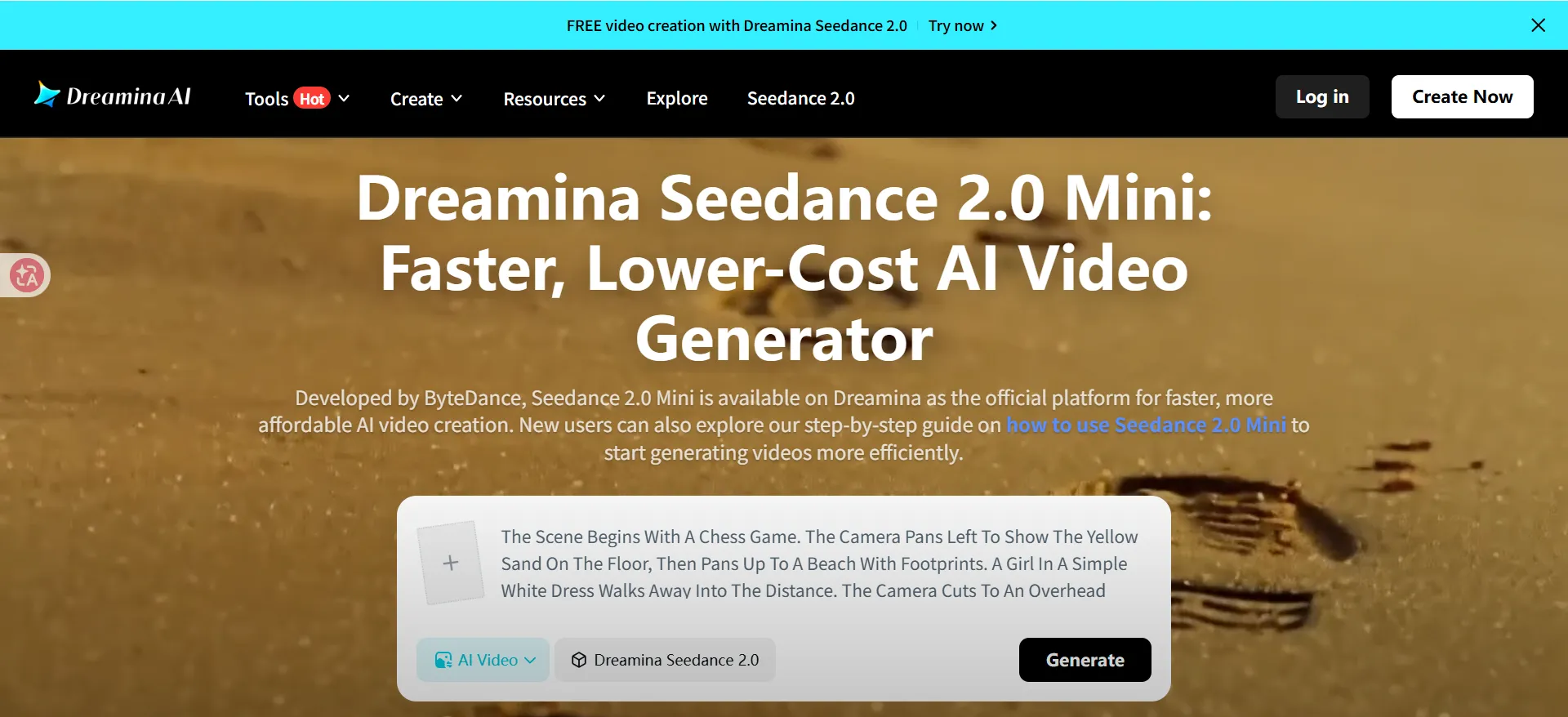
A More Affordable Subscription Option: FamilyPro
Although Seedance 2.0 Mini offers better value for money than the full version, Jimeng (Dreamina China Version)’s membership pricing can still feel expensive for users who want to use it as an everyday creative tool.
That said, I found a more cost-effective option through FamilyPro. FamilyPro is a long-established low-cost subscription service platform that allows users to access the same official membership services at prices lower than the official website. For users with limited budgets who still want to use Jimeng (Dreamina China Version) frequently, this is clearly a more flexible alternative.
More importantly, FamilyPro also provides warranty and after-sales support. If you encounter issues during use, such as abnormal account bans or unexpected subscription cancellations, the platform can offer account replacement, after-sales assistance, or even refunds. This helps reduce the risk of trying a lower-cost subscription channel.
So, if you find Jimeng (Dreamina China Version)’s official subscription price too high but still want to use Seedance 2.0 Mini over the long term, FamilyPro can be a more affordable subscription option. For creators who want to lower usage costs and generate videos more frequently, it is certainly worth considering. 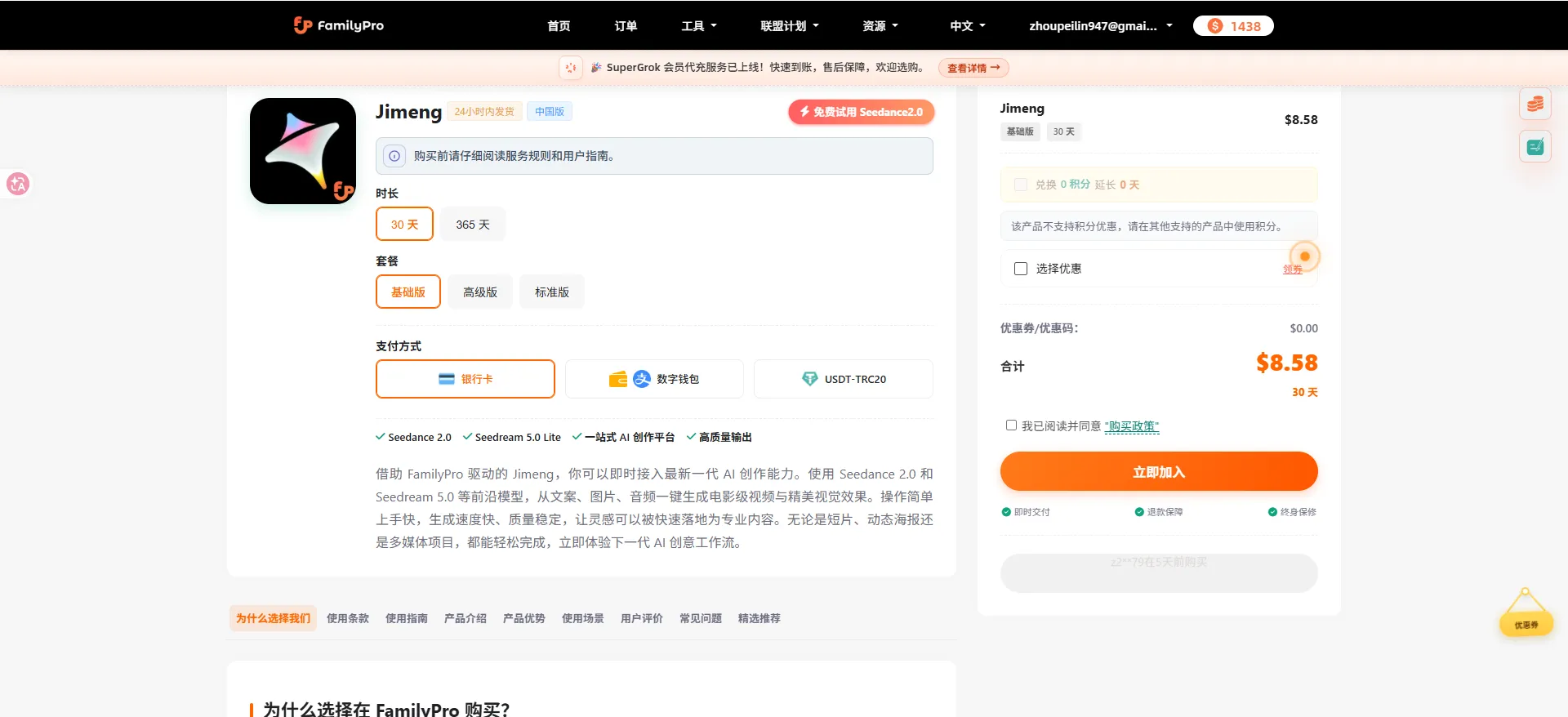
Are There Copyright or Commercial Use Risks with Seedance 2.0 Mini?
Seedance 2.0 Mini lowers the barrier to AI video generation, but that does not mean the videos it creates can automatically be used commercially without restrictions.
The real issue is copyright and licensing.
If your prompt or reference materials include celebrity likenesses, movie characters, anime IP, brand logos, copyrighted music, film clips, or a visual style that clearly imitates an existing work, the generated video may involve copyright, likeness rights, trademark, or platform review risks. These risks become even more serious when the content is used for advertising, brand campaigns, e-commerce product pages, or client projects.
In simple terms, AI-generated content does not automatically come with commercial rights. The model can help you create visuals, but it cannot confirm whether your materials are cleared for commercial use, nor can it take responsibility for any copyright issues that may follow.
So if you are only using Seedance 2.0 Mini for personal testing, creative drafts, or non-commercial content, you have more flexibility. But if you plan to use the generated video commercially, it is better to follow three basic rules:
First, use materials you own or have permission to use. This includes your own product images, licensed brand assets, original character designs, and self-produced audio.
Second, avoid clearly recognizable IP or celebrity elements. Do not directly generate a specific celebrity, movie character, anime figure, well-known brand packaging, or protected artistic style.
Third, check the platform and project rules before publishing. Different platforms have different policies for AI-generated content, ad creatives, likeness rights, and copyrighted music. This is especially important when running ads or delivering work for clients.
So, Seedance 2.0 Mini is better suited for original short videos, product showcases, social media assets, ad drafts, and creative testing. It can be used for commercial projects, but it should be used carefully. The safest question is not “Can AI generate this?” but “Do I have the right to use this content?”
Seedance 2.0 Mini FAQ
1. What is Seedance 2.0 Mini? Seedance 2.0 Mini is a lighter version in the Seedance 2.0 model family, designed for faster and lower-cost AI video generation. Its main value is not pushing the highest possible video quality, but helping users create more usable videos with less waiting time and lower credit consumption.
2. Is Seedance 2.0 Mini better than Seedance 2.0? Not in every way. The full Seedance 2.0 is still better for high-end visuals, cinematic output, and complex final productions. Seedance 2.0 Mini is better for daily content creation, short-form videos, ad drafts, product videos, and quick creative testing. In simple terms: Seedance 2.0 is for quality ceiling, while Mini is for speed, cost, and workflow efficiency.
3. How much cheaper is Seedance 2.0 Mini? Based on current launch information, Seedance 2.0 Mini is around 30% cheaper than the original Seedance 2.0 in regular usage. With the limited-time launch offer, Dreamina Seedance 2.0 Mini can cost up to 55% less than Dreamina Seedance 2.0. This makes it more suitable for users who need to generate multiple versions and test ideas frequently.
4. What type of videos is Seedance 2.0 Mini best for? Seedance 2.0 Mini is best for short-form videos, social media content, product showcases, ad concept testing, e-commerce videos, character mood clips, and storyboard drafts. It is especially useful when you need to generate several variations quickly instead of spending more credits on one high-end final output.
5. Can I use Seedance 2.0 Mini for commercial projects? Yes, but with caution. The model can be used to create commercial video assets, but you still need to make sure your prompts, reference images, music, logos, characters, and brand elements are cleared for commercial use. AI generation does not automatically give you copyright or licensing rights. For ads, client work, and brand campaigns, always use materials you own or have permission to use.
6. What are the main limitations of Seedance 2.0 Mini? Seedance 2.0 Mini is not ideal for complex long-form storytelling, high-end cinematic productions, detailed hand movements, fast action scenes, large multi-person interactions, or projects that require strict character consistency across many shots. It works best when the goal is fast, stable, and cost-efficient video generation rather than maximum visual refinement.