
ChatGPT Account Deactivated? How to Recover It in 2026
If your ChatGPT account deactivated, take a breath. In most cases you can appeal and get it back, but recovery is not automatic and not always guaranteed. The first move is to open the email OpenAI sent you. It usually contains a direct appeal link and a reason code. Start there before you do anything else. 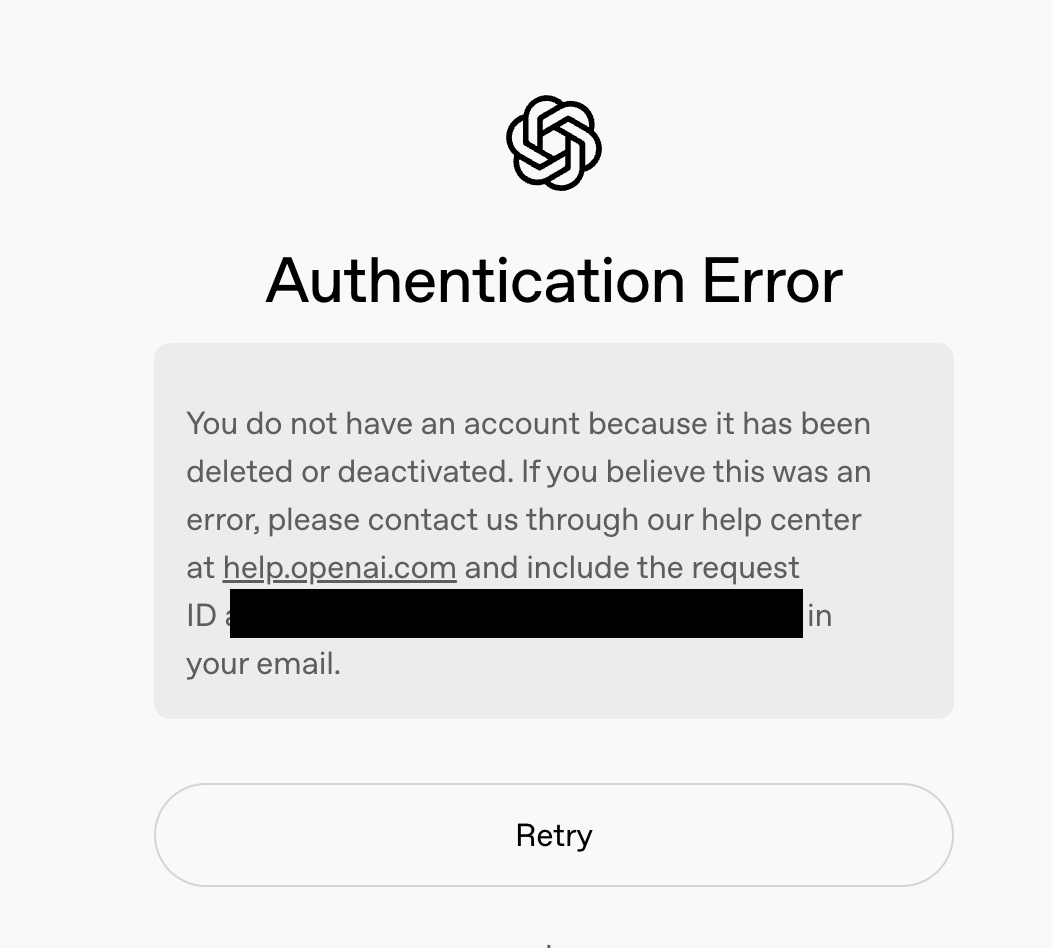 I want to be straight with you about what I found when I worked through this myself. I ran the appeal steps on my own Plus account and read OpenAI's 2026 support flow so I could tell you what actually happens, not just what the help docs claim. The short version: a ChatGPT account deactivated by OpenAI is almost always fixable if you respond the right way, but the clock and your wording both matter.
Here is the problem most people hit. You open ChatGPT, see the deactivated screen, and assume the worst. Maybe you think you broke a rule you never read. Maybe you worry someone hacked you. Meanwhile a paid plan may still be billing. That gap between "I am locked out" and "I understand why" is where panic sets in. This guide walks the full path: why it happened, how to appeal, how to tell deactivation apart from deletion, what changes on a shared plan, and how to avoid it next time. A ChatGPT account deactivated in error is recoverable, and even a justified one can sometimes be reversed.
Why was your ChatGPT account deactivated?
OpenAI rarely disables an account without a trigger. The most common reasons map to five buckets.
Payment failure sits at the top. A declined card, an expired subscription, or a bank flag on the charge can flip your account into a limited state. I once stared at the deactivated screen convinced I had been hacked, then realized my card had simply expired two days earlier. Embarrassing, but easy to fix.
Policy violations come next. Automated systems watch for terms of service breaks: generating disallowed content, automating requests to dodge limits, or sharing an account in ways the rules forbid. A shared login used across many devices and cities is a classic flag.
Security holds are the third bucket. If OpenAI detects unusual activity, such as a login from a new country or a burst of odd traffic, it may freeze the account to protect it. Our guide on the unusual activity notice covers what that screen looks like and the steps to verify you are the real owner.
Verification gaps are a quieter cause. An unconfirmed email or an unfinished identity check can leave the account in limbo. And finally, false positives happen. The filters are not perfect, and a ChatGPT account deactivated by mistake is more common than OpenAI admits in public.
If you share access with others, the trigger can be someone else's behavior. One member of a shared plan tripping a policy flag can pull the whole group into review. Our piece on getting a shared ChatGPT account explains how shared logins create this linked risk, and our banned-account breakdown shows where the line between a warning and a permanent ban usually falls.
How to recover a ChatGPT account deactivated by OpenAI (step by step)
When a ChatGPT account deactivated, your recovery path runs through OpenAI support, not through random "account recovery" sites that promise instant fixes. Those are scams. Follow these steps.
Step 1: Find the email. Search your inbox for "OpenAI" and "account deactivated." The message normally includes a reason and a button or link to appeal. Do not delete it.
Step 2: Open the appeal. Click the link in the email, or go to OpenAI's help center and start a chat or support ticket from the affected account. Explain clearly and calmly.
Step 3: Write the appeal. State what happened, confirm the account is yours, and, if it was a mistake, say so directly. Keep it short. A useful template:
Subject: Appeal for deactivated account Situation: My ChatGPT account was deactivated on [date]. I believe this was a mistake / I understand [reason] and have stopped that activity. Request: Please review and restore access. I can verify ownership via [email or payment method].
Step 4: Wait, and track the case. OpenAI typically replies within a few days, though paid plans often move faster. Save your case or request ID.
Step 5: Back up your data before you lose access entirely. This is the step most people skip, and it is the one I now treat as non-negotiable. Open the export tool and save your conversations as a PDF while you still can. Our walkthrough on saving ChatGPT conversations as a PDF shows the exact menu path. If the account is truly gone, an export may be your only copy of months of work.
Be honest about the odds. A ChatGPT account deactivated for a clear policy break may not come back. An account frozen over a payment glitch or a false positive usually does. Set your expectations accordingly so you are not refreshing your inbox in despair.
If you need to keep working while the appeal clears, a separate subscription can bridge the gap so your workflow doesn't stall. Our ChatGPT plan page explains the options without tying you to a long commitment.
ChatGPT account deactivated vs deleted vs banned
These three words get used interchangeably, but they are not the same, and the difference changes your next move. Here is the breakdown.
| State | What it means | Reversible? | How to tell | Recovery path |
|---|---|---|---|---|
| Deactivated | Account temporarily disabled, often pending review | Usually yes | "Account deactivated" message, appeal link in email | Submit appeal, wait for review |
| Deleted | You or OpenAI removed the account and data | Often no | "Account deleted" or login fails with no appeal option | Restore window is short; contact support fast |
| Banned | Permanent removal for serious or repeat violations | Rarely | "Permanently suspended" language | Appeal once; expect denial if violation is clear |
When a ChatGPT account deactivated, you almost always get an appeal route. When it is deleted, the clock is much shorter and the data may already be queued for removal. When it is banned, the language is final and recovery is unlikely.
If you are on a shared login, the state of one seat can cascade. Our banned-account explainer covers how a single violation can escalate, and our shared-account guide shows why separating seats protects everyone else.
A ChatGPT account deactivated on a shared or family plan
This section is for people using one ChatGPT login across a household, a study group, or a family plan. The recovery steps above still apply, but the shared setup adds risks the solo user never faces. I am not repeating the appeal process here. Instead, let me show you where a shared plan behaves differently and how to protect yourself.
Chain reaction risk is the big one. OpenAI ties behavior to the account, not to the person at the keyboard. If one member triggers a policy flag, the whole account can be pulled, and everyone on it loses access at once. I have seen a friend get locked out of a semester of notes because a housemate automated a batch of requests. The deactivation was not his doing, but the impact was his.
Owner and member responsibility is blurry by default. On a shared plan, the person who set up billing is the owner, and OpenAI treats that owner as accountable for everything that happens on the account. Members have little standing to appeal on their own. Before you share, decide who owns it and who answers if something goes wrong.
Shared chat backup is your safety net. Because a ChatGPT account deactivated on a shared plan can wipe everyone's history, each member should export their own conversations regularly. Do not assume the owner has a copy. Export is a per-action step, not per person, so every user needs to run it.
When to move to an isolated account is the question I get most. If you do client work, store sensitive notes, or simply cannot afford to lose access because of someone else's mistake, stop sharing. A personal top-up account gives you a clean, separate identity that no housemate can endanger. For groups that still want to share to save money, a managed plan with separated seats keeps billing and ownership organized, so one bad action is easier to contain.
Our shared ChatGPT account guide goes deeper on setting this up safely, and our FamilyPro managed plan is built for exactly this: separated seats, clear ownership, and a backup-first habit baked in.
How to prevent a ChatGPT account deactivated event
Prevention is cheaper than appeal. Five habits cut your risk sharply.
Keep your payment current. Update your card before it expires and watch for bank flags on the recurring charge. Most "my account vanished" tickets I have read started with a failed payment, not a policy issue.
Turn on two factor authentication. A locked-down login is far less likely to trip a security hold. If you do see the unusual activity screen, our explainer walks the verification steps so you can clear it fast.
Stay inside the usage rules. Read the policy once. Avoid automation that dodges rate limits and do not push the model into disallowed territory. When in doubt, slow down.
Separate shared usage. If several people use one login, the odds of a flag rise with every extra device and city. A managed plan with separated seats keeps each person distinct, which limits how far one mistake spreads.
Stay active. Long idle periods plus a failed renewal are a common combo. A quick login each month keeps the account healthy. The aim is simple: never open your laptop to a ChatGPT account deactivated notice again.
FAQ: ChatGPT account deactivated questions answered
Q1: Can I recover a ChatGPT account deactivated by OpenAI?A1: In most cases yes, if the cause is a payment failure, a security hold, or a false positive. Submit the appeal linked in your OpenAI email and wait for review. Accounts disabled for clear policy breaks may not be restored, so set realistic expectations before you appeal.
Q2: How long does a ChatGPT account deactivated appeal take?A2: Most replies land within a few business days. Paid subscribers often move through review faster than free users. Save your case ID, check the email you registered with, and avoid sending duplicate tickets, which can slow the queue.
Q3: Is a ChatGPT account deactivated the same as deleted?A3: No. Deactivation is usually temporary and reversible through appeal. Deletion often removes data and leaves a much shorter recovery window. Check your email wording: "deactivated" points to appeal, while "deleted" means you must act fast.
Q4: Will a ChatGPT account deactivated on a shared plan affect everyone?A4: Yes, it can. OpenAI ties action to the account, not the person, so one member's policy flag can pull the whole group offline at once. Each user should export their own chats, and the owner should be ready to appeal on the group's behalf.
Q5: Can I still export my data after a ChatGPT account deactivated event?A5: Sometimes, but not always. If you can still reach settings, export your conversations as a PDF immediately, because access can close without warning. Our PDF export guide shows the menu path. Once the account is fully removed, export is no longer possible.
Q6: Will I keep getting billed after a ChatGPT account deactivated notice?A6: Possibly. A deactivation does not always cancel the subscription. Check your billing settings and cancel if you no longer have access, or you may pay for a locked account. OpenAI support can refund clearly erroneous charges in some cases.
Q7: What should I do first when my ChatGPT account deactivated?A7: Open the email from OpenAI first. It holds the reason code and the appeal link. From there, submit the appeal, then export your data while you still can. Avoid third party "recovery" services, which are scams that target exactly this moment of panic.
Conclusion: your ChatGPT account deactivated, next steps
To recap: a ChatGPT account deactivated by OpenAI is usually recoverable, but the path runs through the official appeal, not a shortcut. Check your email, send a calm and honest appeal, and export your conversations before access closes. Tell deactivation apart from deletion and ban, because the window and the odds are very different. And if you share a login, remember that one person's mistake can take the whole group down.
If the account risk hit close to home, this is the moment to get a separate login so your work no longer depends on the account under review. Our separate ChatGPT option gives you a clean identity you fully control, while a managed plan with distinct seats keeps one person's mistake from taking everyone down. Back up first, appeal fast, and you will almost always land back where you started, with your chats intact.