
Codex Pro Usage Limits: What Changes on the $200 Plan?
Codex Pro usage limits are not a fixed number of tasks. As checked on September 30, 2026, OpenAI says Pro currently has no five-hour limit; your account dashboard is the place to check your applicable limits and reset times. That does not mean unlimited weekly use. The announced change to the $200 plan’s API-equivalent value also does not, by itself, tell you how much useful work you can finish. Official pricing and limits.

Last reviewed: September 30, 2026. This guide distinguishes verified documentation, the supplied announcement, and hypothetical calculations. It does not report a before-and-after performance benchmark.
Use this guide to answer four questions: What applies to my account? When can I resume? What actually changed? Should I keep the subscription or pay for additional usage?
Contents: Current limits · Check usage · $200 changes · Existing subscribers · Work completed · At the limit · FAQ · Your decision
What Are the Current Codex Pro Usage Limits?
Separate the size of your allowance from the time window in which you may use it. Removing a short window gives you more freedom to concentrate work into a busy day. It does not establish a larger total allowance.
Three different numbers often get mixed together:
| Number | What it helps you understand | What it cannot establish alone |
|---|---|---|
| Remaining allowance and reset time | Whether you have capacity for work now | A guaranteed number of future tasks |
| A plan multiplier, such as a historical 20× claim | A comparison against a particular baseline | A permanent entitlement or a dollar balance |
| API-equivalent value | A monetary comparison using a stated price basis | Your subscription’s exact metering formula |
The distinction matters because a “task” is not a standard unit. Renaming a variable and investigating an intermittent integration failure can both begin with one message, yet involve very different amounts of reading, tool output, reasoning, and revision. Counting prompts hides that difference.
For planning, define your own useful unit: a bug fixed with the relevant test passing, a reviewed change with no unresolved blocking issue, or a document accepted against a checklist. This makes your usage history more useful than someone else’s claimed messages per week.
Avoid copying an old Plus message estimate into a Pro weekly allowance. The plan, window, date, and measurement unit must all match before two limits are comparable.
How to Check Your Remaining Usage and Reset Time
Open the Codex usage dashboard, or run /status during a Codex CLI session. Both are documented entry points. OpenAI usage guidance.
- Confirm the account and workspace. Match the signed-in account to the subscription you are paying for. If you use several accounts, record which one you checked.
- Read the window label and percentage together. “Used” and “remaining” have opposite meanings. A number without its label is not enough to diagnose a limit.
- Record the displayed reset time and timezone. Do not assume everyone resets on Monday or that the billing renewal date is the usage reset date.
- Note the work in progress. Record the model, speed setting, and any other active sessions so you can interpret the next change in usage.
- Save a dated record if something looks wrong. Keep the plan name, limit message, reset time, and relevant billing receipt. Remove sensitive details before sharing it with support.
For example, if a panel says 80% used, the remaining share is 20% for that displayed window. It does not follow that you have 20 tasks left or $40 of the $200 subscription available. Those conversions require information the percentage does not provide.
Do not launch another large job just to see whether a confusing limit message disappears. First establish whether you are looking at an exhausted allowance, a different account, or an unrelated error.
What Changed for the $200 Pro Plan?
In the announcement attributed to Tibo, the supplied text says new $200 subscriptions will reopen with a different usage calculation and half the previous API-equivalent spend. It also promises to retain flexible weekly scheduling, argues that better model efficiency can improve value, and previews additional benefits outside the usage allowance. The original X page was not independently retrievable for this review; that summary relies on the supplied text.
The practical implications need separate treatment:
| Announcement point | Implication for your decision | What still needs evidence |
|---|---|---|
| Lower API-equivalent allowance | Reassess the amount of work your subscription supports | Actual completed tasks under comparable conditions |
| No return of the five-hour restriction | More freedom to schedule work within the available allowance | Your account’s applicable total allowance |
| Improved efficiency | A possible offset to the allowance reduction | Cost and quality on your own recurring tasks |
| Additional benefits teased | Potential extra subscription value | Released features, eligibility, and usefulness to you |
Treat a statement about future value as a promise to evaluate. A model can become cheaper while your workflow still needs more retries or more human review. Conversely, better reliability can make a lower nominal allowance more useful.
The word “tomorrow” in a social post is not a reliable universal activation timestamp. Without a confirmed timezone and rollout notice, use the actual checkout terms and account state to establish availability. Do not purchase based on an assumed deadline.
Are Existing Pro Subscribers Affected?
The supplied announcement does not establish every transition rule. In particular, it does not prove that existing subscribers permanently retain a historical allowance, or that cancelling and returning preserves the same treatment.
| Your situation | What to verify before acting |
|---|---|
| Buying $200 Pro for the first time | Current checkout terms and the allowance shown after activation |
| Keeping an uninterrupted subscription | Any account-specific notice and the current dashboard |
| Cancelling and subscribing again | Whether returning subscribers receive the current offer or another arrangement |
| Upgrading or downgrading | When the change takes effect and what happens to the applicable allowance |
If preserving an existing benefit matters, ask support a precise question before changing the subscription: “Does this plan change alter my current allowance, and on what date?” Include your subscription status and the proposed action. A general statement about “existing users” may not answer a question about cancellation and reactivation.
Do not treat an undated screenshot of a 20× label as a transferable entitlement. It can document what one account displayed at one moment; it cannot settle another account’s transition terms.
Does Half the API Value Mean Half the Work?
Only if the comparable cost of completing the same work stays unchanged. If the allowance halves and the cost per successful task also halves, the two changes cancel out. More work requires an improvement beyond that break-even point.
For a hypothetical comparison, define:
- B: allowance expressed in comparable API-equivalent dollars.
- C: average cost of a completed task that passes the same acceptance criteria, including failed attempts and retries.
- N: the number of accepted tasks that budget can support.
Then N = B / C, so:
New task capacity / Old task capacity = (New B / Old B) / (New C / Old C)
This is a comparison model, not OpenAI’s subscription billing formula. It requires a consistent valuation basis; you cannot insert a dashboard percentage as if it were a known dollar budget.
| Hypothetical new allowance | New cost per accepted task | Resulting task capacity, relative to before |
|---|---|---|
| 50% | 100% | 50% |
| 50% | 60% | About 83% |
| 50% | 50% | 100%: break-even |
| 50% | 40% | 125% |
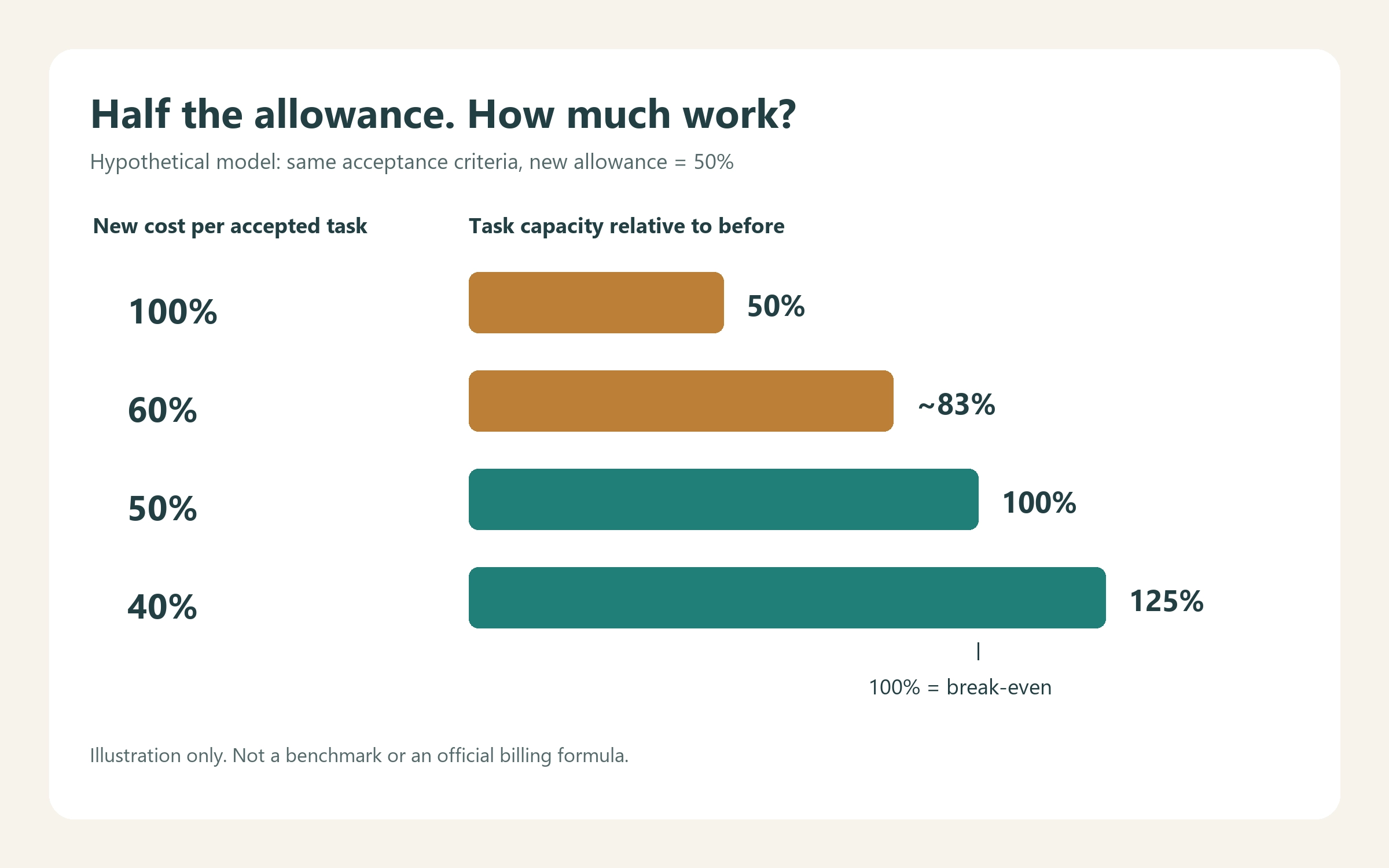
Illustration only. No row represents a measured Codex result or a promised allowance.
To use this reasoning, choose a small set of recurring tasks with stable acceptance criteria. Start from equivalent source material, record the model and settings, and count failures as part of the cost. If you only count successful first attempts, you will overstate efficiency.
A lower advertised token price is only one input. For an API comparison, use the applicable input, cached-input, output, and tool rates from the official API pricing page. Apply them to measured consumption instead of assuming every component fell by the same percentage.
If Astra is one of the models you are evaluating, FamilyPro’s GPT-6 Astra guide to features, access, pricing, and use cases provides background for choosing representative tasks. Use it to frame what you want to test, then check current official rates and your account’s model access before calculating costs.
Use a log like this; leave unavailable fields blank rather than inventing them:
| Field | What to record |
|---|---|
| Task and starting state | Same repository commit, document, or input set |
| Acceptance criteria | Relevant test, review checklist, or required output |
| Model and settings | Model version, reasoning and speed settings |
| Consumption | Measured API cost, or labelled subscription usage change |
| Retries and outcome | Include failed attempts and final pass/fail |
| Human effort | Minutes of correction and review |
A subscription percentage and an API invoice can be useful in the same study, but they are different measurements. Compare accepted outputs and total spend; do not pretend the subscription percentage exposes token billing.
What Should You Do When You Reach the Limit?
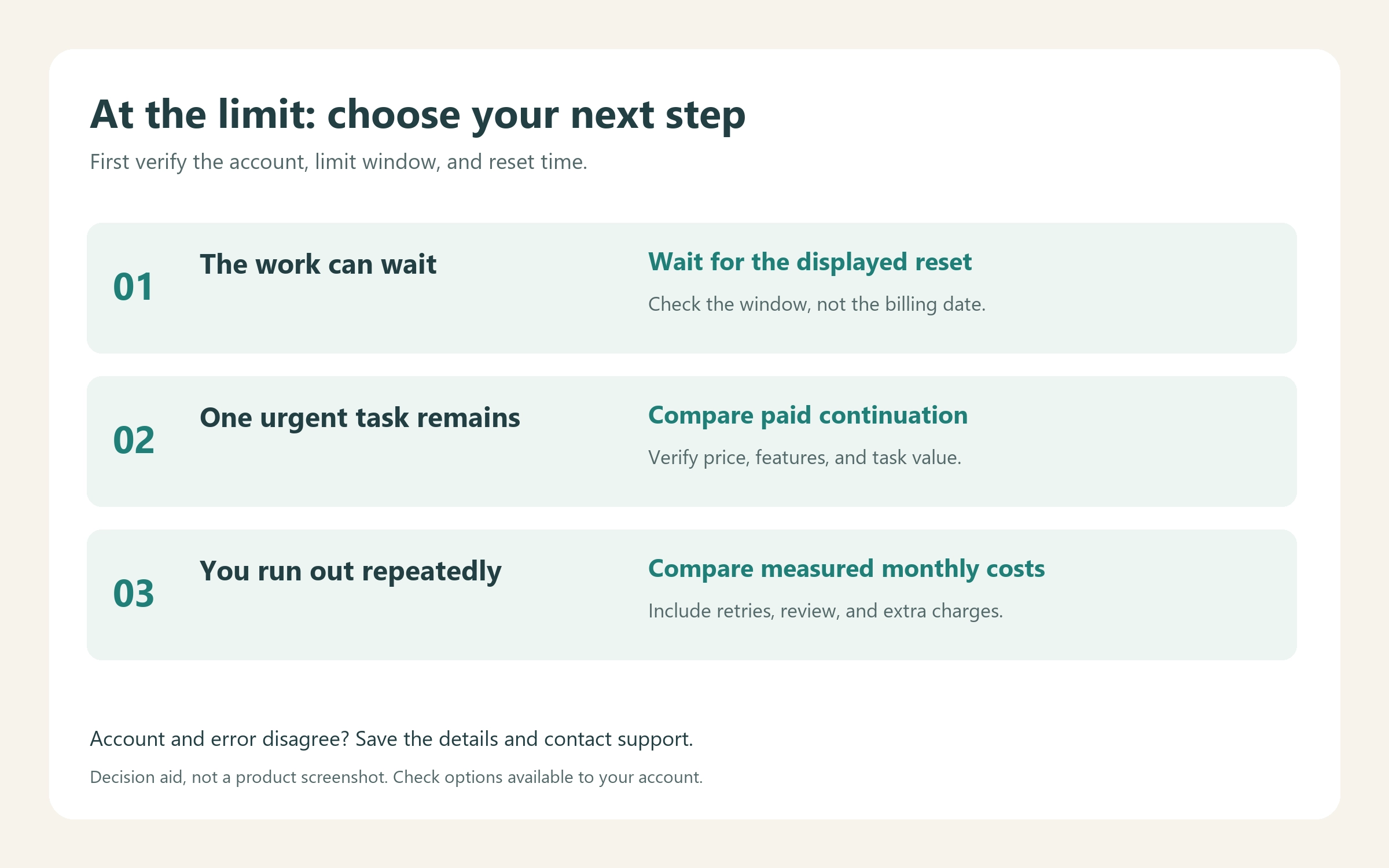
Choose according to urgency and recurrence. OpenAI documents purchased credits for eligible Plus and Pro users and separately billed API-key use for additional local chats. API access does not include every subscription feature. Options after reaching a limit.
| Situation | Sensible next step | Check before spending |
|---|---|---|
| The work can wait | Resume after the displayed reset | The correct account and window |
| One urgent task remains | Compare available paid continuation options | Price, feature support, and the task’s value |
| You run out repeatedly | Track representative work and compare monthly routes | Accepted output, extra spend, review time |
| The message conflicts with your account | Document the discrepancy and contact support | Account, plan, timestamp, and error text |
Reducing task scope can help future usage, but it does not refill an exhausted allowance. Separate a required fix from optional cleanup; ask for a relevant test rather than an unrestricted repository overhaul. When trying a smaller model, keep the acceptance criteria unchanged so that apparent savings do not come from silently accepting worse results.
For a subscription-versus-API decision, compare the cost of the same monthly workload:
Subscription route = subscription fee + additional usage purchases
API route = measured model and tool charges + any required service costs
Track human review time alongside both totals. Keep currency, tax treatment, and the comparison period consistent. If you already need the subscription for other features, ask whether the API is cheaper for overflow work, rather than allocating the full subscription fee to that one task.
Start with a representative sample before moving a recurring workflow. Check that the destination supports the features you actually use. A lower estimated inference bill is not enough if migration removes a workflow you depend on or introduces substantial manual work.
If your workload also includes standalone writing, summarization, or other tasks you can evaluate separately, you can explore the AI tools and community-shared subscription resources listed on FamilyPro. Compare a suitable option against a small, representative task before committing: check its access method, usage allowance, supported features, and total price. For a Codex workflow, verify Codex support explicitly; access to a chat model alone does not establish the same coding workflow or Pro allowance. This gives you another route to evaluate for suitable work without assuming it increases your existing account’s quota.
Codex Pro Usage Limits FAQ
Does Codex Pro have a weekly limit?
Do not interpret Pro as unlimited. Use the account’s displayed allowance and reset time for planning, rather than assuming a universal weekly task count. Current limits guidance.
Does Codex Pro still have a five-hour limit?
As checked September 30, 2026, the official pricing documentation says Pro currently does not. That is a statement about a short time window, not unlimited total usage. Official pricing.
Was the $200 Pro allowance cut in half?
The supplied announcement describes half the previous API-equivalent spend under a changed calculation. That does not establish half the accepted output for every user. Your result depends on task cost and quality, and your account’s applicable terms still matter. Announcement.
Do existing subscribers keep 20× usage?
The evidence reviewed here does not establish a permanent 20× guarantee. Verify your current entitlement and any transition notice before cancelling, rejoining, or changing tiers.
When does Codex Pro usage reset?
Read the reset timestamp for your account’s displayed window. Do not substitute the subscription billing date or a reset day reported by another user.
Is API usage cheaper than Pro for my work?
It depends on measured consumption, required features, and how much subscription value you use elsewhere. Compare the same accepted tasks over the same period, including retries and additional charges. Use current API rates rather than a fixed dollar conversion from a usage percentage.
How to Decide Whether Pro Still Fits Your Work
Start with your usage dashboard. Record the applicable window and reset time, then track a representative week of accepted work and review effort. A week is a starting sample; extend it if your workload varies substantially.
Keep Pro if its capacity and features justify the cost for your work. Consider a lower tier or pay-as-you-go route if your measured needs support that choice. For occasional overflow, evaluate only the incremental cost of finishing the remaining work.
The useful outcome is a decision grounded in your account, your tasks, and the quality you require. Neither a historical multiplier nor a promise of future efficiency can make that decision for you.