
GPT Unsupported Country? Access & Fix Guide (2026)
If you typed GPT unsupported country into search, you probably just saw a message saying the service is not available where you are. Short version: that GPT unsupported country notice is almost always about where your connection comes from, not your account or password. Confirm whether your region is actually supported, rule out a plain network glitch, and remember that buying a paid plan will not by itself lift a regional block. 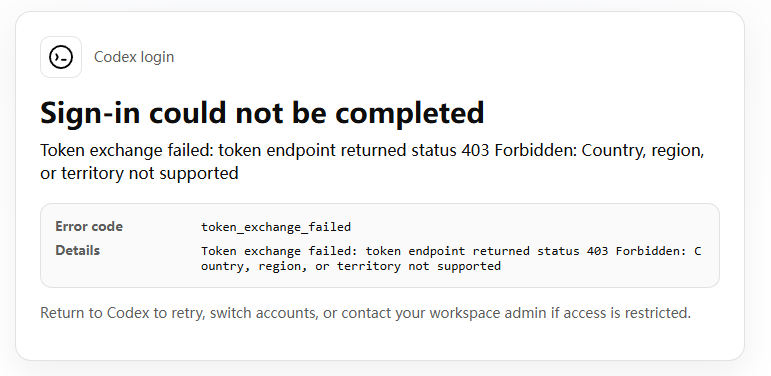 Quick check:
- Read the exact wording. "Country, region, or territory not supported" is a regional availability notice, not a login failure.
- Compare it against OpenAI's official supported-country list. If your country is on the unsupported side, the block is real.
- Rule out a plain glitch. A normal timeout or "something went wrong" looks different and often clears on its own.
The fix is not a single switch. You handle access first, then payment. The rest of this guide walks that order step by step.
Why is GPT unsupported in your country?
When people search for GPT unsupported country, they assume the reason is one simple thing. It is usually one of three, and mixing them up leads to the wrong fix.
That GPT unsupported country message almost never means your login is the problem. It points at where you are connecting from.
OpenAI does not serve that market. Some regions are simply outside the rollout. The service has not been switched on there, for business or compliance reasons of its own.
Local network or government restrictions. In some countries the site is technically offered but is blocked at the network level, so residents cannot reach it without changing how they connect.
A mismatch on your side. You can be on a trip, behind a corporate proxy, or routed through a server in a restricted region without realizing it. The account is fine. The location the system sees is the issue.
An honest note before we go further: reaching the service from a region where it is restricted can conflict with OpenAI's terms of service, depending on how you do it. This guide lays out what is technically possible and where the lines are, not a push to break any agreement. If you are in a restricted region, read the terms that apply to your situation.
Which countries does GPT not support in 2026?
The set of unsupported regions is not static. What was true in 2023 is not guaranteed today, so treat the table below as a practical snapshot and confirm against OpenAI's help center before you rely on it.
| Country or region | Availability | Notes |
|---|---|---|
| China (mainland) | Not offered | Both causes stack here: OpenAI does not serve it, and local networks block access. Real users reach it only by changing their connection. Hong Kong and Macau are handled under separate arrangements and differ from the mainland. |
| Russia | Not offered | Service has been suspended there since 2023. |
| Iran, Syria, North Korea, Cuba | Not offered | Long-standing restrictions apply. |
| Crimea, Donetsk, Luhansk | Not offered | Treated separately from the rest of Ukraine. |
| Your own country (if not listed) | Check the official list | If it is missing from OpenAI's supported list, assume unavailable until confirmed. |
Two things matter for the GPT unsupported country question. First, "not offered" and "blocked locally" are different problems with different fixes, and a binary table hides that. Second, availability changes, so the official help center is the only source worth trusting right now. The mainland China row is the one to read twice, because both causes stack there at once.
If your country is not in the unsupported column, the message you saw may be a connection mismatch, not a real ban. That is the next section.
How to access GPT from an unsupported country
Most advice about GPT unsupported country jumps straight to a VPN. This section is about reaching the service at all. Payment comes after.
- Confirm it is regional, not a glitch. A regional notice names a country or territory. A login error asks for your password again or says the account is odd. Different problem, different fix.
- Check where your connection looks like it is from. If you are on public wifi, a work VPN, or traveling, your traffic may be exiting from a restricted region. Switch networks and try again.
- Review OpenAI's terms and the laws where you are. Some ways of reaching the service conflict with the user agreement. Know which side you are on before you commit.
- Compare legitimate alternatives. If access keeps failing, the issue may be the path, not the account. Step back and look at the options in the next section.
A practical catch: not every connection method works cleanly. Some still fail to clear the GPT unsupported country notice, trigger extra verification, or drop after a few minutes depending on the network. When that happens, try a different network, confirm your account status, and check whether the problem is one device or all of them.
If GPT will not load at all on your end, the troubleshooting guide on GPT not loading covers the common fixes that have nothing to do with your region.
How to use GPT in an unsupported country: two layers, access + subscription
Most guides skip this part, and it is the part that matters most if you are actually stuck.
A paid plan does not remove a regional block. A common pattern is that someone pays for Plus, still hits the regional wall, and concludes the purchase failed. The purchase was fine. The location check is separate from the subscription.
So stop thinking of this as one choice between "VPN, shared account, or top-up." Those are not three rivals. The problem behind GPT unsupported country is really two problems wearing one label:
- Access layer: can you reach GPT at all? Typically this means routing your connection through a supported region. FamilyPro does not provide a VPN, so you handle this step yourself, within the terms that apply to you.
- Subscription layer: how do you pay for or hold a Plus plan? This is where a shared account or a top-up comes in, and it solves the payment problem, not the location one.
Put the two together and you get the real options.
| Option | Access layer (connection) | Subscription layer | Best for |
|---|---|---|---|
| Connection only | Yes | No | You already have a subscription and just need to get in |
| Connection + shared account | Yes | Yes, about $5.50 per month | You want low-cost Plus without a foreign payment card |
| Connection + top-up | Yes | Yes, $23.19 for one month on your own account | You want to upgrade your own account to Plus but cannot complete the overseas payment yourself |
When the GPT unsupported country screen shows up, most people buy a plan first and route a connection second. That order is backwards. A regional message is an access problem first, and no plan, shared or solo, fixes it by itself. No GPT unsupported country fix works through subscription alone.
Two practical notes on the subscription side. A shared account is cheap and skips the foreign-card headache, but the account is shared, so memory and history are not isolated the way a personal account is. If you care about separation, the top-up option lets FamilyPro add Plus to your own login and gives you a private space. That is the right fit when you want to keep your own account but cannot pay overseas directly. For the bigger "is Plus actually worth it" question, the breakdown in is GPT Plus worth it is a useful read before you commit either way.
GPT unsupported country FAQs
Why does GPT say my country is unsupported? Because OpenAI is not offering the service at the location your connection reports, or your network is blocking it. The message is about where you are connecting from, not about your account.
Which countries does GPT not support? Mainland China, Russia, Iran, Syria, North Korea, Cuba, and the Crimea, Donetsk, and Luhansk regions are the commonly cited unsupported areas in 2026. Always confirm against OpenAI's official list, since the set changes.
Is GPT available in my country? Check OpenAI's supported-country list directly. If your country is absent from it, treat GPT as unavailable there until you see otherwise.
Why am I getting a 403 Forbidden error? A 403 usually means the request was refused, often because of the network or region it came from. It is not the same as a login failure, and switching networks or connections often changes the result.
What does "Country, region, or territory not supported" mean? It means the location tied to your connection is one OpenAI does not serve. The wording points at the region, not at your account or password.
Can I use GPT while traveling? Sometimes. If you travel from a supported country to an unsupported one, the service may stop because your connection now reports the new location. The GPT unsupported country block follows the connection, not the account.
Does a GPT Plus subscription remove regional restrictions? No. Plus changes what your account can do once you are in. It does not change whether OpenAI offers service at your location. You still need the access layer sorted first.
Does a shared GPT account change my country's availability? No. A shared account is still subject to the same regional availability as any other account. It helps with payment, not with the GPT unsupported country location check.
Can I use GPT if my country is not supported? Not through OpenAI directly while the regional block stands. You would need a way to reach the service from a supported connection, then a way to handle the subscription, the two layers above. Whether that is permitted depends on local law and OpenAI's terms.
Does GPT Plus work in unsupported countries? Plus works once you are inside the service, but buying it does not make the service available in an unsupported region. The GPT unsupported country check still applies at sign-in, so access comes first, subscription second.
Why does GPT think I'm in another country? OpenAI reads the location from your connection, not from your profile. A work VPN, public wifi, mobile roaming, or a misrouted server can make your traffic appear to come from a restricted region. This GPT unsupported country mismatch often clears when you switch networks and check again.
Why does GPT work with one network but not another? Because the two connections report different locations. One may exit from a supported region while the other exits from a restricted one. If the restricted network is the only option where you are, that GPT unsupported country path is the real block.
Conclusion: getting GPT access from an unsupported country
The GPT unsupported country message sounds like a dead end, but it is really two separate jobs. First get access, usually by routing your connection through a supported region. Then handle payment, either with a low-cost shared account or a top-up on your own login.
Keep the order straight and the confusion goes away. A plan you paid for does not lift a GPT unsupported country block, and a connection method does not give you a subscription. To handle the GPT unsupported country situation, stack both and you are in.
If you only need a working Plus plan once access is sorted, start with the shared option for the price, or the top-up if you want your own account kept separate and cannot pay overseas yourself. Either way, solve the location first.