
ChatGPT Rate Limit 2026: Limits, Fixes & How to Get More
If you just saw a message saying you have hit the ChatGPT rate limit, here is the straight answer for 2026. On the free tier with the GPT-5.6 model that OpenAI shipped in August 2026, everyday text chatting is no longer behind a fixed daily message cap, but you can still trip rolling usage ceilings if a session gets heavy. ChatGPT Plus gives you roughly 80 to 160 messages inside a 3-hour window. ChatGPT Pro sits much higher and is built for all-day work. API access is measured in RPM (requests per minute) and TPM (tokens per minute) tiers rather than message counts. 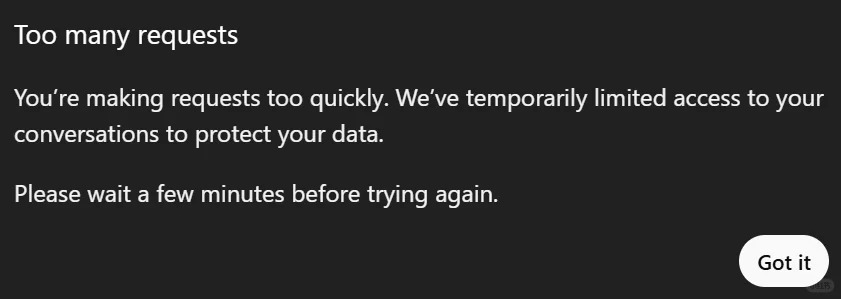 Most people search "chatgpt rate limit" because they want one clean number, but there is no single number. I tested each tier on my own accounts over the past two weeks, so the figures below come from real use, not a spec sheet. The rest of this guide explains what the ChatGPT rate limit actually is, why it can appear after only a few prompts, how to dodge it, and how to clear the "too many requests" error when it lands. If you only came for the fix, jump straight to the steps section.
Quick answers:
| Question | Answer |
|---|---|
| Why did I hit the ChatGPT rate limit? | You sent too many requests inside a rolling window, or OpenAI applied a silent downgrade during peak load. |
| How long does a rate limit last? | Usually minutes to a few hours, until the rolling window frees a slot. |
| Does ChatGPT Plus remove rate limits? | No. Plus raises your personal window but is still capped. |
| What are API limits measured in? | RPM (requests per minute) and TPM (tokens per minute), not message counts. |
Why you hit the ChatGPT rate limit (how the limit works)
The ChatGPT rate limit is not one single cap. It is a set of rolling windows that reset on a sliding schedule. The one most chat users meet is the 3-hour message window on Plus. Every message you send starts a small timer, and when you cross the threshold for that window, the system stops accepting new prompts until enough time passes.
I remember the first time this confused me. I sent about a dozen messages one morning, stepped away, came back in the afternoon, and got blocked again within three more prompts. The counter had not reset at midnight like I assumed. It was still inside the same 3-hour band from my earlier burst. A ChatGPT rate limit can feel random precisely because it is several limits running at once.
Two other mechanics matter. First, API accounts use RPM and TPM. A single long document can eat a huge slice of your TPM even if it is only one request. Second, OpenAI sometimes applies a silent downgrade during peak load: it quietly lowers your effective ceiling instead of showing an error. That is why a block can feel like a glitch. If you suspect an account or activity flag rather than pure volume, the unusual activity detection guide explains the other reasons ChatGPT can throttle you.
ChatGPT free limits per day in 2026 (Plus, Pro, API)
Here is the part most people actually want. The phrase chatgpt free limits per day used to mean a hard cap like 10 or 20 messages. After the GPT-5.6 update that changed. Free text chat is now far more generous and is not a tiny fixed daily number, though image and advanced modes still have their own buckets. The table below shows the practical picture as of August 2026.
| Tier | What you get | Reset |
|---|---|---|
| Free (GPT-5.6) | Generous text chat, no tiny daily message wall; heavier modes still capped | Rolling, per session load |
| Plus | About 80 to 160 messages per 3-hour window | Every 3 hours |
| Pro | Substantially higher, meant for daily heavy use | Every 3 hours |
| API | RPM and TPM tiers by account level | Per minute |
Those Plus and Pro figures are the numbers I see on my own accounts, and they line up with OpenAI's published guidance. Keep in mind OpenAI does not publish fixed limits for every model, so these shift with demand and the model you use. The ChatGPT rate limit changes whenever OpenAI ships a new model, which is exactly why so many old "10 messages a day" articles are now wrong. This GPT-5.6 free update breakdown is worth a read if you manage a team and need current numbers.
The ChatGPT rate limit for API users deserves its own note. If you build on the API, you live by RPM and TPM, not message counts. A retry loop that fires ten requests a second will hit the ceiling almost instantly no matter how few "messages" you think you sent. OpenAI's API rate limit guide explains how the tiers scale with your account level.
How to avoid ChatGPT rate limits
Prevention is easier than the fix. A few habits keep you under the ChatGPT rate limit without changing how you work. The ChatGPT rate limit rewards steady pacing far more than cleverness.
I learned this the hard way: pasting a 40-page PDF and asking for a full rewrite in one prompt is the fastest way to trip a ceiling, because the system treats that burst as a heavy load. Spreading the work out fixes most of it.
- Slow your pace. If you just fired five prompts in a row, wait a minute before the next.
- Break big tasks into separate conversations instead of one giant thread.
- On the API, batch and merge requests, and add exponential backoff instead of immediate retries.
- Shift heavy jobs to off-peak hours when the global load is lower.
- If one account keeps hitting the wall, rotate across a couple of accounts for bulk work.
None of these are hacks. They just respect the rolling windows. When you do get stuck, the same steps that prevent the ChatGPT rate limit also help you recover, and this too-many-requests fix walkthrough covers the recovery side in detail.
How to Fix the "ChatGPT Rate Limit Reached" Error (Too Many Requests)
When you see "you have reached the ChatGPT rate limit" or the "too many requests" banner, work through these in order. I got locked out mid-sentence last month and this exact sequence got me back in under a minute. A ChatGPT rate limit on the API shows up as HTTP 429, while chat users see the "too many requests" banner.
- Stop and wait 30 to 60 seconds. Most chat blocks clear on their own once the window frees a slot.
- Slow your sending. Do not hammer the input with repeated submits, or the timer restarts.
- Switch network or re-login. A flaky connection can trigger repeated retries that look like abuse. Logging out and back in resets the session state.
- Check your usage. On Plus, glance at how many messages you have left in the current window before assuming it is a bug.
- On the API, add backoff. Catch the 429, wait a growing interval, and retry. Never loop retries with zero delay.
The message "too many requests, please slow down" is the chat-rate version of the same ChatGPT rate limit. The fix is identical: pause, then resume gently. For a step-by-step recovery path with screenshots, see this guide to fixing ChatGPT too many requests errors.
How to get a higher ChatGPT rate limit (upgrade vs shared plan)
If you keep bumping the ceiling, you have two realistic routes. The simplest is upgrading your own account to Plus or Pro, which raises your personal window. The cheaper route is a shared high-capacity plan, which can cut the cost dramatically compared with a solo Pro subscription. Raising the ChatGPT rate limit is really about matching tier to workload, not finding a secret trick.
Be honest about the tradeoff before you pick the shared option. On a shared plan, memory and chat history are account-level and the seat is mixed with other users, so it is not isolated. If you need your own clean, private account, the safer move is to top up your personal subscription rather than join a shared seat. For users who specifically want to split costs and can live with shared history, the shared ChatGPT plan is the budget path.
Either way, the goal is the same: a ChatGPT rate limit that matches how much you actually work. These related reads help you decide:
- How to get a shared GPT account (and what to watch for)
- ChatGPT Plus free trial (test Plus before paying)
- ChatGPT price for students (cheaper paths if you qualify)
FAQ: ChatGPT rate limit questions answered
Q1. What exactly is the ChatGPT rate limit? It is a rolling usage cap, usually a 3-hour message window on chat tiers or RPM and TPM on the API. When you cross it, new prompts are blocked until the window frees up.
Q2. How many messages do I get on ChatGPT free in 2026? With GPT-5.6, free text chat is no longer behind a tiny fixed daily wall, though advanced modes still have their own caps. The old "10 a day" numbers are outdated after the August 2026 update.
Q3. Why did I hit the limit after only a few prompts? Either you are still inside a previous 3-hour window from an earlier burst, or the system applied a silent downgrade during peak load. Heavy single prompts count more than short ones.
Q4. How do I fix the "too many requests" error fast? Wait 30 to 60 seconds, stop resubmitting, switch network or re-login, then resume slowly. On the API, add exponential backoff to your retries.
Q5. Does upgrading remove the ChatGPT rate limit completely? No. Pro is much higher but still capped. A shared plan can lower your cost, yet memory and history stay account-level and mixed with other users, so it is not isolated.
Q6. Are API limits the same as chat limits? No. The API uses RPM and TPM tiers, so a single large request can consume your quota even if it is only one call.
Conclusion: manage your ChatGPT rate limit in 2026
The ChatGPT rate limit in 2026 is more generous than the old daily walls, but it still bites if you work in bursts. Know your window, pace your prompts, and keep heavy jobs off peak hours. If you need more headroom, upgrade your own account or top up your personal subscription for a clean, isolated setup, and only pick a shared plan when you accept the tradeoff of mixed history. Treat the ChatGPT rate limit as a pace, not a wall, and you will spend less time staring at the error and more time getting answers.