
Grok Imagine Not Working? Here's How to Fix It
Grok Imagine not working? If your image or video generation keeps failing, gets stuck on "Processing," or simply does nothing after you click Generate, you're not alone.
The good news is that the problem isn't always your account. It can come from your browser session, prompt, credits, a specific generation feature, or a temporary problem on Grok's side.
This guide walks through the most common Grok Imagine problems and, more importantly, shows you how to figure out where the problem actually is before wasting time trying random fixes.
Table of Contents
- Why Is Grok Imagine Not Working?
- Quick Diagnosis: What Kind of Grok Imagine Problem Do You Have?
- How to Fix Grok Imagine Not Working
- Why Is Grok Imagine Stuck Processing?
- Why Is Grok Image or Video Generation Failing?
- Real Grok User Problems
- When Is the Grok Imagine Problem Probably on Grok's Side?
- Grok Imagine Troubleshooting Checklist
- Grok Imagine Not Working FAQ
- What If None of These Fixes Work?
- Final Thoughts
- Related Articles
Why Is Grok Imagine Not Working?
There isn't just one reason why Grok Imagine stops working.
Depending on what you're seeing, the problem could be related to:
- Your current browser session
- Cached cookies or extensions
- A specific prompt or generation request
- Image generation
- Video generation
- Grok credits or usage limits
- Your account or subscription
- A temporary service-side problem
- A generation request that is stuck in processing
That's why the first thing to do is identify exactly where the process fails.
For example, these are very different problems:
You can't open Imagine at all.
Imagine opens, but the Generate button doesn't work.
Your request is submitted, but generation fails immediately.
The request stays on "Processing" for a long time.
Images work, but video generation doesn't.
Treating all of these as the same "Grok Imagine not working" problem usually makes troubleshooting harder.
Quick Diagnosis: What Kind of Grok Imagine Problem Do You Have?
Before changing anything, look at the symptom you're seeing.
| What you're seeing | What it may indicate | What to check first |
|---|---|---|
| Grok Imagine won't open | Browser, session, account, or service issue | Refresh, sign in again, try another browser |
| Generate button doesn't respond | Browser/session problem | Incognito mode, extensions, refresh |
| Request fails immediately | Request, prompt, account, or temporary issue | Try a simple prompt |
| Generation stays on "Processing" | Generation queue or service issue | Try another prompt and check whether all requests are affected |
| Images work but videos fail | Video-specific problem | Test image generation separately |
| Images and videos both fail | Broader account or service problem | Check credits, account, browser, and another device |
| Credits look incorrect | Account or usage issue | Check your account and available credits |
| It works in another browser | Local browser issue | Clear session data or disable extensions |
| It fails on every device | Less likely to be a local browser problem | Check account/service status |
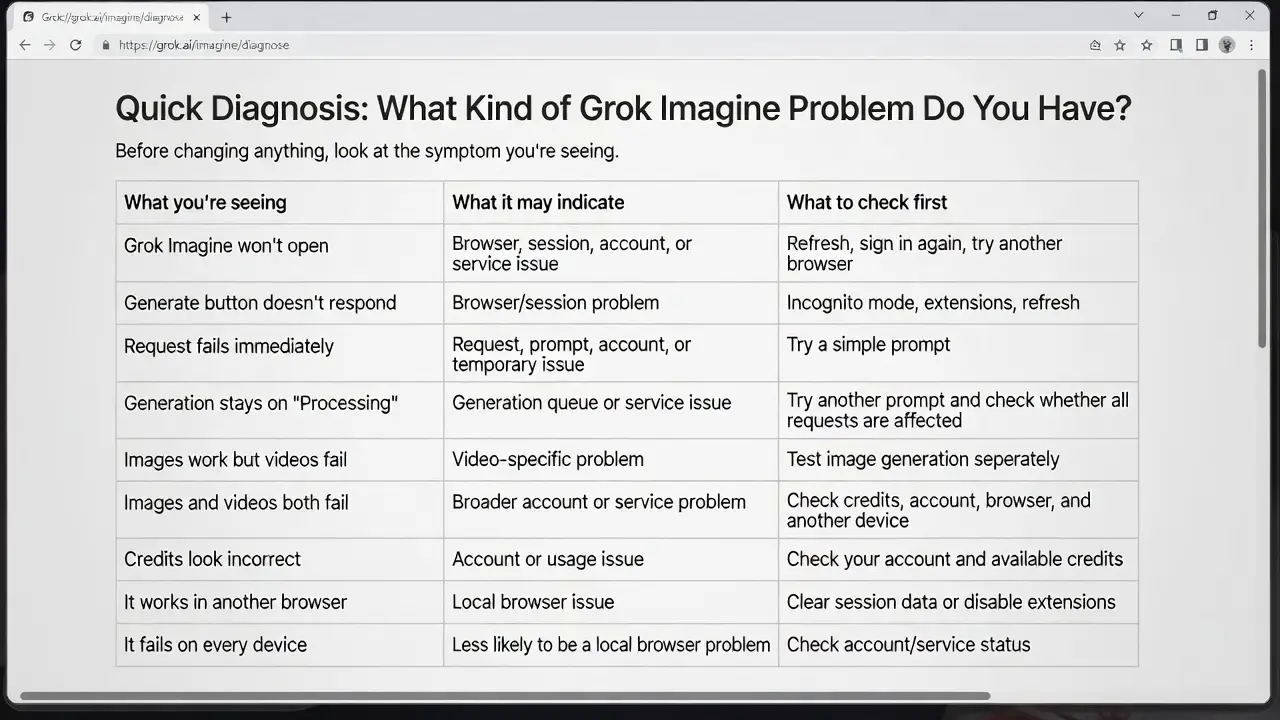
The important part is not to jump straight to a solution.
First find out which part of the process is failing.
How to Fix Grok Imagine Not Working
Try the following steps in order.
You don't necessarily need to do all ten. Once you find the cause, you can stop.
Step 1: Check Whether Grok Itself Works
Start with the simplest question:
Can you open Grok normally?
If Grok itself won't load, there's not much point troubleshooting Imagine yet.
Try opening the normal Grok interface first.
If you can't log in or you're seeing an error while signing in, the problem may be related to your Grok account or login session rather than Imagine.
In that situation, check our guide to Grok login error.
If Grok opens normally, continue to the next step.
Step 2: Open Grok Imagine Again
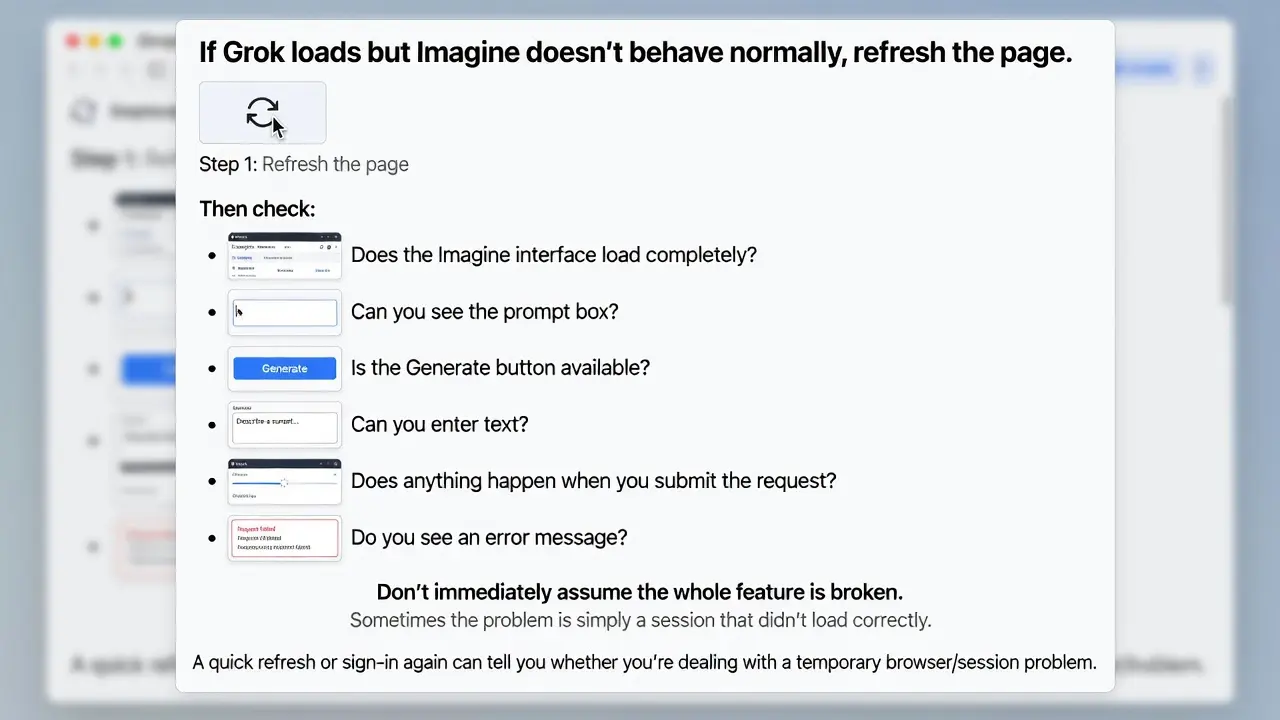
If Grok loads but Imagine doesn't behave normally, refresh the page.
Then check:
- Does the Imagine interface load completely?
- Can you see the prompt box?
- Is the Generate button available?
- Can you enter text?
- Does anything happen when you submit the request?
- Do you see an error message?
Don't immediately assume the whole feature is broken.
Sometimes the problem is simply a session that didn't load correctly.
A quick refresh or sign-in again can tell you whether you're dealing with a temporary browser/session problem.
Step 3: Try a Very Simple Prompt
This is one of the most useful tests.
Instead of immediately trying a long prompt with multiple instructions, styles, characters, locations, camera settings, and other details, try something extremely simple:
text
A red apple on a wooden tableThen submit it.
There are two useful outcomes:
The simple prompt works:
Your original request may have been the problem.
The simple prompt also fails:
The problem is less likely to be caused by the complexity of your original prompt. Continue checking your browser, account, credits, and service.
This simple test can save a lot of unnecessary troubleshooting.
Step 4: Test Image Generation Separately
If you're having trouble with video generation, don't assume that all of Grok Imagine is broken.
Try generating a simple image first.
For example:
text
A small house beside a lakeIf image generation works but video generation doesn't, you've learned something important.
The problem may be specific to the video-generation workflow rather than Imagine as a whole.
On the other hand, if both image and video generation fail, you should broaden the diagnosis.
This distinction is especially useful when searching for solutions to problems such as:
- grok image generation not working
- grok video generation failed
- grok can't generate image
Step 5: Check Your Grok Credits
If your generation request doesn't work, check your available Grok credits or usage information.
This is especially important if:
- You have already generated many images or videos.
- Generation suddenly stopped working.
- The interface shows unexpected credit information.
- A request fails after you submit it.
- You see a message related to usage or limits.
Don't assume that every failed generation means your account has been banned.
A credit or usage-related problem can look very similar to a general generation failure from the user's point of view.
If the credits look wrong, take a screenshot before making further changes. It can be useful if you need to report the problem later.
Step 6: Refresh Your Grok Session
If everything looks normal but Imagine still doesn't work, refresh your session.
Try this sequence:
- Refresh the Grok page.
- Sign out of your account.
- Close the browser tab.
- Open Grok again.
- Sign in.
- Open Imagine.
- Try the simple test prompt again.
This is particularly useful when Grok worked earlier but suddenly stopped working.
You don't need to clear everything from your browser immediately.
Start with the least disruptive option.
Step 7: Try Incognito or Private Mode
If Imagine works differently after signing in again, test it in a private browser window.
For example, in Chrome:
- Open an Incognito window.
- Open Grok.
- Sign in.
- Open Imagine.
- Try the same simple prompt.
If it works in Incognito but not in your normal browser, that's a useful clue.
The problem may be related to:
- Cookies
- Cached session data
- Browser extensions
- A stale login session
- Other local browser settings
In that case, you probably don't need to change your Grok account.
The problem may simply be local to your browser.
Step 8: Try Another Browser or Device
If you're still stuck, try another browser.
For example:
Chrome → EdgeOr try another device:
Desktop → LaptopYou can also test another network if possible.
The purpose isn't simply to "try everything."
You're trying to answer a specific question:
Is the problem local to this browser/device, or does it follow my account?
For example:
| Test | Result |
|---|---|
| Chrome | Doesn't work |
| Edge | Works |
That points toward a browser/session issue.
But:
| Test | Result |
|---|---|
| Chrome | Doesn't work |
| Edge | Doesn't work |
| Desktop | Doesn't work |
| Laptop | Doesn't work |
Now a local browser problem becomes less likely.
Step 9: Check Whether Only One Generation Type Is Affected
This is an easy step to overlook.
Ask yourself:
Is everything broken, or only one type of generation?
For example:
| Generation type | Status |
|---|---|
| Image generation | Works |
| Video generation | Doesn't work |
That's different from:
| Generation type | Status |
|---|---|
| Image generation | Doesn't work |
| Video generation | Doesn't work |
And it's different again from:
| Prompt | Status |
|---|---|
| One prompt | Fails |
| Other prompts | Work |
Try to isolate the smallest failing part.
This makes it much easier to determine whether you're dealing with:
- A prompt-specific issue
- An image-generation issue
- A video-generation issue
- An account issue
- A browser issue
- A broader Grok service issue
Step 10: Stop Repeatedly Submitting the Same Failed Request
If your generation has been stuck on "Processing," don't keep clicking Generate over and over.
For example, avoid doing this:
Generate
    ↓
Processing
    ↓
Generate again
    ↓
Processing
    ↓
Generate again
    ↓
Processing
Instead, stop and diagnose the problem.
Try:
- Wait and check whether the original request completes.
- Test a simple prompt.
- Check your credits.
- Refresh the session.
- Try another browser.
- Check whether other generation types work.
Repeatedly sending the same failed request doesn't tell you what's wrong.
It can also make it harder to understand whether the problem affects one request or all requests.
Why Is Grok Imagine Stuck Processing?
One of the most frustrating Grok Imagine problems is when your request appears to be accepted, but the generation never seems to finish.
You may see something like:
Processing...for much longer than expected.
This is commonly described as:
- grok imagine stuck
- grok generation stuck processing
- Grok Imagine keeps loading
The first thing to determine is whether one request is stuck or every request is stuck.
If Only One Request Is Stuck
Try a completely different, simple prompt.
For example:
text
A blue car on a streetIf that works, the original request may have been the problem.
If Every Request Is Stuck
Now check:
- Your browser
- Your session
- Your credits
- Your account
- Another device
- Another generation type
If the same thing happens everywhere, the problem is less likely to be caused by a single browser tab.
Why Is Grok Image or Video Generation Failing?
Image and video generation don't necessarily fail for the same reason.
When Image Generation Doesn't Work
If Grok opens normally but every image request fails, test a very simple prompt first.
For example:
text
A white cat sitting on a chairIf even a simple request fails, continue with browser, credits, account, and device checks.
This is more useful than repeatedly changing your original prompt.
When Video Generation Fails
If images work but videos don't, don't immediately conclude that your whole Grok account is broken.
Run a simple image test first.
If:
| Type | Result |
|---|---|
| Image | Works |
| Video | Fails |
you've narrowed the problem down considerably.
The same principle applies to searches for:
- grok video generation failed
The useful question isn't just "How do I fix it?"
It's:
Does the failure affect video only, or does it affect Grok Imagine generally?
Real Grok User Problems
The most useful troubleshooting guides aren't based only on generic advice.
They should reflect the problems people actually report.
We've seen users report Grok access problems in several different ways, including cases where Grok itself was available but a particular account, feature, or access path wasn't working as expected.
For example, one user reported being unable to access SuperGrok even after paying for and activating the subscription.
Another user could enter Grok with a Google account but couldn't access it through the email login path.
These examples are useful because they show why "Grok isn't working" doesn't necessarily describe the actual problem.
Note: The examples above come from real support tickets, but they concern Grok login or subscription access rather than Grok Imagine specifically. We don't label them as Imagine-generation cases because the original tickets don't support that conclusion.
When Is the Grok Imagine Problem Probably on Grok's Side?
This is where things can get confusing.
You usually can't prove from one failed request that Grok itself is having an outage.
Instead, look at the pattern.
A Problem Limited to One Browser
| Test | Result |
|---|---|
| Chrome | Doesn't work |
| Edge | Works |
A local browser or session issue becomes more likely.
A Problem Limited to One Device
| Test | Result |
|---|---|
| Desktop | Doesn't work |
| Laptop | Works |
Again, a local environment issue becomes more likely.
A Problem Limited to One Prompt
| Prompt | Result |
|---|---|
| Prompt A | Fails |
| Prompt B | Works |
The request itself may be the important difference.
A Problem Limited to Video
| Type | Result |
|---|---|
| Image | Works |
| Video | Fails |
The issue may be specific to video generation.
Every Prompt Fails
| Prompt | Result |
|---|---|
| Prompt A | Fails |
| Prompt B | Fails |
| Prompt C | Fails |
Now it's worth checking your account, credits, browser, and service availability.
Multiple Browsers and Devices Fail
If the same problem follows you across:
- Chrome
- Edge
- Desktop
- Laptop
then a local browser problem becomes less likely.
At that point, account-level or service-side issues become more plausible.
Still, avoid saying:
"Grok is definitely down."
unless you have reliable evidence that the service is actually experiencing an outage.
Grok Imagine Troubleshooting Checklist
Before contacting support or giving up, run through this list:
- [ ] Can I open Grok normally?
- [ ] Can I open Grok Imagine?
- [ ] Does the Generate button work?
- [ ] Does a simple prompt work?
- [ ] Does image generation work?
- [ ] Does video generation work?
- [ ] Are my Grok credits displayed normally?
- [ ] Did I refresh my Grok session?
- [ ] Did I try Incognito or Private mode?
- [ ] Did I try another browser?
- [ ] Did I try another device?
- [ ] Is only one prompt failing?
- [ ] Is only one generation type failing?
- [ ] Are all generation requests failing?
If you've checked most of these and the problem still happens everywhere, you've already done the most important part of troubleshooting: you've narrowed down the scope of the problem.
Grok Imagine Not Working FAQ
Why is Grok Imagine not working?
There are several possible reasons. The problem may be related to your browser session, prompt, credits, account, a specific generation feature, or a temporary issue with Grok.
Start by testing a simple prompt and checking whether the problem happens in another browser or device.
Why is Grok Imagine stuck processing?
If a request stays on "Processing," first determine whether it's only one request or every request.
Try a simple prompt. If the simple prompt works, the original request may have been the issue. If every request remains stuck, continue checking your session, credits, account, and other devices.
Why can't Grok generate images?
If Grok opens normally but can't generate any images, test a very simple image prompt first.
If simple prompts also fail, check your browser session, credits, and account. Then try another browser or device.
Why does Grok video generation fail?
If image generation works but video generation doesn't, the problem may be specific to the video-generation workflow.
Test image generation separately before assuming your entire Grok account is affected.
Why does Grok Imagine keep loading?
A continuously loading Imagine page can be caused by a browser session or page-loading problem.
Try refreshing the page, signing in again, opening Grok in Incognito mode, or testing another browser.
Why did Grok Imagine suddenly stop working?
If Imagine worked earlier and suddenly stopped, don't assume that your account is permanently broken.
First check whether:
- Grok itself still works
- A simple prompt works
- Your credits look normal
- Another browser works
- Another device works
These tests help determine whether the problem is local, account-related, or broader.
Why are my Grok credits not working?
If your credits appear incorrect or generation stops unexpectedly, check the credit information shown in your account.
Take a screenshot if something looks unusual. This gives you useful information if you need to report the issue.
Why does Grok Imagine work on one device but not another?
If Imagine works on one device but not another, the problem is more likely to be related to the browser, session, extensions, or local device environment.
Try the same account and the same simple prompt on both devices to confirm the difference.
What If None of These Fixes Work?
If you've tried the basic troubleshooting steps and Grok Imagine still doesn't work, don't keep repeating the same actions.
At this point, record what you've already tested.
For example:
| Item | Status |
|---|---|
| Grok | Works |
| Imagine | Opens |
| Simple image prompt | Fails |
| Video generation | Fails |
| Chrome | Fails |
| Edge | Fails |
| Laptop | Fails |
| Desktop | Fails |
| Credits | What you see |
That's much more useful than simply reporting:
"Grok Imagine doesn't work."
If you contact support, include:
- The exact error message
- A screenshot
- The approximate time the problem occurred
- Whether image generation fails
- Whether video generation fails
- Whether simple prompts fail
- Whether another browser works
- Whether another device works
- Any relevant credit or account information
The more specific the report, the easier it is to determine what is actually happening.
Final Thoughts
When Grok Imagine isn't working, the fastest solution isn't always to clear your browser cache or try random settings.
Start by asking:
Where exactly does it fail?
- Can you open Imagine?
- Can you submit a prompt?
- Does a simple prompt work?
- Is the problem only with images or videos?
- Is the request stuck on Processing?
- Do your credits look normal?
- Does the same thing happen in another browser or device?
Once you answer those questions, the problem becomes much easier to narrow down.
And if you discover that the problem isn't Imagine at all—for example, you can't log in to Grok in the first place—start with our guide to Grok login error.
If your issue is specifically related to SuperGrok access or subscription features, you can also read SuperGrok not working.
The goal isn't to try ten fixes just because they're listed in an article.
The goal is to identify the failing part first, then use the fix that actually matches it.
Note: Grok's interface, available features, usage limits, and generation behavior may change over time. The troubleshooting steps above are intended to help identify common causes and isolate the problem; they do not guarantee that every Grok-side issue can be fixed locally.