
ChatGPT 403 Forbidden: Fix Login & Access Errors
ChatGPT error 403 means a request was refused; the number alone does not tell you why or prove your account is banned. Read the accompanying message first. An explicit account-deactivation notice needs a different response from a blocked browser request. See the HTTP 403 definition.
Start here: check OpenAI's status page, try the same account in a private browser window, and compare your usual connection with another trusted network. Change one thing at a time, then retry the action that failed. Stop when it works—there is no need to complete every fix.
If the message says your account was deleted or deactivated, skip directly to account restrictions and support.
In this guide:
- Identify your error
- 403, account deactivation or an outage?
- Eight troubleshooting steps
- When to stop and contact support
- Shared accounts and subscription issues
- Frequently asked questions
What causes the ChatGPT 403 Forbidden error?
A browser request, an app request and an API call can all return 403. Before changing settings, note where the error appears, the full message, and what you were doing: signing in, sending a prompt, loading the page or opening one resource.
| What you see | What to check next |
|---|---|
| “Request failed with status 403” or “There is a problem with your request (403)” | This wording does not identify the cause. Compare browser, app and network results using the steps below. |
| “Sorry, you have been blocked” | Check the connection and any VPN or proxy. OpenAI documents this as a possible Cloudflare access block. |
| A login loop or a failure immediately after sign-in | Check the account and sign-in method, then test a fresh browser session. |
account_deactivated, or an explicit deleted/deactivated-account message | Follow the account-recovery or appeal instructions; clearing cookies will not reverse an account decision. |
| A blank page with a 403 visible only in developer tools | Record the failed request's hostname and path. A failed page asset is different from an account-deactivation notice. |
| A 403 from your code or a third-party integration | Inspect the response body and the service receiving the request. Use the API branch below. |
OpenAI's blocked-access guidance explains that VPN traffic and IP-related security checks can contribute to blocks. It does not mean every 403 is an IP ban.
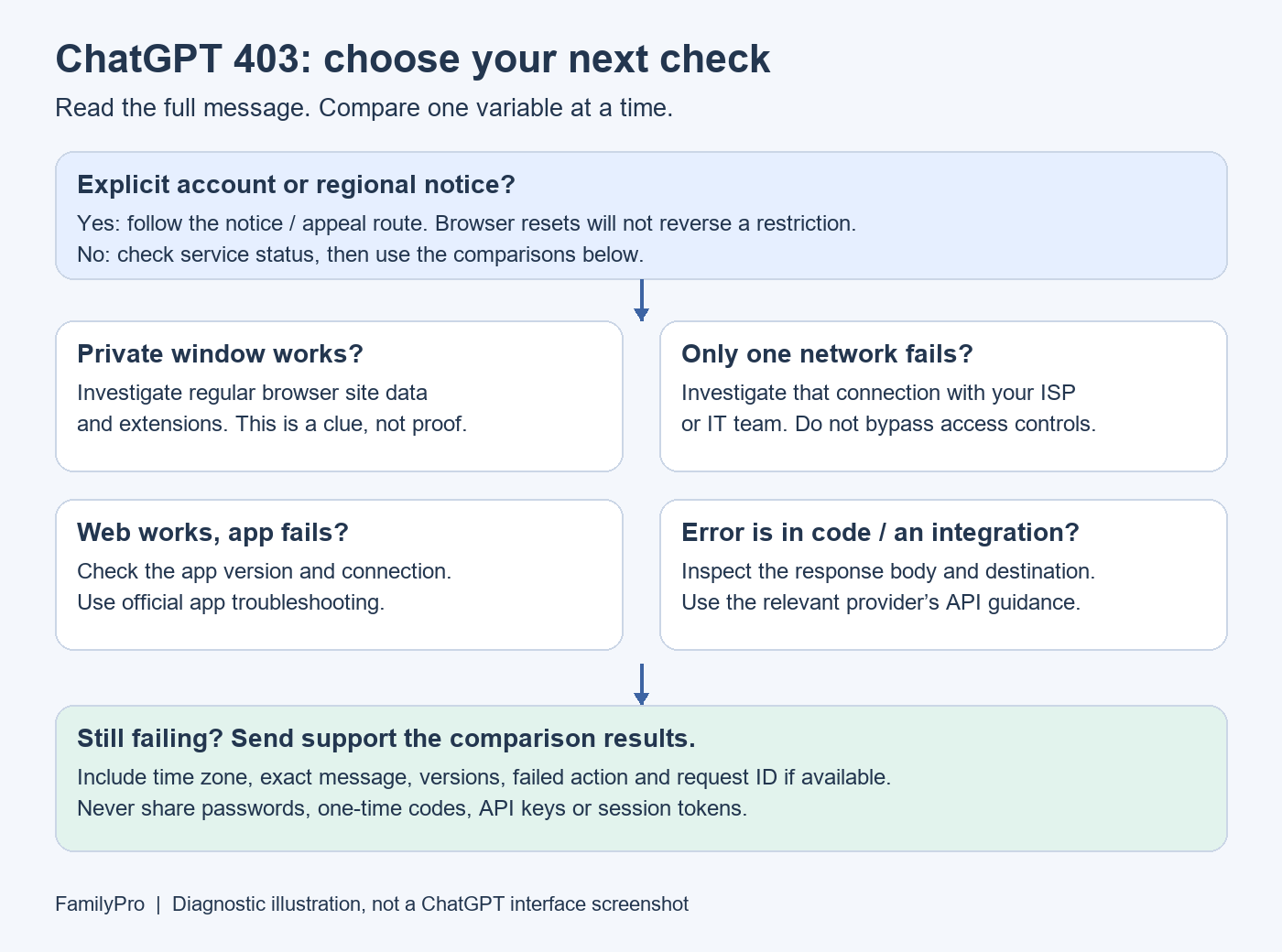
A troubleshooting map, not a screenshot of ChatGPT. The comparisons suggest a next step; they do not establish the root cause.
Does a 403 mean your account is banned?
No. A 403 by itself is not a ban notice. Use the message and the scope of the failure together:
| Observation | What it suggests | What it does not prove |
|---|---|---|
| The same action works in a private window | Investigate your regular browser profile, site data and extensions. | That cookies are definitely the cause. |
| It works on mobile data but fails on Wi-Fi | Investigate the Wi-Fi network, routing or filtering. | That OpenAI permanently banned your IP. |
| The app fails but the same account works on the web | Investigate the app and its connection. | That your account is unrestricted in every feature. |
| It fails across browsers and trusted networks | Prepare a support request with those results. | That the account must be banned. |
| OpenAI reports a relevant incident | Follow the incident updates before making more changes. | That every user is affected or that this explains your specific error. |
A usage-limit message is a separate clue. If the screen actually says “too many requests” or shows a reset time, follow that notice and the ChatGPT rate-limit guide, rather than treating it as a generic 403.
How to fix ChatGPT error 403: eight steps
These steps organize the checks in OpenAI's ChatGPT troubleshooting guidance. On a managed work or school device, ask IT before changing browser or network controls.
1. Check for an incident and save the error
Open status.openai.com and look for an incident affecting the service you are using. Record the time and time zone, and save a screenshot of the message with personal details hidden.
If there is a matching incident, follow its updates. If there is none, continue troubleshooting: a status page cannot diagnose an individual account or connection. Avoid repeatedly refreshing the same failed request.
2. Test a private window before deleting anything
Open a private or incognito window, visit chatgpt.com, sign in to the same account, and repeat the failed action.
If it works, focus on your usual browser profile in steps 3 and 4. If it fails, try another up-to-date browser. Record the outcome rather than repeating the same test indefinitely. Private mode changes several things at once, so success is a clue rather than a precise diagnosis.
3. Refresh the affected browser session
First make sure you know which account and sign-in method you use. In the browser's privacy settings, find stored site data for ChatGPT/OpenAI and remove the relevant entries. Reopen ChatGPT and sign in again. This can sign you out; you do not need to erase every site's browsing history.
Use the same sign-in provider associated with the account. If you originally used Apple, Google or Microsoft, selecting a different method can lead to a separate login problem. Apple Hide My Email can also make the account address different from your usual email. See OpenAI's sign-in instructions.
If the error persists after a fresh session, move on. Clearing data repeatedly adds little information.
4. Check browser extensions and blocked page resources
If the private-window test worked, temporarily test without extensions that modify ChatGPT pages, block scripts or filter requests. Re-enable them one at a time to isolate any conflict. Keep unrelated security protections in place.
For a blank screen, note whether the main page or a separate resource is failing. If you are comfortable using browser developer tools, record the failed request's hostname, path and status. Do not run console scripts from strangers or disable browser security to make an error disappear. If you only have a loading problem without a confirmed 403, use our ChatGPT not loading guide.
5. Compare two trusted connections
If you use an optional personal VPN or proxy, disconnect it for a test. Compare your usual Wi-Fi with mobile data or another connection you are authorized to use, keeping the device and account the same.
If only the work or school network fails, give IT the time, error and failed hostname. If a required corporate VPN is involved, let IT handle the comparison. Do not disable the organization's firewall yourself.
Use ChatGPT only from a supported country or territory. Changing countries through a VPN is not a dependable account-recovery method. A successful connection test also does not identify which network component caused the earlier failure.
6. Compare the mobile or desktop app with the web
For an iPhone or Android app error, try the same account at chatgpt.com in a browser. Close and reopen the app, check for app and operating-system updates, then compare Wi-Fi and mobile data. If the app alone continues to fail, reinstalling from the official store is a later option.
OpenAI notes that reinstalling does not reset usage limits, permissions or account restrictions. Follow its mobile-app troubleshooting guide. For a desktop-app failure, record the app version and whether the browser works; do not assume deleting browser cookies also clears app data.
7. Read account and regional notices literally
If the message names a deactivated account, unsupported region or required verification, use the instructions for that condition. Do not keep cycling through browser fixes or buy another subscription to test whether the notice disappears.
If the message instead flags suspicious activity, stop any automated refreshing or third-party scripts and review account access. OpenAI's general error guidance includes steps for unusual-activity warnings. A generic 403 without that warning should not be labeled suspicious activity automatically.
8. If it is an API or integration error, use a separate path
Check the failed request's destination and response body. An integration can fail at OpenAI, at the integration provider or at another connected service. The same status number does not make those failures interchangeable.
OpenAI's API error reference lists a 403 for unsupported countries, regions or territories. Match the response to the documented condition; do not assume that buying ChatGPT Plus, clearing browser cookies or replacing an API key will fix it. Save the request ID if available, omit secrets, and contact the relevant provider if the response is unclear.
When should you stop troubleshooting and contact support?
Stop repeating local fixes when an explicit account notice requires action, or when a fresh browser session and a second trusted connection still fail. Those results are useful evidence, not proof of a ban.
If the message says deleted or deactivated
Confirm you are using the intended account. For a deactivation you believe is mistaken, follow the appeal link in OpenAI's notification. If you cannot access that email or received no notification, follow the alternative routes in OpenAI's account-deactivation guide. Our account-deactivation explainer covers this separate issue in more detail.
A paid plan is not evidence that the account is currently accessible. Keep subscription receipts for a billing inquiry, but do not expect a new payment to reverse a restriction.
Send a useful report instead of “403 still happens”
Use the chat bubble at OpenAI Help. Copy this checklist and fill in only what you know:
Issue: ChatGPT returns 403 during [login / page load / prompt / other].
First noticed: [date, time and time zone].
Exact message: [include accompanying text, not just 403].
Device / OS / browser or app version: [...].
Account sign-in method: [Google / Apple / Microsoft / email].
Private-window or second-browser result: [...].
Wi-Fi versus another trusted connection: [...].
App versus web result, using the same account: [...].
Relevant status incident, if any: [...].
Failed hostname and path / request or Ray ID, if shown: [...].
Send account-identifying details only through the official support channel. Never include passwords, one-time codes, API keys or session tokens. If support asks for a HAR file, follow its instructions and remove sensitive information before sharing; network captures may contain private data. See how to contact OpenAI Support.
Shared accounts, Plus and FamilyPro support
A 403 cannot establish that account sharing caused the problem. However, when investigating suspicious activity, OpenAI specifically recommends ensuring that other people are not sharing your account. Use your own account and secure it if access looks unfamiliar; buying another shared login does not diagnose the original failure.
Already a FamilyPro customer? If your problem concerns an order or a missing subscription benefit, contact FamilyPro with your order reference and a redacted screenshot. Keep this separate from an OpenAI access-block or deactivation appeal.
After access is restored, you can review FamilyPro's GPT top-up service and current service rules if you need subscription assistance. The listed warranty covers certain unexpected downgrades and excludes personal account bans or policy violations. A top-up is not a repair for 403, a regional restriction or an outage.
FAQ: ChatGPT 403 errors
What does “Request failed with status 403” mean in ChatGPT?
The request was refused. The accompanying text and the failing action matter more than the number alone. Start with the error table above, then compare the same account across browser, app and network where possible.
Why does ChatGPT show 403 after I log in?
The signed-in request is failing, but that alone does not identify a cause. Check the original sign-in method, try a private window, and look for an explicit account notice. Do not assume your password is wrong or your account has been banned.
How do I fix ChatGPT error 403 on iPhone?
Compare the app with ChatGPT in a browser using the same account, then compare Wi-Fi and mobile data. Update and reopen the app. If the issue remains app-specific, use the official app troubleshooting steps above.
Is a 403 the same as a Cloudflare 1020 error?
No. HTTP 403 is a status code. Cloudflare 1020 is a more specific access-denied error associated with a firewall rule. If 1020 is displayed, retain its screenshot and Ray ID for the site operator or support. See Cloudflare's error 1020 documentation.
How long does a ChatGPT 403 last?
There is no single countdown that applies to every 403. A temporary incident, a browser problem and an account restriction require different responses. Use any instructions on the error screen; if your checks do not narrow it down, send support the results.
Will ChatGPT Plus or a new account fix the error?
Do not buy a subscription or replace an account as a generic fix. Payment does not tell you why a request was refused. Resolve the access issue first, then address any separate subscription problem.
Your next step
Read the full error, try one controlled comparison, and follow the matching branch. If the tests do not isolate the issue, use the support checklist above. This gives the next person investigating your case something concrete to work with.