
GPT Message Limit in 2026: Reached, Reset & Fixes
Last updated: 2026-08-25. This guide covers OpenAI's August 6, 2026 change that removed text caps for free accounts.
 If you just saw a notice that you hit the GPT message limit, take a breath. In 2026 the limit is not one number for everyone. It depends on your plan, the model you pick, and the feature you use. Free text chats are no longer capped by a message counter (OpenAI dropped that for free accounts on August 6, 2026), but image generation, voice mode, file uploads, and the higher tier reasoning models are still metered. So what trips most people today is one of those metered lanes, not how many sentences you type. Read the on-screen notice, switch to a lighter model, or wait out the window instead of assuming something broke.
What is the GPT message limit in 2026?
The GPT message limit used to mean a hard number of prompts free users could send before a cooldown. That changed. On August 6, 2026, OpenAI stopped counting text messages for free accounts, as reported by Engadget. Now the limit is about behavior, not a visible counter. Text chatting is open. Image, voice, and uploads still have guards. The paid tiers get higher ceilings and faster recovery, but they are not infinite either.
When someone asks what the GPT message limit actually is, the honest 2026 answer is that there is no single universal cap. It varies by plan, model, and feature. Think of it as four separate lanes. Text is free and open. Images and voice are metered. Uploads are metered. Advanced models like the reasoning tiers are metered hardest. The caps people complain about today almost always show up in one of those metered lanes, not in the text lane. For the technical side of throttling, our GPT rate limit guide explains how the meters work.
GPT message limits by plan: free, Go, Plus & Pro
Exact numbers move often, so the table below describes behavior rather than a fixed count that will be wrong in two months. OpenAI lists current plan caps in its help center, and our shared GPT account guide tracks the 2026 tiers as they shift.
| Plan | What gets capped | How it feels day to day |
|---|---|---|
| Free | Text is not subject to the old message-count cap. Images, voice, uploads, and advanced models are capped at modest daily amounts. | Great for chatting, tight for heavy image or voice use. |
| Go | Region-tiered. Similar to Free but with slightly higher non-text caps. | A middle step in markets where it is offered. See the Go plan for current pricing. |
| Plus | Text is not subject to the old message-count cap. Non-text features get higher usage limits and quicker resets. | Comfortable for regular creators. Our is GPT Plus worth it guide compares the tiers. |
| Pro | Highest ceilings and priority access during busy times. The most expensive models still have caps. | Built for heavy daily work. |
The key point is that the GPT message limit is no longer one number for everyone. It is a set of lanes, and your plan decides how wide each lane is. If you share an account, those lanes get narrower for you personally, which is the next problem.
Why did you hit the GPT message limit?
A few things push you into the wall, and only one of them is "you talked too much." When you hit the GPT message limit, the cause is rarely just how much you typed.
- Reset window. Image, voice, and advanced-model caps refill on a rolling window. Hit the cap, and you wait.
- Model choice. Some advanced reasoning models have separate or stricter limits. Switch to the standard model and the same chat keeps going.
- Usage demand. Limits can vary with the model and current system conditions, so the same plan may not always behave exactly the same way.
- Shared accounts. If the plan is shared, other people pull from the same pool. Their usage is your usage.
Last month I burned my image quota in one sitting making thumbnails for a slide deck. The fix was not deeper prompts, it was waiting for the window and switching models. Knowing which lane you hit is most of the battle.
How to keep chatting when you hit the limit
When the GPT message limit stops you mid-task, work through these in order. If the app shows a "too many requests" message specifically, our fix GPT too many requests guide covers that error step by step.
- Wait for the limit to reset. The notice GPT shows usually tells you when you can go again, so read it instead of guessing.
- Switch to a lighter model. Drop from a reasoning model to the standard one and the text keeps flowing.
- Start a new chat if the issue is one thread getting too long (more on that below).
- Check whether you hit a feature-specific cap rather than a text cap.
- Upgrade if you consistently need higher limits.
How Long Does the GPT Message Limit Take to Reset?
This is the question behind searches for "chatgpt limit reset" and "how long until GPT limit resets," and the honest answer is that it depends on which lane you hit. Text does not cap, so there is nothing to reset there. Image, voice, and upload caps refill on a rolling window that changes by model and region, so do not trust a fixed "three hours" you read on an old blog. The reliable signal is the message GPT gives you in the app. It names the feature and the rough time. Plan around that, not around a number someone screenshot in 2025.
Is it a message limit, ban, outage, or account problem?
People see a block and assume the worst. Usually it is none of the dramatic options. Use this table before you panic and mistake a ban for the GPT message limit.
| Situation | What it means | What to do |
|---|---|---|
| Message limit reached | You hit a usage cap on a metered feature. | Wait for the window, switch models, or upgrade. |
| Login required again | Your session timed out. | Log back in. Nothing is wrong with the account. |
| Access denied | A security or network check fired, often on a new IP. | Check your connection or device, then retry. Our unusual activity guide explains common triggers. |
| Chat missing | A sync issue, not a limit. | Check your history or another device. Our GPT something went wrong guide helps when chats will not load. |
I once panicked thinking I was banned because GPT asked me to log in again out of nowhere. It was a session timeout, fixed in ten seconds. The GPT message limit and a ban are completely different events, and mixing them up wastes your evening.
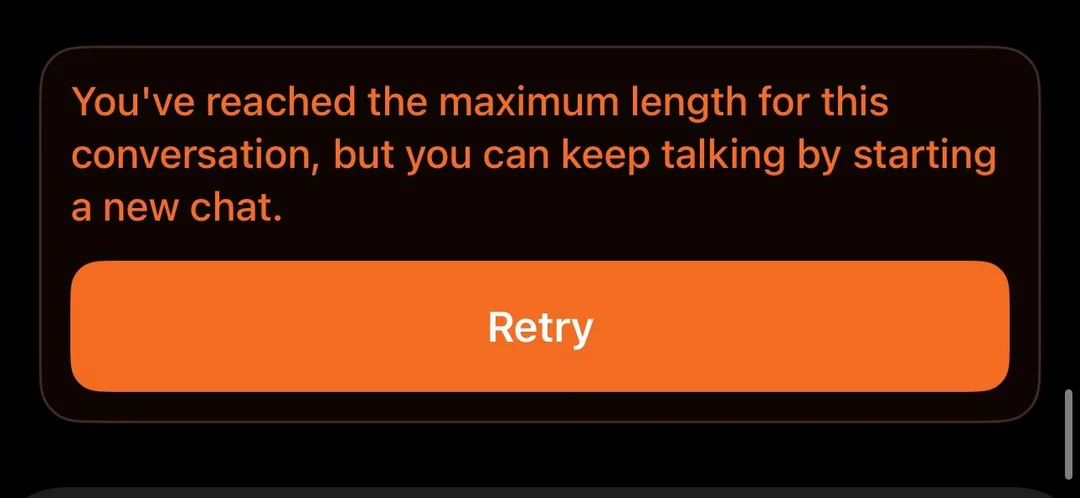
Why "You've reached the maximum length for this conversation"?
That exact message is not the message limit. It is about context length inside one chat, not a count of messages across the day. The conversation grew too long for the model to hold, so it asks you to start fresh. The fix is practical: open a new chat, or paste a short summary of what matters and continue there. This is a conversation-length or context-limit issue, not the same thing as a usage cap. Keep the two separate and the errors stop feeling random.
Why shared GPT accounts hit limits faster
A shared plan splits one pool of usage across everyone on it. That is great for cost and rough on quotas. If three people generate images on the same account in the morning, the image lane is empty before noon, and you feel the GPT message limit harder than a solo user would.
The tradeoff is real. Sharing can cut the bill by 70 to 80 percent compared with a full price subscription, which is why a lot of students and small teams do it. The cost is that memory is account level, so your chats mix with everyone else's, and the caps get used faster. When the shared memory fills up, our GPT memory full guide shows what to clear. If you only use GPT now and then, a shared setup is a smart save. If you need private memory and steady limits for client work, an individual account is the safer pick.
We cover the 2026 tiers and the shared versus solo math in our shared GPT account guide. If cost is your main concern, a managed shared seat from FamilyPro can be cheaper, though you share usage and memory. For private chats and predictable access, topping up an individual account keeps your own memory and limits separate.
GPT message limit FAQ
Q1. What is the GPT message limit in 2026? Free text chatting has no message cap. Image, voice, file uploads, and advanced reasoning models are still metered. The GPT message limit now lives in those non-text features, not in how many messages you send.
Q2. Why does GPT say I've reached the message limit? You most likely hit a cap on images, voice, uploads, or a reasoning model, not on text. Read the on-screen notice. It names the feature and tells you when the window refills.
Q3. How long does the GPT message limit take to reset? Text never caps, so there is nothing to reset. For images, voice, and uploads, the reset is a rolling window that varies by model and region. Check the message GPT shows you for the real time.
Q4. Does GPT Plus remove message limits? GPT Plus does not remove every usage limit. It generally provides higher limits than Free, and non-text features get faster resets, while some advanced models and features can still have separate caps.
Q5. Can I bypass the GPT message limit? There is no legitimate bypass. The working moves are waiting for the window, switching to a lighter model, or upgrading. Anything that promises to break the limit is a risk to your account.
Q6. Do shared GPT accounts have lower limits? The plan caps are the same, but a shared account feels tighter because several people draw from one pool. Solo users hit the GPT message limit less often for the same plan.
Q7. Why does GPT say "You've reached the maximum length for this conversation"? That is a context-length message for one thread, not the daily message limit. Start a new chat or summarize and continue. It is unrelated to the metered feature caps above.
Conclusion: choose the right GPT plan for your message limit
The GPT message limit in 2026 is simpler than the old horror stories but easier to misread. Text is open. The meters are on images, voice, uploads, and the heavy models. Read the notice, switch models, and wait out the window before you assume something broke.
If you share an account to save money, expect the caps to bite sooner and keep your private work separate. If cost matters most, a shared setup may be worth considering. If you need private memory and predictable access, an individual account is usually the better fit. Pick the lane that matches how you actually use GPT, and the limit stops being a surprise.