
How to Improve Writing with a DeepL-Based Tool
Good writing is not only about grammar.
A sentence can be technically correct and still feel awkward, too literal, too stiff, or unclear. That is why many users do not just need translation. They also need a way to improve writing, refine tone, and make text sound more natural.
This is especially common when:
- you write in a second language
- you translate a draft and need to polish it
- you want a smoother, clearer final version
- you need content for work, study, or publishing
- your message is understandable, but not strong enough yet
A DeepL-based writing workflow can help with that. Instead of stopping at “good enough,” you can rewrite rough text into something more readable and more confident.
If you first need to translate content from another language, start with our broader guide: Free DeepL Translator Online for Text, Files, and Writing AI. If you are working with PDFs, also read How to Translate PDF Online Without Losing Formatting. If your source content is in DOCX or PPTX, see Translate Word and PowerPoint Files Online for Free.
What Does “Improve Writing” Actually Mean?
Writing improvement is not the same as translation.
Translation changes the language. Writing improvement keeps the language but rewrites the text so it becomes:
- clearer
- smoother
- more natural
- easier to read
- more consistent in tone
- more suitable for its purpose
That purpose matters a lot. The right wording for an email is different from the right wording for a blog post, product description, client proposal, or internal note.
When users search for terms like improve writing online, rewrite text, or improve grammar and tone, what they usually want is not fancy language. They want writing that works better.
Improve mode overview
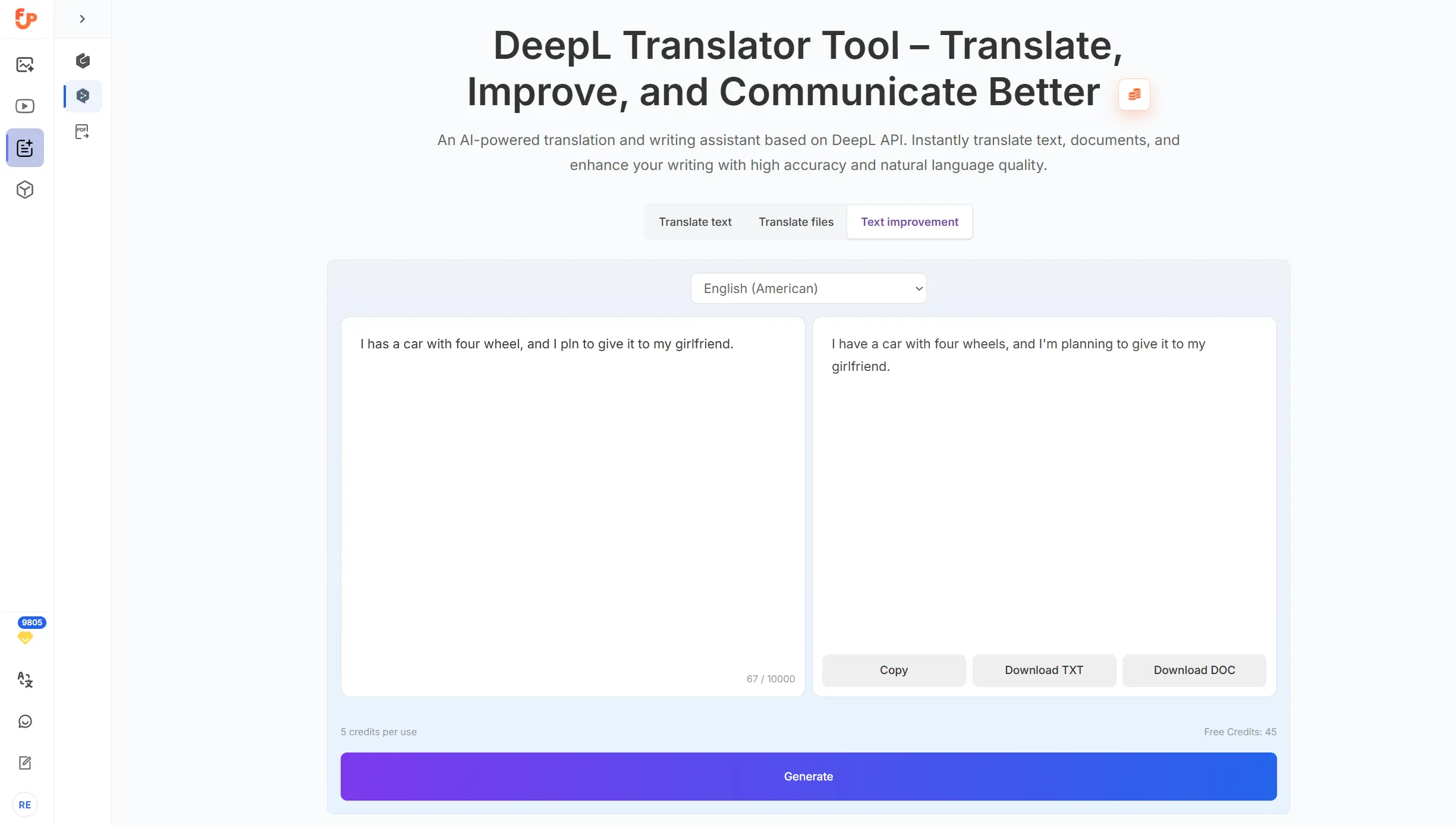
When Writing Improvement Helps Most
1. When the draft is understandable but rough
This is one of the most common situations. The message is already there, but the wording feels stiff, repetitive, or unnatural.
2. When you wrote in a non-native language
Many people can write clearly enough in English, Spanish, German, or another language, but still want help making the final version more natural.
3. After translation
A translated paragraph may be accurate, but still sound too literal. Improvement helps make it read more like native writing.
4. Before publishing or sending
Before you post an article, send an email, or share a deck, it often helps to do one final readability pass.
Translate vs Improve: Which One Should You Use?
This is one of the most important distinctions.
Use Translate when:
- your source text is in another language
- your main goal is language conversion
- you need to understand or reuse content across languages
Use Improve when:
- your text is already in the target language
- the wording feels weak or unnatural
- you want to polish clarity, grammar, tone, or flow
A practical workflow often looks like this:
- translate first
- review the result
- improve the writing
- do a final human check
If you are starting from a PDF or document instead of plain text, first use file translation. See How to Translate PDF Online Without Losing Formatting or Translate Word and PowerPoint Files Online for Free.
How to Improve Writing Step by Step
Step 1: Start with your real draft
Do not wait for perfect wording. Start with what you already have:
- rough notes
- first draft
- translated paragraph
- email draft
- blog intro
- product copy
Step 2: Decide what needs improvement
Ask:
- Is the meaning clear?
- Is the tone too formal or too plain?
- Are there repeated phrases?
- Does the text sound translated?
- Is it easy to read?
Step 3: Run an improvement pass
Use the improve function to polish the text. This helps especially with:
- flow
- sentence structure
- awkward wording
- grammar cleanup
- more natural phrasing
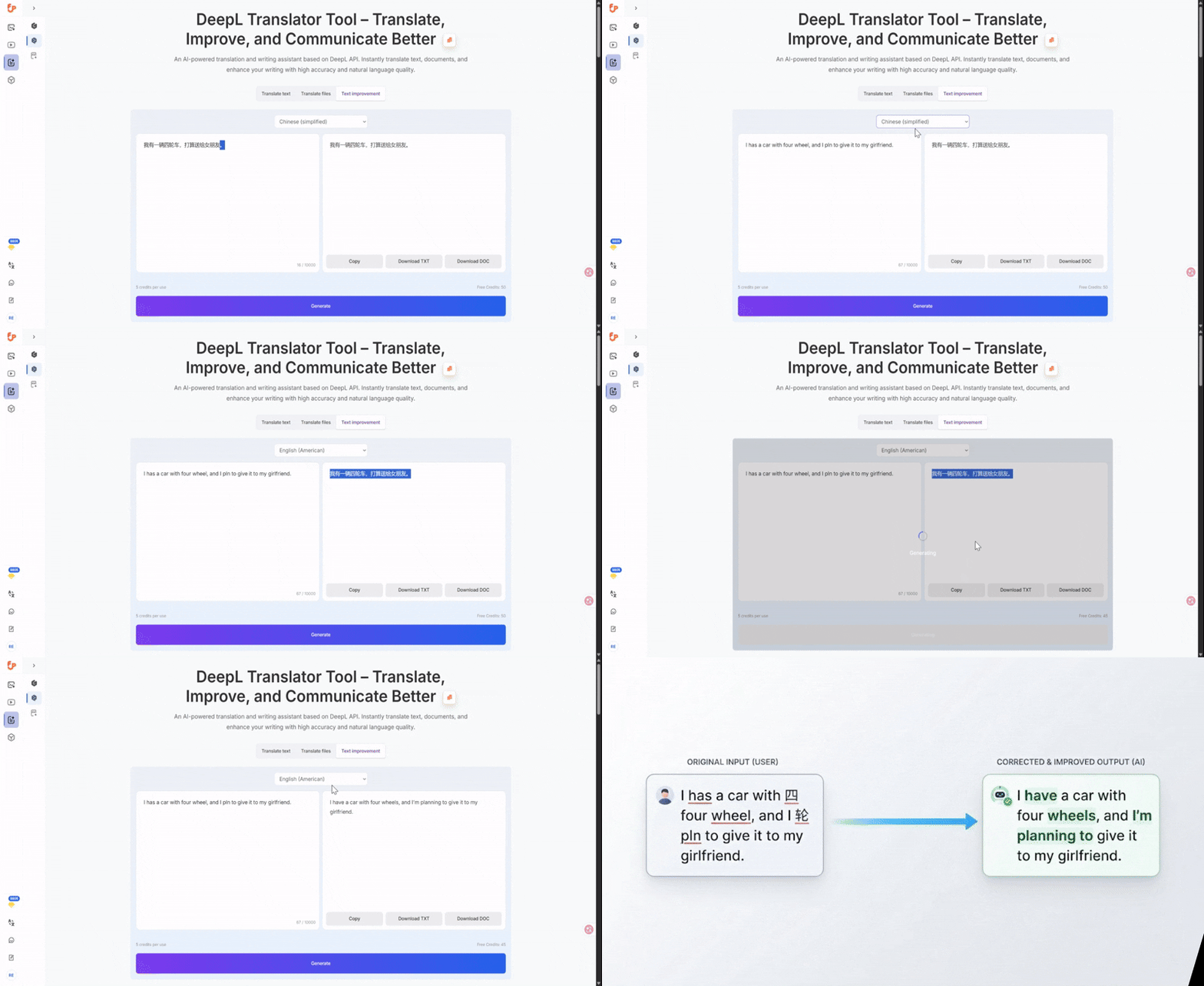
Step 4: Compare the original and improved versions
Do not accept every change automatically. Review whether the revised text:
- keeps the original meaning
- sounds more natural
- matches your audience
- stays accurate for names and terms
Step 5: Make final manual edits
This is where you keep control. Adjust brand language, industry terms, and any details that matter for your final use.
Rough draft to improved version
What Kind of Writing Can You Improve?
A DeepL-based writing tool is useful for many content types.
Emails
This is one of the best use cases. You want the message to sound clear, polite, and natural without spending too much time rewriting.
Blog drafts
If the article says what you mean but still feels heavy or repetitive, writing improvement can help smooth it out.
Product descriptions
Good product copy needs clarity. It should be easy to scan and easy to understand.
Marketing text
Improvement is useful when the wording needs to become more natural or more persuasive, but still stay simple.
Client communication
Freelancers, agencies, and teams often need writing that sounds professional but not overly formal.
Internal documentation
Even internal notes become easier to use when the language is cleaner.
Common Things Improvement Can Fix
Here are typical problems that a writing improvement step can help address:
Awkward sentence structure
Some sentences are grammatically acceptable but still feel unnatural. Rewriting can make them flow better.
Repetition
Drafts often reuse the same words too often. Improvement can vary phrasing without changing the meaning.
Weak transitions
Sometimes each sentence is fine, but the paragraph does not move smoothly. Improvement can help connect ideas.
Tone mismatch
A message may sound too cold, too direct, too wordy, or too stiff. Polishing can adjust the tone.
Literal translation feel
This is especially common in multilingual writing. The idea is correct, but the sentence still sounds like a direct translation.
A Good Writing Improvement Workflow
A useful editing workflow does not need to be complicated.
For short text
- write the draft
- improve it
- check key details
- send or publish
For translated content
- translate the content
- improve the result
- review terminology
- finalize
For long-form content
- improve section by section
- keep your voice consistent
- review headings and transitions
- make final edits manually
This balanced approach saves time without giving up control.
What Improvement Cannot Do for You
It helps to stay realistic.
Writing improvement can make text clearer and more natural, but it does not automatically solve everything.
You should still review:
- legal wording
- medical content
- technical terminology
- brand voice
- culturally sensitive phrasing
- factual accuracy
The tool can improve language quality. It cannot replace domain expertise.
Best Use Cases After File Translation
Writing improvement is especially useful after file translation.
For example:
- you translate a PDF and want smoother wording in key sections
- you translate a proposal and need the final version to sound more professional
- you translate a presentation and want the slide text to feel more natural
- you translate an article draft and want it ready for publishing
If you work from PDFs, start with How to Translate PDF Online Without Losing Formatting. If you work from editable office files, see Translate Word and PowerPoint Files Online for Free.
Translate first, improve second
Tips for Better Results
Be clear about your goal
Are you trying to sound more professional, more natural, more concise, or easier to understand? The clearer the goal, the easier it is to evaluate the result.
Improve in smaller chunks when needed
For important content, section-by-section review often works better than changing a very large block all at once.
Keep key terms consistent
If you use product names, legal terms, or industry phrases, review them manually.
Compare before and after
The point is not just to change the text. It is to make it better.
Keep your own voice
Use the tool to strengthen your writing, not to erase your meaning.
FAQ
Is improving writing the same as translating?
No. Translation changes the language. Improvement rewrites text in the same language to make it clearer, smoother, or more natural.
Can I improve translated text?
Yes. This is one of the best use cases. Translate first, then improve the wording.
What kind of writing works best?
Emails, articles, product copy, blog drafts, client communication, and internal content all work well.
Should I still review the final text?
Yes. Always review important details, names, terms, and audience fit.
Can I use this after translating a PDF?
Yes. You can translate the PDF first, then improve important sections of the translated text. See How to Translate PDF Online Without Losing Formatting.
What if my source file is a Word document or PowerPoint?
See Translate Word and PowerPoint Files Online for Free.
Final Thoughts
If your writing is accurate but still feels weak, rough, or too literal, a writing improvement step can make a real difference.
It helps turn:
- rough drafts into cleaner drafts
- translated text into more natural text
- understandable writing into usable writing
That is often the difference between “I can read this” and “I can actually send or publish this.”
A DeepL-based writing tool is especially useful when you want a practical workflow: translate when needed, improve when needed, and keep moving.
For related workflows, continue with: