
Is SuperGrok Worth It in 2026? What $30/Mo Really Gets You
Last checked: September 20, 2026.
If Grok is part of your daily workflow, SuperGrok may be worth the $30 monthly price. If you only use Grok for a few quick questions each week, the free tier or $10 Lite plan may be enough. The real question is what you get for $30, how the weekly usage limit works, and whether you will actually use the extra capacity.
Most people searching for SuperGrok are trying to answer a simple question: does the paid plan justify the cost? To find out, we reviewed xAI’s current plan information, our own Grok pricing research, and user discussions across r/grok and r/supergrok. Where usage figures come from users rather than xAI, we clearly label them as reports rather than official limits.
Which SuperGrok Plan Is Right for You? Lite $10, SuperGrok $30, Plus $100, Heavy $300
Grok no longer has one paid tier. xAI's plan page currently lists four SuperGrok plans, and the cheapest one changes the answer for light users.
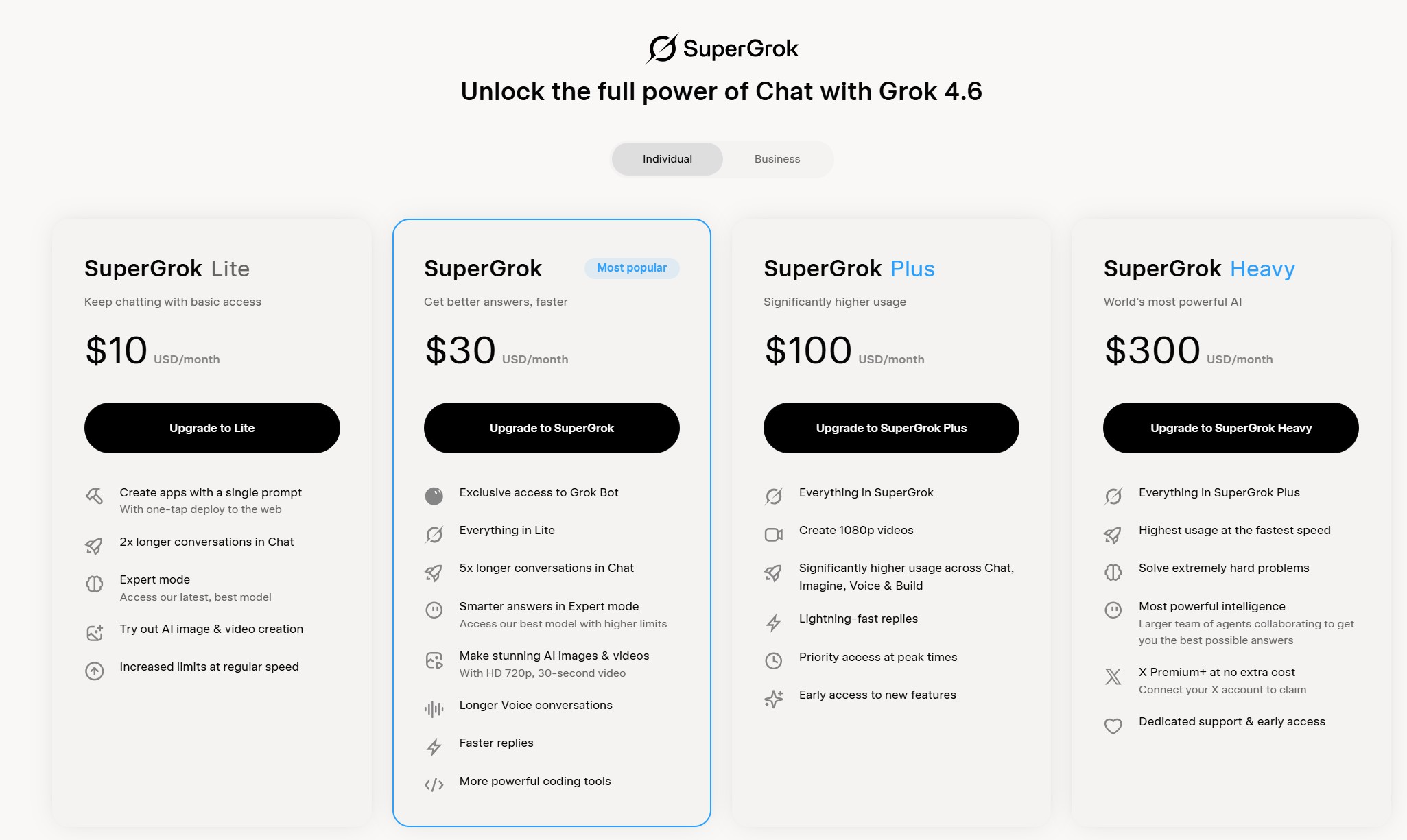
| Plan | Price per month | What the plan page lists | Best for |
|---|---|---|---|
| SuperGrok Lite | $10 | 2x longer conversations, Expert mode access, trial of image and video creation, higher limits than free | Light daily use, little or no image work |
| SuperGrok | $30 | Everything in Lite, plus Grok Bot, 5x longer conversations, higher Expert mode limits, AI images and 720p video up to 30 seconds, longer voice chats, faster replies, stronger coding tools | The default pick for daily users |
| SuperGrok Plus | $100 | Everything in SuperGrok, plus 1080p video, higher usage across Chat, Imagine, Voice and Build, fastest replies, priority at peak times, early access to new features | Video creators and all-day heavy users |
| SuperGrok Heavy | $300 | Everything in Plus, plus the highest available limits, the strongest reasoning mode, bundled X Premium+, expert support | Researchers and multi-agent workflows |
The jump from $30 to $100 mainly buys more usage, 1080p video, and faster replies—not a fundamentally different assistant. For most users, the key question is simple: have you already reached the cheaper plan’s limits?
User reports in r/grok show a similar pattern: heavy video creators and researchers value the larger limits, while lighter users often see less benefit from the higher price.
If you only ask a few questions a day, Lite at $10 is likely a better starting point. You still get Expert mode and longer conversations without paying for capacity you may not use.
What $30 a Month Actually Gets You in 2026
Here is the split that matters, taken from xAI's own plan page:
| You get at $30 | You do not get at $30 |
|---|---|
| 5x longer conversations than the free tier | 1080p video creation (that is Plus, $100) |
| Higher Expert mode limits, with access to the strongest current model | Priority at peak times (Plus and up) |
| AI images plus 720p video up to 30 seconds | The largest usage pool (Heavy) |
| Longer voice conversations and faster replies | A published usage number (nobody publishes one) |
| Grok Bot access | |
| Stronger coding tools, including the Build command line |
That last row is easy to miss: xAI does not publish exact usage limits for any paid tier, so specific weekly message counts for the $30 plan should be treated as estimates rather than official figures.
One more thing to keep in mind is that Grok’s models change over time. If model access matters to your decision, our Grok 4.6 guide covers the latest rollout. Compared with ChatGPT, Grok’s main differences are its live X data and overall style.
In short, the $30 plan mainly buys more capacity and access—not a fundamentally different assistant.
How Much SuperGrok Usage Do You Get Each Week?
This is where SuperGrok’s paid plans changed in 2026, and where many older reviews are now outdated.
Grok previously used separate limits for different features, so you could run out of image credits while still having messages left. Paid plans now use a shared weekly usage pool across Chat, Imagine, Voice and Build. You can check your remaining usage under Settings > Usage, where Grok displays the pool as a percentage. The catch is that xAI does not publish the pool’s exact size, either on the plan page or in its help documentation.
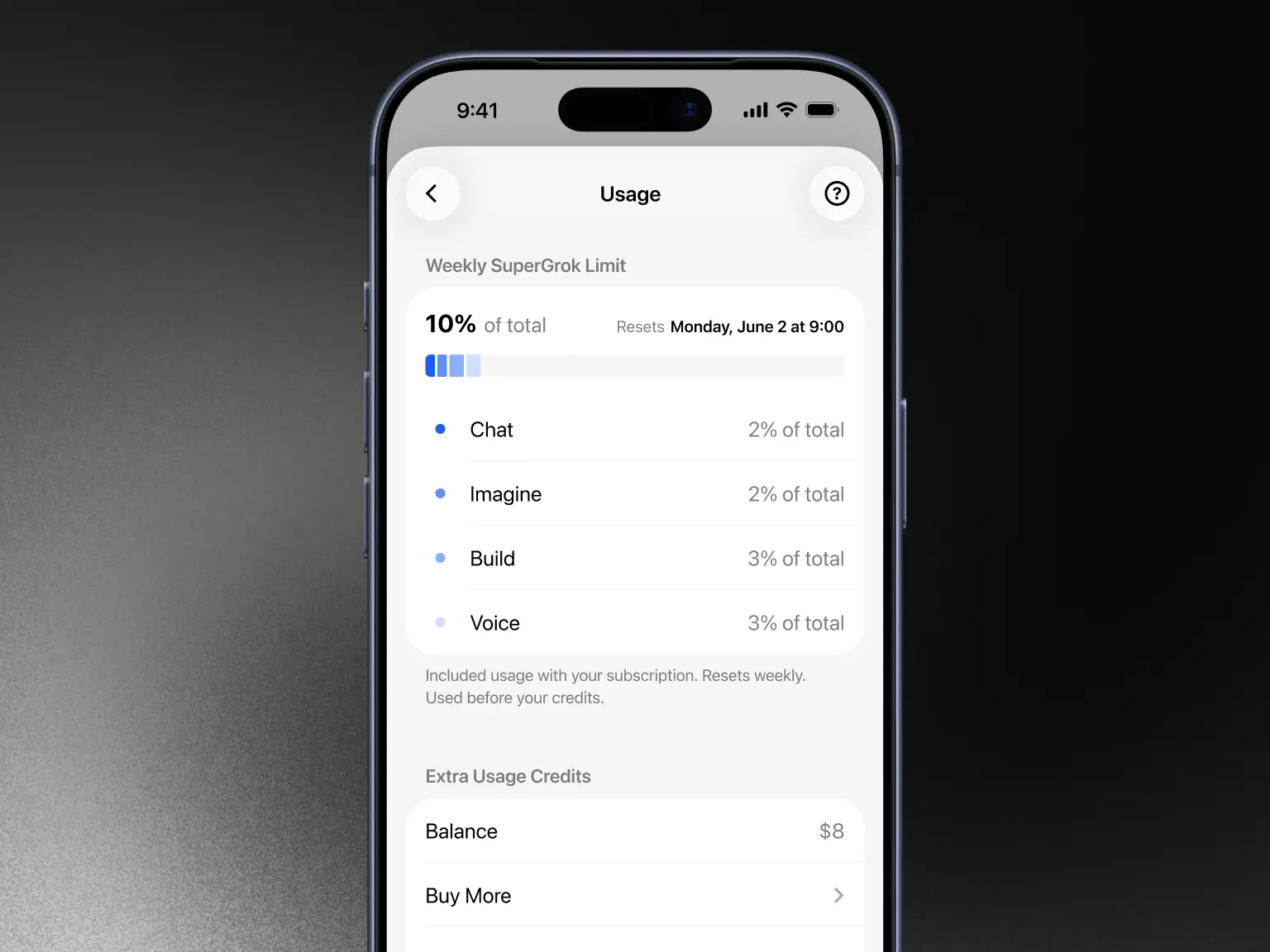
What matters is how quickly different tasks use the pool. Simple chats and drafting consume less, while video generation, DeepSearch and other intensive tasks use more. User reports suggest heavy video use, long research sessions and shared accounts are more likely to hit the limit.
When the pool runs out, access becomes more limited until the usage resets, though the exact behavior can vary by plan and account. Treat user reports as a reference rather than a guaranteed rule.
The easiest way to judge whether you need a higher plan is to track your usage for a week. If you regularly approach the limit, more capacity may be worthwhile; if not, upgrading may add little value. See our guides to SuperGrok weekly quota limits and Grok rate limits for more details.
Is SuperGrok Worth It for You? A Quick Decision Table
Find your row. The recommendation in the middle column is based on the plan grid and the pool behaviour above, not on how enthusiastic anyone is about Grok.
| Your situation | Recommended plan | Why |
|---|---|---|
| You use Grok daily for writing and research | SuperGrok, $30 | You convert a larger weekly pool into daily output |
| Long research sessions with DeepSearch on long documents | SuperGrok, $30 | 5x longer conversations and higher Expert limits are the point of the upgrade |
| You code with Grok, including the Build command line | SuperGrok, $30, or Plus at $100 for all-day runs | Build is included from $30; only constant daily runs justify Plus |
| You ask a few questions a week | Free Grok, or Lite at $10 | Your usage may be too light to justify a paid plan. |
| You create images and short video | SuperGrok, $30, or Plus at $100 for 1080p | 720p video up to 30 seconds is included at $30; 1080p is not |
| You already pay for X Premium+ | Check what your bundle includes first | Grok access is bundled into that subscription, so adding $30 is often redundant |
| You already pay for ChatGPT Plus or Claude Pro | Compare the overlap before adding anything | Two AI subscriptions only pay off if both get used every week |
The decision mainly comes down to three things: how often you use Grok, what you generate, and what other AI subscriptions you already pay for. If another assistant already covers most of your needs, compare the overlap before adding another $30 subscription. See our ChatGPT Plus value breakdown for a broader comparison.
SuperGrok vs Free Grok vs ChatGPT Plus vs Claude Pro
Four options, and four different answers depending on what you do all day.
| Free Grok | SuperGrok | ChatGPT Plus | Claude Pro | |
|---|---|---|---|---|
| Price | $0 | $30 a month, about $300 a year | $20 a month (check ChatGPT pricing) | $20 a month (check Claude pricing) |
| Strongest reason to pick it | Live web and X search with no commitment | Higher usage limits plus image and video generation | The widest set of tools and integrations around one assistant | Long documents, careful writing, and code work |
| Where it falls short | Real limits on chat and voice, no image generation | No published usage number, and 1080p video needs the $100 plan | No live X data | No live X data |
| Who it fits | Occasional users | Daily Grok users | People who want one assistant for everything | Writers and developers with heavy text work |
Two notes on that table. Free Grok is a genuine option rather than a demo, but image generation left the free tier in March 2026, which we covered in our post on the change. And if you mainly need the X side of Grok, publishing and trend tracking, the comparison in our Claude vs Grok side-by-side test covers where each one actually wins.
Is SuperGrok Worth It on a Budget? Two Ways to Pay Less
SuperGrok pricing starts at $10, but two situations still send people looking for a cheaper path: $30 a month is more than you want to spend on a chatbot, or you cannot pay xAI directly because of the card or the region you are in. Both have workable answers, and both change the math in different ways.
| Shared account | Top-up on your own account | |
|---|---|---|
| Typical price | From about $6 a month per person on the 4-person shared plan | $19.99 a month |
| How it works | Several users log in to one SuperGrok account | You keep your own account; the plan is added to it using your account UUID |
| What you keep | Access to the paid features and the same weekly pool | Your own history, settings, and account |
| What to watch | The pool and the Imagine quota are shared, chat history may be visible to other users, and passwords can rotate | Best used when your current plan is close to expiry or already finished, since it extends access |
The shared route is the cheaper option, but it comes with trade-offs. Multiple users share the same account and usage pool, and chat history may be visible to others. It works well for budget-conscious chat and research, but is less suitable for heavy image/video use or private work.
The top-up route keeps your own account and is mainly useful if you cannot pay xAI directly because of card or regional restrictions. It extends your existing plan, so timing matters—ideally, use it when your current subscription is close to expiry.
Both options are available on FamilyPro: the shared SuperGrok plan and SuperGrok top-up. For a full breakdown of plan prices, see our Grok pricing guide.
In short: choose shared access for lower cost, or top-up if you want to keep your own account.
FAQ: Is SuperGrok Worth It?
Is SuperGrok Worth It for Image Generation?
It depends on volume. The $30 plan includes images and 720p video up to 30 seconds, which covers most people who post visuals a few times a week. What it does not include is 1080p video, which sits on the $100 Plus plan. If your work is video-first, the $30 tier will feel narrow.
Is Super Grok Unlimited?
No. Paid plans draw from a single weekly usage pool, but xAI does not publish the pool's exact size. Once you reach the limit, access becomes more restricted until the allowance resets. The exact experience can vary by plan and account.
Is SuperGrok Worth It Compared to Free Grok?
If you regularly hit the free tier's limits, the paid plan may be worth it. The upgrade adds higher usage limits, longer conversations, and paid access to image and video generation. If you rarely hit those limits, free Grok already does what you need.
Is SuperGrok Worth It if You Already Pay for X Premium+?
Often not. Grok access is bundled into X Premium+, so paying $30 on top can buy a second copy of something you already have. Check what your subscription includes before adding another.
Is SuperGrok Lite Worth It Instead?
For light users it often is. At $10 you keep Expert mode access and the longer conversation window while dropping most image and video work. That fits someone who asks a few questions a day and does not generate visuals, which is the profile where the answer is usually a straightforward no.
What Do Reddit Users Say About SuperGrok?
The community is genuinely split, and both sides are worth reading. Long-term subscribers praise the live X data and the pace of new features, and a visible group says the paid plan has lost quality in image generation while becoming stricter about moderation. A common theme is practical: the paid plan tends to make more sense for heavy users than occasional users.
Conclusion: So, Is SuperGrok Worth It?
Is SuperGrok worth it? It depends mainly on how much you use Grok. If you regularly generate images or run long research sessions, the $30 plan offers more useful capacity. If you only use Grok occasionally, Free Grok or Lite at $10 may be enough.
If $30 is still more than you want to spend, consider the two budget options above: shared access for lower cost, or a top-up if you want to keep your own account.