
Grok Imagine Stuck? Here's How to Fix It
Grok Imagine can be pretty frustrating when it gets stuck.
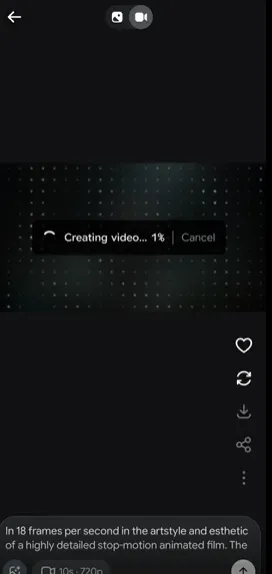
You enter a prompt, hit generate, and expect an image or video to appear. Instead, Grok just keeps showing Processing, Generating, or a loading animation.
And nothing happens.
If that sounds familiar, don't immediately submit the same prompt over and over again. The problem isn't always your prompt, and it doesn't necessarily mean your Grok account is broken.
In this guide, we'll look at why Grok Imagine gets stuck, how to tell whether a generation is actually stuck, and what you can do to get it working again.
Quick answer: If Grok Imagine is stuck on Processing or Generating, wait briefly first. If the task doesn't finish, cancel it, refresh Grok, try a simple prompt, check your available credits, and test a fresh browser session. If every generation remains stuck, the problem may be related to your account, session, or a temporary Grok service issue.
Why Is Grok Imagine Stuck?
There are several reasons why a Grok Imagine generation may appear to be stuck.
Sometimes it's just a temporary delay.
Other times, the generation task may have failed somewhere between submitting your prompt and receiving the final result.
Common possibilities include:
- A temporary generation delay
- A stuck generation task
- Too many generation requests
- A browser session problem
- Cached or outdated browser data
- A temporary network problem
- Insufficient or unavailable Grok credits
- A prompt that is difficult for the system to process
- A problem specific to image generation
- A problem specific to video generation
- A temporary service-side issue
The important thing is to figure out whether one generation is stuck or every generation is stuck.
That distinction can save you a lot of unnecessary troubleshooting.
What Does "Grok Imagine Stuck" Actually Mean?
When users search for grok imagine stuck, they usually aren't talking about a completely unavailable Imagine feature.
They're talking about a generation that has already started but never seems to finish.
For example, you may see:
text
Generating...or:
text
Processing...or simply a loading animation that keeps going.
The page itself may still work normally. You can click around, but the requested image or video never appears.
A typical flow looks like this:
text
Enter prompt
    ↓
Click Generate
    ↓
Grok accepts the request
    ↓
Processing / Generating
    ↓
?????
    ↓
No final image or video
That's what we mean by a stuck generation in this guide.
How Do You Know If Grok Imagine Is Actually Stuck?
Not every slow generation is necessarily a failed generation.
Before you cancel anything, ask yourself a few questions.
Is only one generation stuck?
If one image is taking a long time but other generations work normally, the problem may be limited to that particular request.
Are all new generations stuck?
If every new prompt stays on Processing or Generating, the problem is more likely related to your browser session, account, credits, or a broader service issue.
Does a simple prompt work?
Try something basic such as:
A small dog sitting in a garden.
If the simple prompt works but your original prompt doesn't, the original request may be the problem.
Is the problem only happening with video?
If images generate normally but videos remain stuck, the problem may be specific to video generation rather than Grok Imagine as a whole.
Quick Diagnosis: Why Is Grok Imagine Stuck?
Use this table to quickly narrow down the problem.
| What you're seeing | Possible cause | What to try |
|---|---|---|
| One generation is stuck | Temporary generation problem | Wait briefly, then retry |
| Every generation is stuck | Session or service issue | Refresh and test a simple prompt |
| Processing never finishes | Generation task may be stuck | Cancel and retry |
| Image works but video is stuck | Video-specific issue | Test another image generation |
| Simple prompts work | Original prompt may be problematic | Simplify the prompt |
| Nothing generates | Credits, account, browser, or service issue | Check each one |
| Works in Incognito | Browser/session problem | Clear site data or disable extensions |
| Works in another browser | Browser-specific issue | Refresh or reset the affected browser |
| Suddenly stopped working | Temporary service/account issue | Wait and test again later |
How to Fix Grok Imagine Stuck
If Grok Imagine has been stuck on Processing or Generating, work through these steps in order.
You probably won't need all of them.
Once a new generation works normally, you can stop.
Step 1: Wait a Little Before Doing Anything
This sounds obvious, but it's worth doing first.
If you just submitted a generation request, give it some time.
- Don't immediately refresh the page.
- Don't immediately submit the same prompt five more times.
- And don't assume that the generation has failed just because it isn't finished immediately.
A better approach is:
text
Submit prompt
     ↓
Wait
     ↓
Check whether generation finishes
     ↓
Still stuck?
     ↓
Continue troubleshooting
If the generation eventually finishes, there may not be anything wrong with your account or browser.
Step 2: Check Whether One Generation or Every Generation Is Stuck
This is one of the most useful troubleshooting steps.
Suppose you generated an image and it became stuck.
Before assuming Grok Imagine is completely broken, try to determine whether the problem affects everything.
For example:
text
Generation A → Stuck
Generation B → Works
Generation C → Works
That's very different from:
text
Generation A → Stuck
Generation B → Stuck
Generation C → Stuck
In the first situation, the problem may be related to a specific request.
In the second, you should investigate the browser, session, account, credits, or Grok itself.
Step 3: Cancel the Stuck Generation
If the generation has clearly stopped making progress, don't keep staring at the same Processing screen forever.
If Grok gives you an option to cancel or stop the generation, use it.
Then start a fresh request.
After canceling:
- Wait for the task to stop.
- Refresh Grok if necessary.
- Start with a simple prompt.
- Check whether the new generation completes.
This gives you a cleaner test than repeatedly submitting the original request.
Step 4: Refresh Grok and Start a Fresh Session
A stale browser session can sometimes cause confusing behavior.
Try refreshing the Grok page and starting the generation again.
If the problem continues, close the Grok tab completely and open it again.
Then try a new generation.
You can also sign out and sign back in if necessary.
The goal is to eliminate a temporary session problem.
Step 5: Try a Very Simple Prompt
This is one of the best ways to identify whether the problem is related to your prompt.
Instead of immediately retrying a complicated prompt, use something extremely simple.
For example:
A cat sitting on a chair.
If that works, try something slightly more detailed:
A white cat sitting on a wooden chair in a sunny room.
Then gradually return to your original prompt.
This gives you a simple diagnostic:
text
Simple prompt
      ↓
Works
      ↓
Try original prompt
      ↓
Stuck again?
      ↓
The original request may be contributing to the problem
This doesn't prove that your prompt is invalid. It simply gives you a useful clue.
Step 6: Check Your Grok Credits
If your account uses credits for the generation features you're trying to use, check your available balance.
A generation problem can sometimes look like a technical failure when the actual issue is related to account usage or limits.
Check whether:
- Your credits are available
- Your account still has access to the feature
- The generation you are attempting requires additional credits
- Your credits display normally
If your credits look normal but every generation remains stuck, continue with the browser tests below.
Step 7: Test Image Generation Before Video Generation
If you're having trouble generating a video, don't assume the entire Imagine system is broken.
Try generating a simple image first.
For example:
text
Image generation → Works
Video generation → Stuck
This gives you a useful clue.
The problem may be specific to video generation rather than Imagine overall.
On the other hand:
text
Image generation → Stuck
Video generation → Stuck
suggests a broader problem.
This distinction is particularly useful when troubleshooting Grok video generation stuck problems.
Step 8: Try Incognito or Private Mode
If Grok Imagine still doesn't work, try a fresh browser session.
In Chrome, open an Incognito window.
Then:
- Open Grok.
- Log in.
- Open Imagine.
- Enter a simple prompt.
- Start a new generation.
If it works in Incognito but not in your normal browser, that's a useful clue.
The problem may be related to:
- Cookies
- Cached data
- Browser extensions
- An old authentication session
- Site-specific browser settings
You can then focus on fixing your normal browser instead of troubleshooting your Grok account.
Step 9: Try Another Browser or Device
Still stuck?
Try another browser.
For example, if you're using Chrome, test the same account in another supported browser.
You can also test another device if one is available.
The result can help narrow things down:
| Test | Result | What it suggests |
|---|---|---|
| Chrome | Stuck | Unknown |
| Incognito | Works | Browser/session issue likely |
| Another browser | Works | Browser-specific issue likely |
| Another device | Works | Device/browser issue likely |
| Everything is stuck | Still stuck | Account/service issue becomes more likely |
You don't need to permanently switch browsers.
This is simply a troubleshooting test.
Step 10: Check Whether the Problem Is Temporary
If you've tried a fresh browser session, a simple prompt, and another device or browser, but every generation is still stuck, the problem may not be something you can fix locally.
At that point, consider whether Grok may be experiencing a temporary service-side issue.
This is especially worth considering if:
- Imagine worked earlier
- It suddenly stopped working
- Multiple generations are stuck
- Different browsers show the same behavior
- Different devices show the same behavior
- Other users are reporting similar problems
In this situation, repeatedly refreshing or submitting the same prompt probably won't help much.
Wait and try again later.
Should You Keep Waiting or Start a New Generation?
This is probably the most important question when Grok Imagine gets stuck.
The answer depends on what you're seeing.
If only one generation is stuck
Give it some time first.
If it eventually completes, you're done.
If it remains stuck for an unusually long time, cancel it and try again.
If the generation has clearly stopped making progress
Don't keep waiting indefinitely.
Try:
- Cancel the generation.
- Refresh Grok.
- Use a simple prompt.
- Generate again.
If every new generation is stuck
Don't repeatedly submit the same request.
Instead, test:
text
Browser
  ↓
Incognito
  ↓
Another browser
  ↓
Another device
  ↓
Credits
  ↓
Account access
  ↓
Possible service issue
This tells you much more than submitting the same prompt again and again.
What If Grok Imagine Is Stuck on Video Generation?
Video generation can be a different situation from image generation.
If your images generate normally but videos remain stuck, don't immediately assume your entire Imagine feature is broken.
Try this:
1. Generate a simple image
If the image works, your basic Imagine access is probably functioning.
2. Try a simple video prompt
Don't start with a complicated cinematic request.
Use something simple.
3. Wait and observe
If the video remains stuck while images work normally, the problem may be specific to video generation.
4. Test again later
If the problem continues across different browsers and devices, a temporary service-side issue becomes more likely.
What If a Simple Prompt Works but My Original Prompt Gets Stuck?
This is an especially useful test.
Imagine this happens:
text
"A cat sitting on a chair"
        ↓
Works


Your original detailed prompt
        ↓
Stuck
Don't immediately conclude that Grok Imagine is broken.
Instead, simplify your original prompt.
Remove some details and generate again.
For example:
Original
A highly detailed cinematic scene showing a futuristic city at night, with hundreds of flying vehicles, complex reflections, multiple characters, dramatic lighting, specific camera movement, and...
Simplified
A futuristic city at night with flying cars.
If the simplified version works, add details back gradually.
This helps identify whether a particular request is contributing to the generation problem.
Don't Keep Submitting the Same Generation Request
One common reaction to a stuck generation is:
"Maybe if I click Generate again, it'll work."
Then again.
And again.
That's usually not the best troubleshooting strategy.
If the first request is already stuck, repeatedly submitting the same request can create several overlapping generation tasks.
You may end up with:
text
Request #1 → Processing
Request #2 → Processing
Request #3 → Processing
Request #4 → Processing
Now it's even harder to understand what's happening.
Instead:
Cancel the clearly stuck task when possible, then run one clean test.
Real User Cases: What Grok Users Have Reported
The following examples are based on real support feedback collected from users. Exact wording may be shortened or translated for clarity.
Importantly, not every case below is a confirmed "Imagine stuck on Processing" case. Some are broader Grok generation or access problems.
We don't want to turn a real support case into something the user didn't actually report.
Case 1: Grok Generation Problems
A user reported that Grok was not working correctly and that an error message kept appearing.
This type of feedback is useful because it shows how a generation problem can initially appear to the user as a general Grok error.
The important troubleshooting question is:
Is the entire Grok service unavailable, or is only the generation task affected?
That distinction should be checked before changing account settings or repeatedly retrying.
Case 2: Grok Image Generation Doesn't Work
Another common type of feedback is simply:
"Grok can't generate images."
This is broader than a stuck-generation report.
The first thing to determine is whether:
- The Imagine feature cannot be opened
- The generation button doesn't work
- The request is rejected immediately
- The request starts but never finishes
- The image is generated but doesn't appear
These situations can look similar to the user but require different troubleshooting steps.
Case 3: Generation Keeps Processing
A generation that remains in Processing is much closer to the problem covered by this guide.
If the request has been accepted but the status never changes, treat it as a potentially stuck generation.
The most useful next step is to determine whether a fresh generation works.
What If Grok Imagine Suddenly Stopped Working?
This is another useful clue.
Suppose you used Imagine normally yesterday.
Today:
- Same account
- Same browser
- Same device
- Same type of prompt
But every generation gets stuck.
That makes it less likely that you suddenly entered the wrong prompt.
Instead, test:
- Refresh the session.
- Try Incognito.
- Try another browser.
- Try another device.
- Check credits.
- Try again later.
If the same behavior happens everywhere, the issue may be outside your local browser.
Grok Imagine Stuck: A Simple Decision Tree
If you don't want to read the entire guide, use this quick decision tree.
text
Is Grok Imagine stuck?
        |
        v
Is only one generation affected?
        |
   +----+----+
   |         |
  YES       NO
   |         |
   v         v
Wait       Test simple prompt
   |         |
Still stuck? |
   |         v
   v      Does it work?
Cancel       |
   |      +--+--+
   v      |     |
Retry    YES   NO
           |     |
           v     v
      Check the  Test browser
      original   / Incognito
      prompt         |
                     v
                 Check credits
                     |
                     v
               Try another device
                     |
                     v
              Still stuck everywhere?
                     |
                     v
              Possible service issue
This is why diagnosing the problem first is usually better than blindly refreshing the page.
Grok Imagine Stuck Checklist
Before giving up, go through this checklist.
- [ ] Did I wait a few minutes?
- [ ] Is only one generation stuck?
- [ ] Did I cancel the stuck task?
- [ ] Did I refresh Grok?
- [ ] Did I try a simple prompt?
- [ ] Did I check my Grok credits?
- [ ] Does image generation work?
- [ ] Does video generation work?
- [ ] Did I try Incognito or Private mode?
- [ ] Did I try another browser?
- [ ] Did I try another device?
- [ ] Is the problem happening with every prompt?
- [ ] Did the problem start suddenly?
- [ ] Could this be a temporary service-side issue?
If the problem disappears at any point, you've probably found the relevant layer of the problem.
Common Mistakes When Grok Imagine Gets Stuck
Refreshing the page immediately
If the generation has just started, give it some time first.
Submitting the same prompt repeatedly
This can create multiple overlapping tasks and make troubleshooting harder.
Assuming the prompt is always the problem
A stuck generation can happen even with a perfectly reasonable prompt.
Assuming the account is banned
A single stuck generation isn't enough evidence that your account has been restricted.
Ignoring credits
If the feature depends on available credits, check them before spending too much time troubleshooting the browser.
Only testing one browser
A browser-specific issue can look like a Grok problem.
Try Incognito or another browser to rule it out.
Grok Imagine Stuck FAQ
Why is Grok Imagine stuck on Processing?
A generation can remain on Processing because of a temporary generation delay, browser/session problem, account limitation, or a service-side issue.
Start by waiting briefly, then test a fresh generation with a simple prompt.
Why does Grok Imagine keep loading?
If the page keeps loading without producing a result, the generation task may not have completed successfully.
Try refreshing Grok, starting a new session, and testing a simple prompt.
How long should I wait if Grok Imagine is stuck?
There isn't a single reliable waiting time for every generation.
If the task clearly isn't progressing, don't wait indefinitely. Cancel it when possible and run a clean test with a simple prompt.
Why is my Grok image generation stuck?
The cause can vary.
Check whether other image generations work, then test your browser, credits, and a simpler prompt.
Why is Grok video generation stuck?
If images work but videos don't, the issue may be specific to video generation.
Try a simple video request and test again later if the problem persists.
Can Grok credits cause Imagine generation problems?
They can be relevant if the feature or generation you're using depends on available credits.
Check your account's credit status before assuming that the browser or prompt is the problem.
Why does Grok Imagine work in Incognito but not my normal browser?
If Incognito works, the problem may be related to your normal browser's cookies, cached data, extensions, or session.
Try clearing site data or disabling extensions that may interfere with the page.
What should I do if every Grok Imagine generation is stuck?
Start with a simple prompt, then test Incognito, another browser, and another device.
If every test fails, the issue may be related to your account or a temporary Grok service problem.
Should I keep clicking Generate if Grok Imagine is stuck?
No.
If a generation is clearly stuck, repeatedly submitting the same request usually isn't a useful troubleshooting strategy.
Cancel the stuck request when possible and run one clean test instead.
Final Thoughts
When Grok Imagine is stuck, the first instinct is usually to refresh the page or hit Generate again.
But there's a better way to troubleshoot it.
Start by asking:
Is one generation stuck, or is every generation stuck?
Then test the problem systematically.
- Wait briefly.
- Cancel the stuck task if necessary.
- Try a simple prompt.
- Check your credits.
- Test image and video generation separately.
- Try Incognito.
- Try another browser or device.
If everything is still stuck everywhere, the problem may not be something you can fix from your browser.
Most importantly, don't keep submitting the same generation request over and over. A clean test gives you much more useful information.
Still Having Trouble With Grok?
If your problem isn't specifically a stuck Imagine generation, one of these guides may be more relevant:
- Grok Imagine Not Working
- Grok Login Error
- Grok Wrong Password
- Grok Verification Code Not Received
- SuperGrok Not Working
About This Guide
FamilyPro Editorial Team publishes practical troubleshooting guides for AI tools and online services.
Our content is based on real user questions, support feedback, and hands-on troubleshooting. We aim to explain technical problems in plain English and provide steps that users can actually try.
Note: Grok's interface, features, limits, and authentication methods can change over time. The troubleshooting steps in this guide are general guidance and may not resolve temporary service-side or account-specific problems.