
Grok An Error Occurred Loading This Image: 7 Fixes (2026)
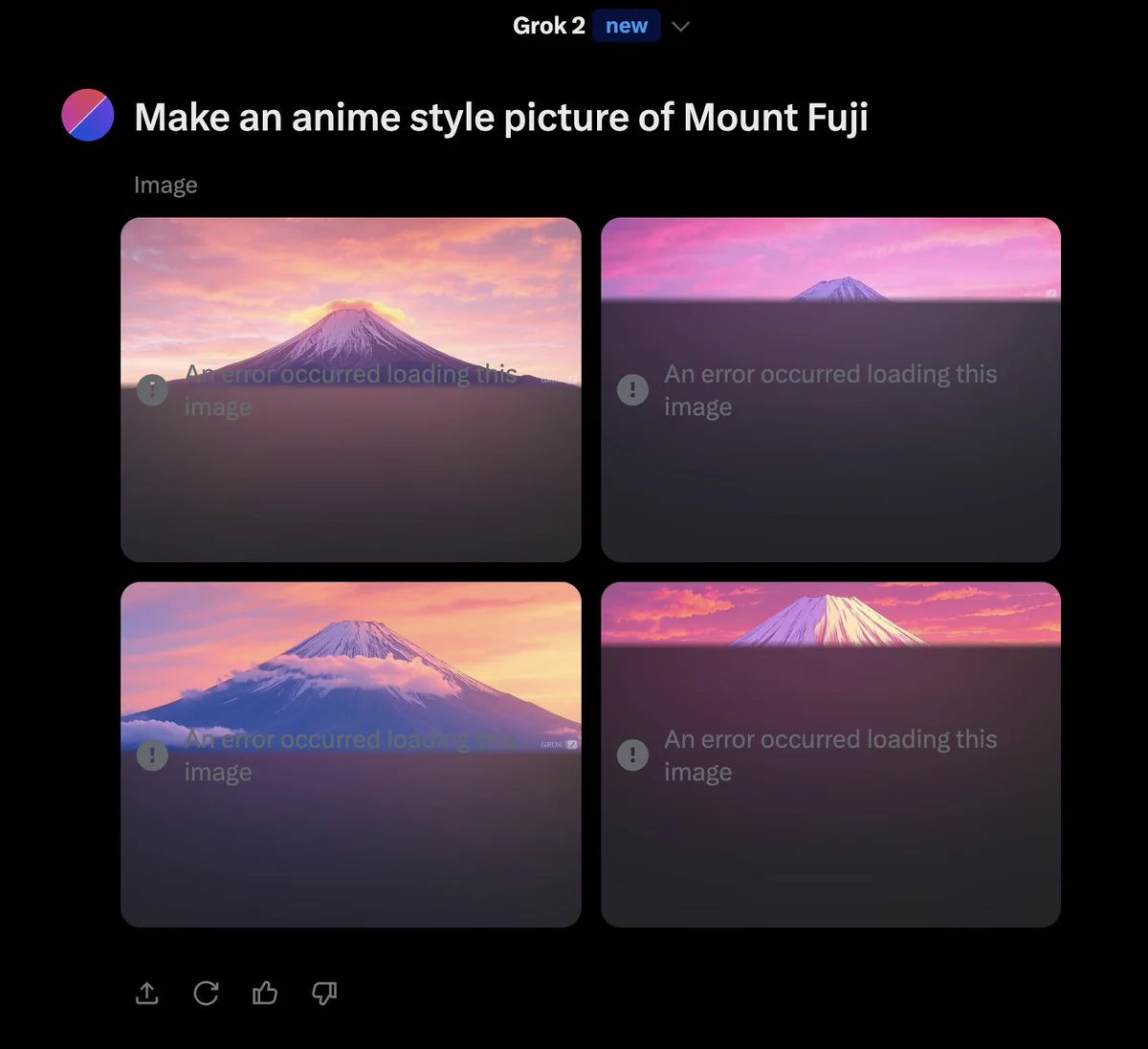
In most cases, this is a temporary image-loading or display problem rather than an account ban. If an error occurred loading this image, the image itself may well exist on Grok's side, and your browser simply failed to paint it. Start here: reload the image once, refresh the page, then sign out and back in. If the same error occurred loading this image comes back, the cause is usually a stale cache, a VPN or extension interfering, or Grok's servers under load. This guide walks through seven fixes in the order that makes sense, shows you which single step fits your symptom, tells you when a step has done its job and you should stop, and explains what to do when an error occurred loading this image will not clear.
What an Error Occurred Loading This Image Means in Grok
This one string covers three situations people constantly mix up, and telling them apart saves you twenty minutes of the wrong troubleshooting.
The first is a display error. The image was generated and it exists on Grok's side, but your browser could not paint it, so an error occurred loading this image appears in place of the picture.
The second is a generation failure. Grok never produced the image at all, so there is nothing to load. An error occurred loading this image is technically accurate here, but the fix is nothing like a display problem. This usually arrives with different wording, like a prompt taking longer than usual or a refusal notice.
The third is an account or access problem. Your session dropped, your plan does not include the feature, or your account is restricted, and an error occurred loading this image is the symptom you happen to see.
The wording is identical in all three cases, which is what makes this message and the other Grok image errors so easy to misread. In many instances the message is a loading or display problem rather than a failed image generation, which is good news: a display error is fixed locally in under a minute. A generation failure needs a different set of steps, which you can find in our walkthrough on what to do when Grok Imagine gets stuck and never returns an image. Because each of the three needs a different first move, the fix section below starts by matching what you are actually seeing to a single step.
One detail worth knowing: this message is not Grok-only. The same phrasing appears on X timelines, Reddit embeds, and other sites when an image host hiccups. That is partly why search results around it are noisy, and why so many of them do not apply to Grok at all.
Why Grok Shows This Image Error
Six common causes cover most of the paths worth checking when an error occurred loading this image appears. They run from the ones you can hit any day to the ones you can do nothing about.
1. A temporary Grok server or image-loading issue. xAI pushes updates, and occasionally a delivery node misbehaves. Images generated in the last few minutes may not render while everything else works fine.
2. Heavy traffic or usage limits. Grok Imagine is popular and rate-limited. Under load, image delivery can fail even though text chat responds normally. If you keep hitting walls after several prompts, the mechanism is explained in our guide to why Grok rate limits trigger so quickly, and the plan-by-plan ceilings are in our breakdown of SuperGrok weekly quota limits.
3. Browser cache or cookies. Stale cached assets are one of the most common local causes of this image-loading error. Your browser keeps an old copy of Grok's image loader and serves it after xAI has changed the file.
4. VPN, proxy, or browser extensions. Ad blockers and privacy extensions sometimes treat image endpoints as trackers and block them silently, which surfaces as an error occurred loading this image. A VPN that changes your apparent country can interfere with image delivery too.
5. Network problems. Corporate proxies, campus networks, and flaky Wi-Fi drop large image payloads more easily than they drop text, so an error occurred loading this image can appear only on the image step.
6. Account or feature access issues. This is last on purpose. It is the least likely explanation and the one people jump to first. If your sign-in is failing rather than your images, the real problem is elsewhere, and the fix list below treats that as a separate branch.
7 Fixes, and When to Stop Trying Each One
Most guides hand you a list and leave it there. The harder part is knowing which single step fits what you are seeing the moment an error occurred loading this image appears, and when a step has already told you what you need to know. Pick your entry point from the table, then work down from there.
| What you are seeing | Start with | Why that step | Stop and move on if |
|---|---|---|---|
| One image failed, chat works fine | Fix 1 | The image likely exists and only the render failed | It fails twice, then go to fix 2 |
| Every image fails, the page looks stale | Fixes 2 then 3 | A reload and a fresh session clear the two cheapest causes together | Both are done inside two minutes, then go to fix 4 |
| Images work in a private window | Fix 6 | That result already proves your normal browser profile is at fault | Clearing grok.com site data changes nothing, then go to fix 5 |
| It only fails on a VPN or a new region | Fix 5 | Image loading tends to be more sensitive to VPN routing and region than text | It still fails with the VPN off, then go to fix 7 |
| Other people are reporting it too | Fix 7, then wait | It is an outage, and no local step can change that | Never. Waiting is the whole fix |
| Nothing above matches | Fix 7, then the access section | Ruling out service health comes before blaming your account | Service is healthy and quota is not the issue, so contact support |
1. Retry the image. When this error shows up, open the conversation, find the failed item, and reload just that one. Do not resend the prompt yet. If the image was actually generated, re-running it burns another Imagine credit for no reason. It is an easy mistake to make, and entirely avoidable. Stop after two attempts. If the same item fails twice, the problem is not a transient glitch, so move to fix 2.
2. Refresh Grok. A full page reload (Ctrl+R on Windows, Cmd+R on Mac, or the reload button on mobile) re-fetches the image from the server instead of the cache, which clears an error occurred loading this image caused by a stale copy. Stop if the failure looks identical. An unchanged result after a full reload means the cached copy was not the cause, so go to fix 3.
3. Re-login to your Grok account. Sign out, sign back in. This rebuilds your session token, which clears an error occurred loading this image in a surprising number of cases. One warning before you do it: if you cannot get back in at all, whether the password is rejected or the verification code never arrives, clear that first, because the image error is now downstream of a login problem. Our walkthrough on the Grok login error covers the recovery order. Stop if text chat works and images still do not. That split means an error occurred loading this image is not a session problem, and the fault sits in the browser layer, which makes fix 4 the better next move.
4. Try Incognito or another browser. A private window loads Grok with no extensions and no cache, and this is the step that splits your diagnosis in two. If the image appears there, the problem is in your normal browser profile and fix 6 will solve it. If it fails there as well, an error occurred loading this image is not a browser problem, so skip to fix 7. Stop treating it as a solution. Private mode is a test, not somewhere to keep working.
5. Disable VPN or extensions. Turn the VPN off and reload. Then disable extensions one at a time, starting with ad blockers, and reload after each. If one of them is the culprit, the error stops the moment you disable it. Stop as soon as it returns. Re-enable everything else, leave only that one off, and you are done.
6. Clear cache and cookies for Grok. Clear site data for grok.com only, not your whole browser, so you do not get logged out of everything else. Then sign in and reload. This is one of the more useful local fixes when nothing else has worked. This is the last local fix worth trying. If a clean profile still shows the same error, stop changing browser settings and go to fix 7.
7. Check Grok's service status. Visit the official xAI status page before doing anything more drastic; during an incident, an error occurred loading this image is expected and waiting is the whole fix. Stop troubleshooting entirely if there is an incident. If there is an active incident, stop troubleshooting and come back later.
If the fixes above changed nothing and the error shows up only when you generate, not when you chat, that narrows things considerably. Our overview of the common Grok Imagine failures and what each one signals maps each symptom to its likely cause.
If an error occurred loading this image survives all seven steps, the service is healthy, and your account and quota both check out, rule out one last thing before you blame the service: a subscription that was paid but never activated behaves exactly like an access failure, and our guide to SuperGrok not working covers how to confirm it. If that is clear too, you are in the small group where the fix has to come from xAI. Report it through Grok's in-app feedback with the time it happened and the conversation it happened in, then stop. Running the same seven steps a fourth time will not change the outcome.
Is This a Ban? How to Tell
If an error occurred loading this image is your only symptom, start by weighing it against the signals below. Being blocked from an image and being banned look nothing alike once you know what to check.
| What you are seeing | What it usually suggests |
|---|---|
| You can sign in without any warning | An account ban is unlikely |
| Text chat works normally | The problem is specific to images |
| Only one image fails | An asset or loading issue |
| Several Grok features fail at once | Check your account status and service health |
| You see an explicit suspension or restriction notice | An account access problem |
The signs compound rather than decide on their own. One broken image is not strong evidence of an account ban, especially when you can still sign in and use other Grok features normally. A suspension notice plus locked features is a different story. Treat the table as a way to weigh the evidence, not as a verdict on any single row: an error occurred loading this image plus a suspension notice points somewhere very different from the same error on its own.
Where the signals do point to a restriction, an error occurred loading this image is the least of your problems and the recovery path is its own process. Our guide to what to do when a Grok account is suspended walks through the appeal steps and how to keep working in the meantime.
One caution worth stating plainly: not being banned today does not make shared access risk-free. Account-level restrictions can follow from any account you use, so weigh how you get access before you treat a shared seat as a safe long-term base.
Is Grok Down? How to Check for an Outage
Sometimes the problem has nothing to do with your setup.
If Grok's status page shows an active incident, or a wave of users report failures at the same hour, you are looking at an outage. In that case an error occurred loading this image is a server symptom, and the fix is to wait. Close the tab, check back in twenty or thirty minutes, and avoid clearing settings you did not need to clear. Changes made during an outage tend to create new problems that outlast the outage itself.
If the status page is green and other people can generate images while you cannot, the problem is on your side. An error occurred loading this image while the service is healthy usually traces back to the cache, VPN, or extension steps, so go back to those first. A loading failure while the service is healthy points at your setup, not at Grok.
The useful rule is this: wait if the incident is official, troubleshoot if it is only you. An error occurred loading this image during a confirmed outage needs no diagnostics at all. Skipping the status check and diving straight into settings is how a five-minute outage turns into an afternoon of broken logins.
Still Can't Load Grok Images? Check Your Access
If you have worked through every fix and images still will not appear, the difficulty may no longer be the image itself. Two things get mixed together here, and they need separating first: a persistent loading failure and running out of quota are not the same problem. 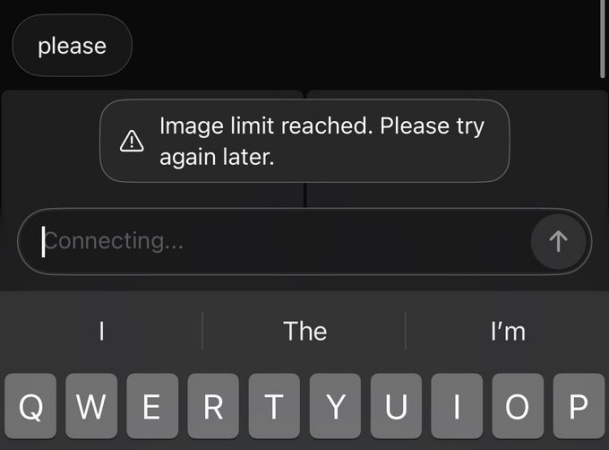 If an error occurred loading this image because your plan ceiling is reached, the fix is timing or a higher tier, not cache clearing. Our guide to SuperGrok weekly quota limits shows how the refill window works. Treating a quota problem as a loading problem is an easy way to burn an afternoon on this. One useful signal: if an error occurred loading this image only on new generations while older images still open fine, the ceiling is the likelier cause.
Once quota is ruled out, if your text chat works normally but every image attempt fails at the same point, or if a fresh login still does not reach the image quota your plan should include, then an error occurred loading this image is telling you about access, not about your prompt.
That distinction decides where your money should go: an error occurred loading this image caused by a quota ceiling and one caused by a payment wall lead in different directions.
Start with the official price. SuperGrok is currently $30 per month and is the main tier that includes Imagine. If you want to spend less, xAI also sells SuperGrok Lite at $10 per month, which still covers image and video generation at lower limits and resolution. There is a free tier with a small image allowance too. Figures change, so check the official pricing page before you subscribe.
xAI does have a savings route of its own: pay yearly. SuperGrok runs $360 across a year on monthly billing, or $300 billed once annually. That is ten months' price for twelve months, a $60 saving, or $25 per month. Every individual tier follows roughly the same pattern.
So if the only problem is that $30 feels steep and paying is not an obstacle, annual billing is your most straightforward option, and there is no reason to route around it.
What annual billing does not solve is two other things: you still need a card that can pay in US dollars, or a region where the charge goes through, and you still pay for a full year up front. If either one blocks you, that is when the two routes below become worth considering.
If the blocker is the up-front cost, a shared Grok account is the lowest-cost route that still includes Imagine, at a fraction of the official price. Be clear-eyed about the trade-off: on a shared account the Imagine quota is pooled across everyone using it, chat history can be visible to other users, and you should not store anything sensitive there.
If the blocker is payment, and you cannot use an overseas bank card or your region blocks the charge, a SuperGrok top-up is the better fit. It places the subscription on your own account, so your history and memory stay private, while the payment problem is handled for you. The order page explains the account UUID you need.
The choice is fairly clear: pay without friction and you can live with annual billing, stay official. Only objecting to the total, go shared. Cannot pay at all, go top-up.
FAQ: Grok Image Error Questions Answered
Why does Grok show this message?
Because your browser could not fetch or render an image that Grok's servers sent. An error occurred loading this image is a delivery failure on the path between the server and your screen, not a statement about your account. Reloading the image, refreshing the page, and clearing Grok's cached site data resolves most cases.
Could this mean my account is banned?
Usually not. A restriction normally comes with explicit text on your account, and that text does not look like a broken image. If you can still sign in and use text chat, an error occurred loading this image on its own is not strong evidence of a ban. Weigh the signals together rather than reading one of them as a verdict.
Why are my Grok images not loading?
An error occurred loading this image usually traces to a stale browser cache, an ad blocker or privacy extension blocking the image endpoint, or a VPN changing how your request resolves. Server load and rate limits account for most of the rest. Retry the image, then refresh, then sign out and back in before changing anything in your browser settings.
Can a VPN cause Grok image loading errors?
Yes. A VPN routes your request through a different region, and image delivery tends to be more sensitive to that than text, so an error occurred loading this image is a common result. Some VPN endpoints are also blocked on the image path. Turn the VPN off, reload, and see whether the image returns. If it does, that was the cause.
Is Grok down when images won't load?
An error occurred loading this image means Grok is down only if the official xAI status page shows an incident, or a large number of users report failures at the same time. Check the status page before you touch your own settings. If it is green and others are generating normally, the issue is local to you.
Why does Grok keep showing this error?
When an error occurred loading this image comes back repeatedly, that points away from a one-off glitch and toward something persistent: cached site data that keeps being served, an extension that re-blocks the endpoint on every load, or a quota that refills slowly and empties fast. Clear Grok's site data, test in a private window, and if the failures cluster around generation limits, check your plan's ceiling for Imagine.
What to Do When Grok Won't Load Your Image
Start with the cheap explanation. An error occurred loading this image is a delivery problem more often than an account problem, and the seven fixes above take less than two minutes as a group. Retry the image before you resend the prompt, check the xAI status page before you clear your settings, and weigh the ban signals before you assume the worst.
The part most guides skip is knowing when to stop. Two rules cover it. First, give the whole local sequence ten minutes at most. If an error occurred loading this image has not moved by then, the fault is not in your browser, and repeating the same steps harder will not move it. Second, stop immediately and wait whenever the signal points at the service rather than your setup: the status page shows an incident, or a wave of users reports the same thing at the same hour.
If an error occurred loading this image keeps coming back at the same point after all of that, treat it as a persistent access or service issue rather than a display bug. When it keeps landing on the generation step alone, the plan ceiling is worth checking before anything else, so verify three things in order: your account status, your plan's current limits, and Grok's service health at that moment. If all three check out and an error occurred loading this image is still there, that is your cue to report it to xAI and stop working the problem yourself.
Last checked: September 2026. Prices and plan limits change, so confirm current figures on the product page before you buy.